
EM Sampling
Record environmental monitoring sample results for active air, settle plates, contact plates, and glove prints across your classified cleanroom areas.
Environmental monitoring sampling is the hands-on process of collecting microbiological data from your cleanroom environments. Each sample event — whether an active air sample, settle plate, contact plate, or glove print — generates a quantitative result (colony forming units, or CFU) that is compared against established action limits. Clarix provides a structured data entry workflow for recording sample results so that they are immediately compared against limits, trended over time, and — if an excursion occurs — escalated to the investigation workflow automatically.
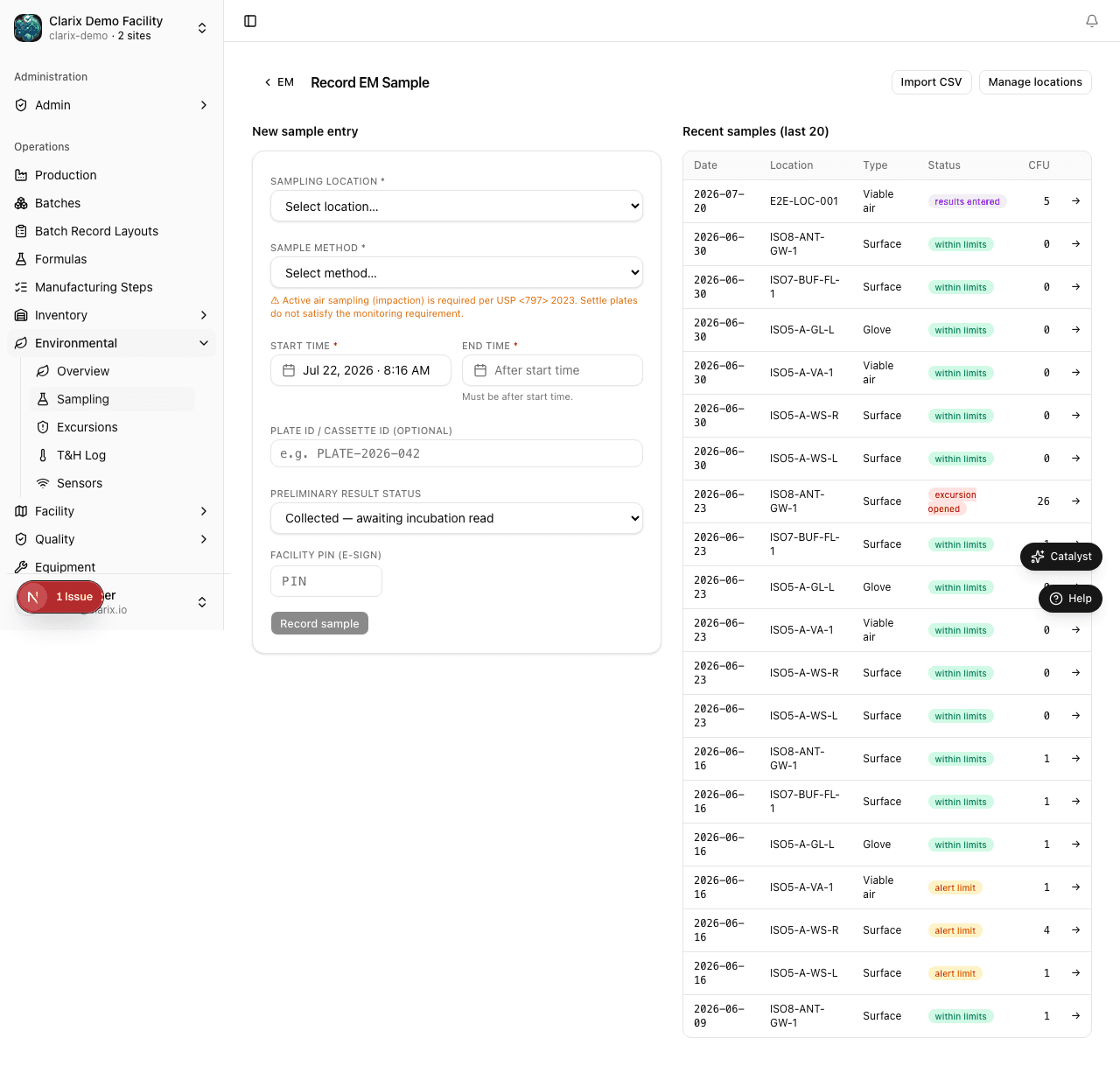
Navigate to Environmental → Sampling to access the sampling log.
Sampling methods
USP 797 recognizes several methods for environmental sampling. Clarix supports all of them:
Active Air Sampling (RCS Sampler)
Active air sampling uses a calibrated air sampler (such as an RCS Plus centrifugal sampler or an Andersen impactor) to draw a defined volume of air (typically 1,000 liters) through an agar strip or plate. The strip is then incubated, and colonies are counted after 48–72 hours. Active air sampling is the gold standard for ISO 5 areas and is required by USP 797 for all classified cleanrooms.
Settle Plate (Passive Air)
Settle plates are 90mm agar plates exposed to the environment for a defined period (typically 1–4 hours) and then incubated. They are a passive method that captures larger settling particles. Settle plates are commonly used in ISO 7 and ISO 8 areas as a supplement to active air sampling.
Contact Plate (Surface Sample)
Contact plates (RODAC plates) are pressed directly against a surface — a workbench, equipment housing, glove finger, or wall — and then incubated. They capture microbial contamination on surfaces and are critical for monitoring the interior surfaces of Primary Engineering Controls.
Glove Print (Personnel Monitoring)
Personnel monitoring involves pressing gloved fingertips onto a contact plate to assess the microbial burden on gown and gloves after compounding. USP 797 requires this to be performed for each compounding personnel at defined frequencies.
Recording a sample result
To log a new EM sample result:
- Navigate to Environmental → Sampling and click New Sample.
- Select the Sampling Location — this is a combination of room and position. Example location codes: "ISO5-A Surface South," "ISO7-B Active Air Return," "ISO5-A Glove Print — Operator 1." Sampling locations are configured by your EM program coordinator in the facility settings.
- Select the Sampling Method: Active Air, Settle Plate, Contact Plate, or Glove Print.
- Enter the Sample Date and Time — the date and time the sample was collected (not when it was incubated or read).
- Enter the Incubation Start Date (optional) — the date the plate was placed in the incubator.
- Enter the CFU Count — the number of colonies counted on the plate after incubation. If no growth was observed, enter 0.
- For active air samples, enter the Volume Sampled (liters) so that the system can normalize the result to CFU/m³.
- Enter the Analyst — the name of the person who counted the colonies. This may differ from the person who collected the sample.
- Add any Notes — for example, observations during collection, any technique deviations, or unusual appearance of growth.
- Click Save Sample.
Automatic limit comparison
After saving, the system immediately compares the CFU count to the action limit for the selected sampling location's ISO classification:
- If the result is at or below the action limit → result is marked Pass
- If the result exceeds the action limit → result is marked Action Required
For active air samples, the system normalizes the count to CFU/m³ based on the volume sampled before comparing against the ISO 5 limit of 1 CFU/m³.
When a result is Action Required
If a sample result exceeds the action limit, Clarix automatically creates an Excursion record linked to that sample. You will see an on-screen notification immediately after saving. The excursion record enters the investigation workflow, where QA staff must document the investigation, assess product impact, identify root cause, and implement corrective action. See Environmental Excursions for the full investigation workflow.
If your facility has a Business Rule configured to auto-create a CAPA or Deviation record upon excursion, those records will also be generated automatically.
Sampling frequency requirements
| ISO Classification | Minimum Active Air Frequency |
|---|---|
| ISO 5 | Monthly; before each compounding session is best practice |
| ISO 7 | Monthly |
| ISO 8 | Every 6 months |
| Personnel (Glove Print) | Semi-annually per person minimum |
Many facilities sample more frequently than the USP minimums during high-volume production periods or following any environmental event (HVAC alarm, construction, etc.).
Viewing the sampling history
The sampling log list shows all historical sample records, filterable by date range, location, method, and result. Click any row to view full details. The EM Trends report (available under Reports) provides a graphical view of CFU trends over time for each room.
Role required: Pharmacy Technicians can log sample results. QA and Admin can manage excursions and configure sampling locations.
Related pages
Environmental Monitoring Overview
Track cleanroom air and surface quality across your ISO-classified areas with CFU trend charts, room status cards, and excursion alerts.
Environmental Excursions
Manage environmental monitoring excursions from detection through investigation, product impact assessment, root cause analysis, and resolution.