
Welcome to Clarix
The digital operations platform for FDA-registered 503B sterile compounding pharmacies.
Welcome to Clarix
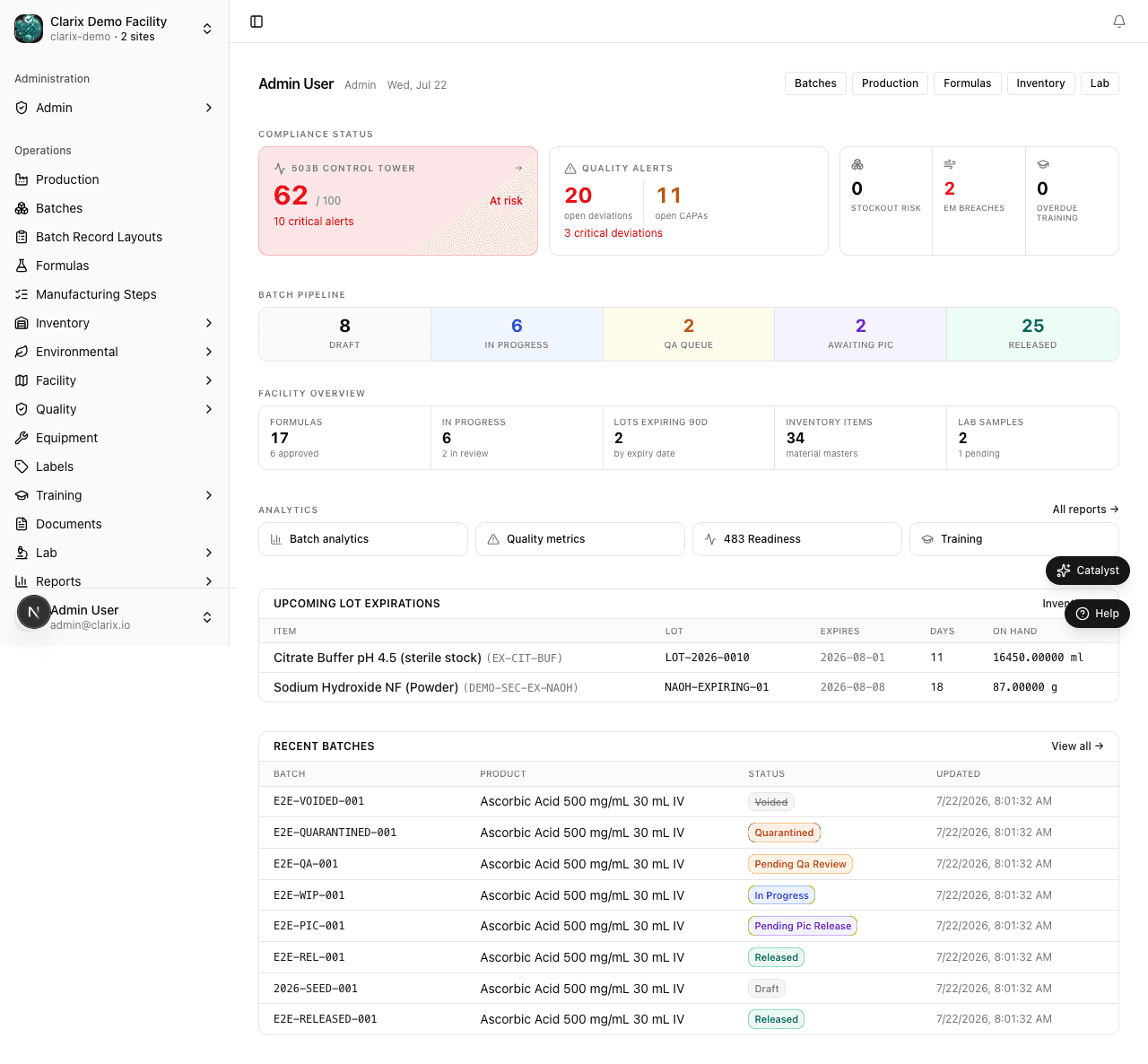
Clarix is the digital operations platform built for FDA-registered 503B outsourcing facilities. It replaces paper batch records, disconnected spreadsheets, and manual compliance checklists with a single, unified system that guides your team from formula authoring all the way through to batch release — every step tracked, every signature captured, every record immutable.
Whether you are a Pharmacist-in-Charge signing off on a critical batch, a compounding technician executing steps on the floor, or a QA officer reviewing deviations, Clarix gives you exactly the view and tools you need for your role — and nothing you don't.
The core workflow
Clarix is organized around the lifecycle of a compounded sterile preparation.
-
Formulas — Build and approve your Master Formula Records (MFRs). Define the bill of materials, step-by-step compounding instructions, BUD rules, and required e-signature gates. Formulas must be approved before any batch can use them.
-
Batches — Create a Compounding Production Record (CPR) from an approved formula. Technicians execute each step in order, scanning components, logging measurements, and signing electronically. The system enforces the sequence — no step can be skipped or performed out of order.
-
Inventory — Receive raw material lots, track expiry dates and quantities, and issue materials to batches with lot-level traceability. Clarix enforces FIFO, blocks expired lots, and generates expiry alerts so you stay ahead of shortages.
-
Quality — Log deviations, investigate root causes, open CAPAs, and conduct QA batch reviews before PIC release. Environmental monitoring excursions are automatically linked to any in-progress batches that may have been affected.
-
Reports — View yield trends, batch analytics, environmental monitoring trend charts, 483-readiness scoring, and inventory intelligence — all in one place, ready to share with inspectors or leadership.
Who uses Clarix
Clarix is a multi-role platform. Each person on your team signs in with their own credentials and sees a view tailored to their responsibilities.
| Role | Primary responsibilities in Clarix |
|---|---|
| Pharmacist-in-Charge (PIC) | Formula approval, final batch release, deviation review, regulatory oversight |
| Compounding Technician | Batch step execution, inventory issuing, environmental sample entry |
| QA Officer | Batch QA review, deviation and CAPA management, training compliance oversight |
| Admin | User management, role assignment, system configuration, integration setup |
Permissions are fine-grained — a technician can execute steps but cannot release a batch; a QA officer can approve QA but cannot change formula versions. See Roles and Permissions for the full matrix.
Regulatory posture
Clarix is designed from the ground up to support the regulatory requirements that govern 503B outsourcing facilities:
-
21 CFR Part 11 — Every electronic record has an immutable audit trail. Every e-signature is linked to a verified user identity with a timestamp and IP address. Records cannot be altered or deleted after creation.
-
USP <797> — Master formulas capture all required MFR fields. Batch records mirror MBR requirements. BUD is calculated and enforced automatically. Environmental monitoring and training modules address personnel qualification and EM program requirements.
-
cGMP (21 CFR Part 211) — Production and process controls are enforced through the formula and batch step system. Equipment is tracked through calibration and preventive maintenance schedules. Laboratory controls are managed through the Lab Samples module.
-
FDA 503B — Higher-volume production with FDA registration requires additional documentation rigor. Clarix supports the full documentation lifecycle — formula approval, batch execution, QA review, PIC release, and electronic MBR PDF generation — suitable for FDA inspection.
Module overview
| Module | What it does |
|---|---|
| Formulas | Author, version, and approve Master Formula Records with BOM and compounding steps |
| Batches | Create and execute Compounding Production Records with guided step execution and e-signatures |
| Inventory | Receive lots, track expiry, issue materials to batches, and manage FIFO |
| Quality | Log and investigate deviations, manage CAPAs, and conduct QA batch reviews |
| Equipment | Maintain an asset registry with calibration schedules, PM logs, and certification tracking |
| Environmental Monitoring | Schedule and record air and surface sampling, track excursions, and view EM trends |
| Training | Manage training plans, assign SOPs and qualifications, and track personnel compliance |
| Lab Samples | Log sterility, endotoxin, and other QC test results linked to batches |
| Documents | Store and control SOPs, policies, and reference documents |
| Reports | Batch analytics, yield analysis, 483-readiness scoring, inventory intelligence, and more |
| Settings | Organization configuration, integrations, inventory policy, and formula policy |
Getting started
If this is your first time in Clarix, start with the Dashboard:
- Dashboard — understand the at-a-glance view of your facility
- Navigation — how to move around the application
- Roles and Permissions — what each role can see and do
When you're ready to start compounding, follow the core workflow. The demo dataset includes Ascorbic Acid 500 mg/mL 30 mL IV (VITC-489) as a fully approved Master Formula with sample batches at each lifecycle stage:
- Create your first formula — or review the existing VITC-489 MFR
- Create a batch from that formula
- Execute batch steps
Compliance documentation
Clarix is built for inspectable operations. The compliance section of these docs explains how each regulatory requirement is addressed:
- 21 CFR Part 11 — Electronic records and signatures
- USP <797> and cGMP — Sterile compounding and manufacturing standards
- E-Signatures and Audit Trail — How signatures are captured, stored, and queried
Related pages
- Dashboard — Start here after signing in
- Roles and Permissions — Understanding your access level
- Batch Overview — The full batch lifecycle from creation to release
- Formula Overview — Authoring and approving Master Formulas