
Environmental Excursions
Manage environmental monitoring excursions from detection through investigation, product impact assessment, root cause analysis, and resolution.
An environmental monitoring excursion occurs when a sample result exceeds the established action limit for its ISO-classified location. Excursions are among the most serious quality events in a sterile compounding facility because they indicate that the cleanroom environment may have been compromised during a period when sterile preparations were being compounded. Every excursion must be investigated, a product impact assessment must be performed, a root cause identified, and corrective action implemented. Clarix tracks the complete lifecycle of each excursion and integrates with the broader quality system.
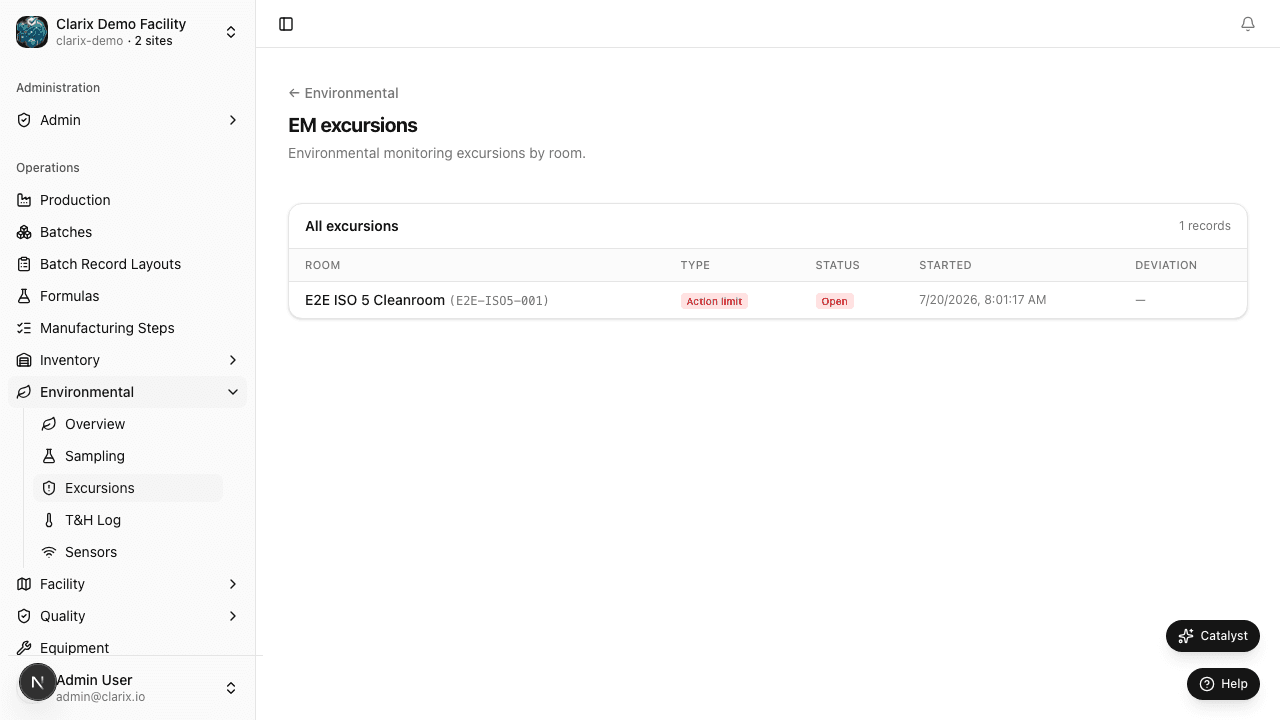
Navigate to Environmental → Excursions to manage open and historical excursions.
What triggers an excursion
Excursions are created automatically when a sample result is entered in the EM Sampling module and the CFU count exceeds the action limit for the room's ISO classification:
| ISO Class | Active Air Action Limit |
|---|---|
| ISO 5 | >1 CFU/m³ |
| ISO 7 | >10 CFU/m³ |
| ISO 8 | >100 CFU/m³ |
For surface and contact plate samples, action limits are defined per your facility's EM SOP (commonly ≥1 CFU for ISO 5 surfaces, ≥5 CFU for ISO 7 surfaces). These limits can be configured by your EM program administrator in facility settings.
You can also create an excursion manually for situations such as visible contamination or personnel monitoring failures that need to be tracked through the investigation workflow.
Excursion states
Each excursion progresses through a defined lifecycle:
- Open — The excursion has been created (automatically from a failed sample or manually). No investigation has been assigned or started. Open excursions appear on the EM dashboard and trigger notifications to QA staff.
- Under Investigation — A QA team member has opened the investigation and is actively documenting findings. The excursion remains in this state until all required investigation fields are completed and the excursion is resolved.
- Resolved — The investigation has been completed, root cause has been identified, corrective action has been implemented (or a timeline established), and a QA reviewer has signed off on the resolution. Resolved excursions are archived but remain accessible for trend analysis and inspection readiness.
Investigating an excursion
To begin investigating an open excursion:
- From the excursion list, click the excursion row to open its detail page.
- Click Begin Investigation to transition the excursion to Under Investigation status.
- Complete the following required investigation fields:
Immediate containment actions
Document any immediate actions taken when the excursion was discovered. Examples: suspended compounding in the affected area, initiated additional cleaning, quarantined potentially affected batches.
Product impact assessment
This is the most critical section of the investigation. You must answer: Was any sterile product compounded in the affected area during or near the time of the excursion?
- If No (the area was not in use): document this clearly. Impact is minimal, but the environmental condition must still be corrected.
- If Yes: identify all batches compounded in the area during the relevant time window. List each batch number, lot number, product name, and disposition status. For each batch, assess whether the product has already been dispensed, is in quarantine, or can still be retrieved. QA must make a formal disposition decision (release, reject, or additional testing) for each affected batch.
This assessment is a regulatory requirement. FDA investigators will look for evidence that every excursion was evaluated for its potential impact on distributed product.
Root cause analysis
Document the probable or confirmed root cause of the excursion. Common root causes include:
- Personnel gowning or aseptic technique deviation
- Cleaning procedure failure (missed area, wrong agent, too short contact time)
- HVAC / differential pressure event
- Equipment failure (e.g., HEPA filter damage)
- High-traffic or unusual activity in the cleanroom
- Sampling or laboratory error (rule out before declaring an environmental cause)
Corrective action
Document the corrective action taken or planned to prevent recurrence. Corrective actions should be specific and time-bound. Examples: "Additional training on gowning procedure for all ISO 5 personnel by [date]," "HEPA unit inspected and filter replaced on [date]," "Enhanced cleaning protocol implemented with sporicidal agent."
Electronic sign-off
When all fields are complete, enter your Facility PIN to sign the investigation. If your facility requires a second QA reviewer sign-off, that reviewer must also enter their PIN before the excursion can be moved to Resolved status.
Automatic deviation creation
If your facility has a Business Rule configured to automatically create a Deviation record when an excursion occurs, Clarix will generate a linked Deviation in the Quality module. This ensures that excursions are included in your periodic quality review data and that any CAPA actions are formally tracked.
Trending: identifying patterns
Individual excursions can occur in even well-controlled environments. However, recurring excursions in the same room, at the same sampling location, or with the same organism pattern are a signal of a systemic problem. The Excursion Trending view (accessible from the Excursions list header) displays:
- Excursion count by room over a selected time period
- Repeat excursions at the same sampling location
- Organism type breakdown (if organism identification data is entered)
Trend review should be part of your monthly and quarterly quality review meetings. Clarix's EM Trends report in the Reports module provides additional graphical analysis tools.
Role required: All staff can view the excursion list. Beginning an investigation and entering investigation data requires the QA or Admin role. Signing off on excursion resolution requires the QA Manager or Admin role.
Related pages
EM Sampling
Record environmental monitoring sample results for active air, settle plates, contact plates, and glove prints across your classified cleanroom areas.
Temperature and Humidity Logs
Record and review temperature and humidity readings for your classified cleanroom areas to verify USP 797 environmental conditions are maintained.