
Environmental Monitoring Overview
Track cleanroom air and surface quality across your ISO-classified areas with CFU trend charts, room status cards, and excursion alerts.
Environmental Monitoring (EM) is the systematic program by which a sterile compounding facility continuously verifies that the classified cleanroom environment meets established microbial limits. USP 797 mandates that every 503B outsourcing facility maintain an EM program that covers active air sampling, surface sampling, and personnel sampling, with defined action limits based on ISO room classification. The Environmental Monitoring module in Clarix provides the dashboard, data entry, trending, and excursion management tools that make it possible to operate and demonstrate compliance with this program.
Navigate to Environmental in the left sidebar to open the EM overview.
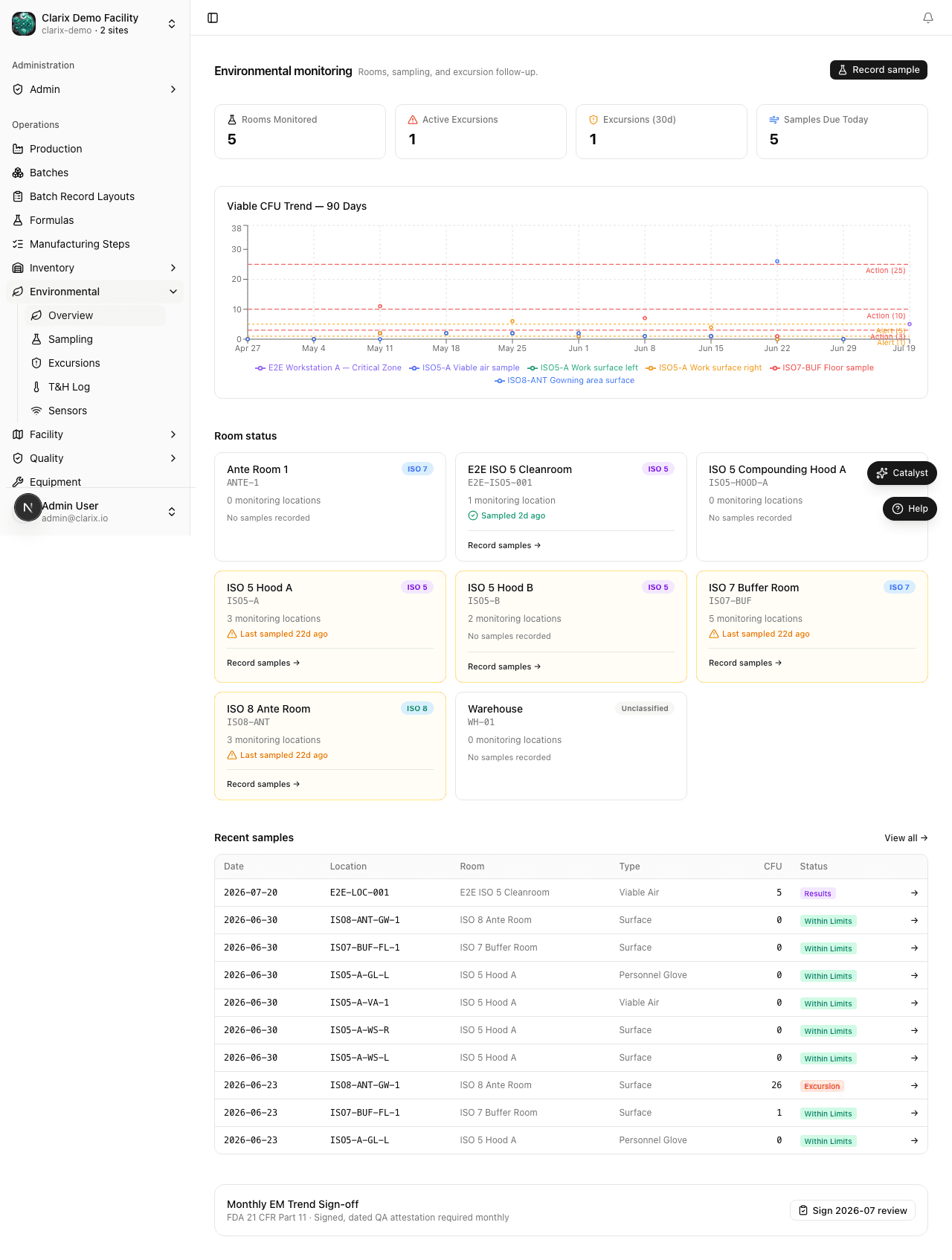
Room status cards
The top of the EM overview displays status cards for each classified room in your facility. Each card shows:
- The Room Name and ISO Classification (e.g., ISO 5 / ISO 7 / ISO 8)
- The Current Status: Clean (no recent excursions), Action Required (one or more open excursions), or No Data (no sampling recorded in the expected period)
- The CFU count from the most recent sample event
The color coding of each card provides an at-a-glance indication of room health: green for clean rooms, amber for rooms with pending investigations, and red for rooms with active excursions requiring immediate attention.
ISO room classifications and action limits
Understanding ISO classifications is fundamental to interpreting EM results. The ISO class defines the maximum allowable concentration of airborne particles and microorganisms in a cleanroom:
| ISO Class | Federal Standard | Active Air Limit | Typical Use in 503B |
|---|---|---|---|
| ISO 5 | Class 100 | ≤1 CFU/m³ | Primary Engineering Control (BSC, LAF hood, isolator) |
| ISO 7 | Class 10,000 | ≤10 CFU/m³ | Buffer Room, secondary engineering control |
| ISO 8 | Class 100,000 | ≤100 CFU/m³ | Anteroom, support areas |
These are the action limits — readings that exceed these values constitute an excursion and require investigation. Your facility's EM SOPs may specify alert limits at lower CFU counts (typically 50% of the action limit) as early warning indicators.
CFU trend charts
The center section of the EM overview displays trend line charts for each room, plotting CFU counts over time. Trending is one of the most powerful aspects of environmental monitoring: even if all individual readings pass their action limits, an upward trend over weeks or months indicates that environmental conditions are deteriorating and that corrective action should be taken proactively before an excursion occurs.
Use the date range selector above the trend charts to change the time window displayed. Typical review windows are 30 days (operational monitoring), 90 days (quarterly review), and 12 months (annual trend analysis).
Recent samples table
Below the trend charts, the Recent Samples table lists the most recent EM sample results across all rooms. Each row shows the sample date, room, sample location, sampling method, CFU count, and result (Pass or Action Required). Click any row to open the full sample detail.
Continuous monitoring sensors
The Sensors page at /environmental/sensors displays live and historical temperature, humidity, and differential-pressure readings from IoT devices installed in your classified rooms. Sensor data complements your EM sampling program by providing continuous environmental evidence between manual sample events.
Navigate to Environmental → Sensors to view device status, recent readings, and alert history. Sensor excursions can be linked to in-progress batches for impact assessment.
Excursion count
A summary widget in the overview shows the current count of open excursions — EM results that exceeded their action limit and require investigation. Click this widget to navigate directly to the Excursions list.
USP 797 requirements
USP 797 (2023 revision) specifies minimum EM sampling frequencies:
- ISO 5 areas: At minimum monthly; more frequently during high-volume compounding
- ISO 7 areas: At minimum monthly
- ISO 8 areas: At minimum every six months
- Personnel monitoring (glove prints): Each compounding personnel, at minimum semi-annually
Facilities must also perform EM after any significant cleaning event, construction or maintenance activity in or near the cleanroom, or any breach of environmental controls (e.g., HVAC failure, differential pressure alarm). Clarix sample records are timestamped and linked to specific sampling locations, making it straightforward to demonstrate that sampling requirements are being met.
Role required: All staff can view the EM overview and sample history. Entering new sample results requires the Environmental Monitoring Technician, QA, or Admin role. Managing excursions requires QA or Admin.
Related pages
Cleaning Logs
Record and track room and equipment cleaning events to maintain a complete cleaning history for your sterile compounding facility.
EM Sampling
Record environmental monitoring sample results for active air, settle plates, contact plates, and glove prints across your classified cleanroom areas.