
Rooms
Managing the room register — ISO classification, usage tracking, and batch/EM linkage
Rooms
Overview
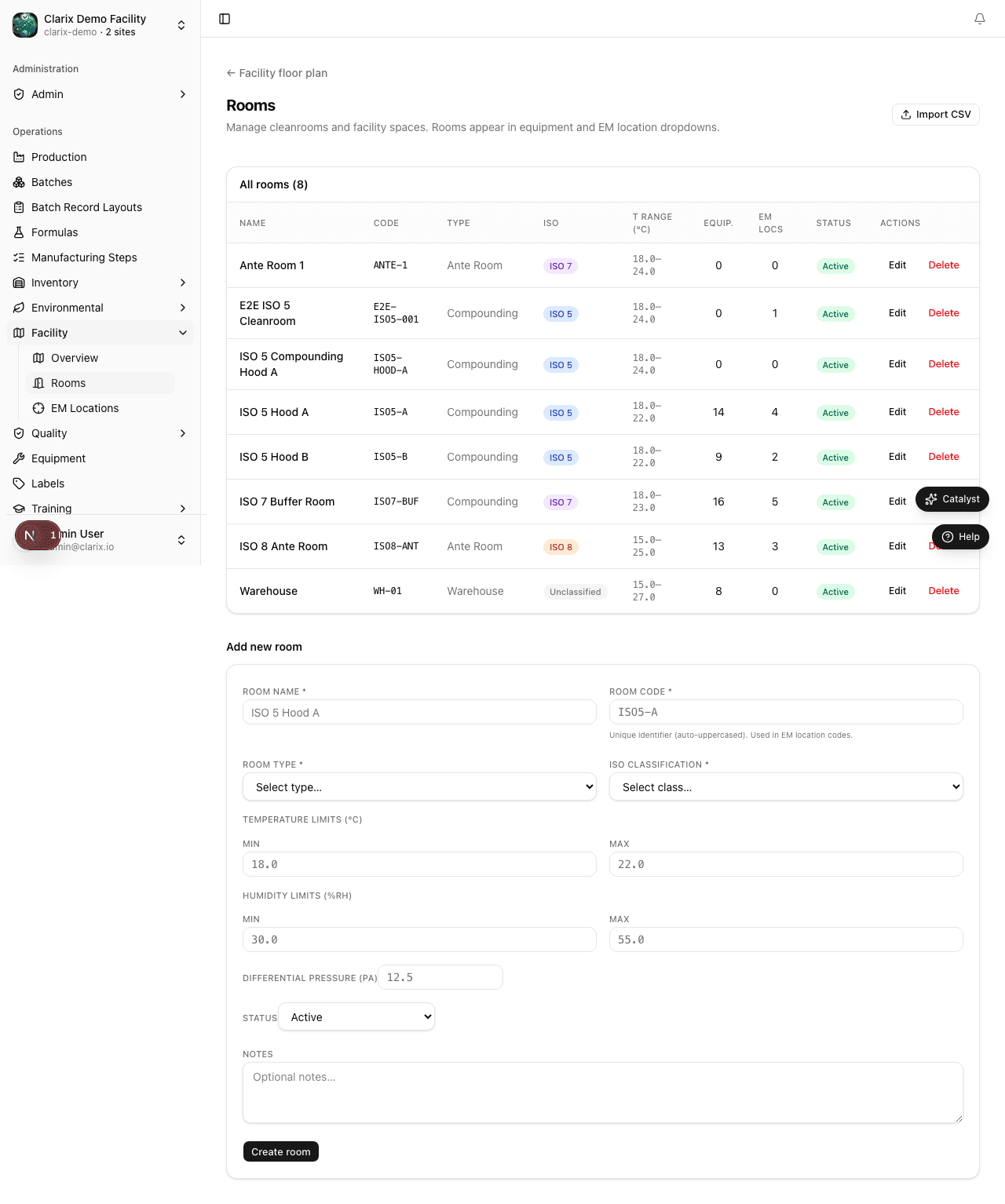
The Rooms page is the central register of every physical space in your facility. Each room record captures its ISO classification, functional type, and operational status. Rooms serve as the spatial anchor for environmental monitoring (EM) sample points, batch production line assignments, and excursion reports — ensuring that all compliance data is traceable to a specific, classified location.
Room Fields
| Field | Description |
|---|---|
| Name | Human-readable display name for the room (e.g., "Cleanroom A") |
| Code | Short stable identifier used in reports and EM location references (e.g., CR-A) |
| ISO Class | Classification level: ISO 5, ISO 7, ISO 8, or Unclassified |
| Room Type | Functional role: ISO 5 PEC (Primary Engineering Control), ISO 7 Buffer, ISO 8 Ante, or Unclassified |
| Active | Whether the room is available for new batch and EM assignments |
| Description | Optional free-text notes (physical location, HVAC zone, etc.) |
How to Add a Room
- Go to Settings → Facility → Rooms.
- Click Add Room in the top-right corner.
- Enter the Name and a unique Code.
- Select the ISO Class and Room Type that match the room's qualification documents.
- Toggle Active on (default).
- Add an optional Description, then click Save.
Role required: Settings permission is required to create or edit room records. Read-only users can view the room register but cannot make changes.
ISO Classification Reference
| ISO Class | Max Particles/m³ (≥0.5 µm) | Typical Use in a 503B Pharmacy |
|---|---|---|
| ISO 5 | ≤ 3,520 | Primary Engineering Control (PEC) — LAF hood, BSC, RABS, isolator |
| ISO 7 | ≤ 352,000 | Buffer zone directly adjacent to the PEC |
| ISO 8 | ≤ 3,520,000 | Ante-room or clean corridor |
| Unclassified | N/A | Warehousing, staging, non-sterile areas |
Particle count limits are taken from USP 797 and ISO 14644-1. Rooms must be re-certified according to your facility SOP; Clarix stores the classification but does not perform particle counting directly.
Room Usage Tracking
Rooms are referenced across several modules:
- EM Sample Points — every EM location is linked to a parent room; the room's ISO class is inherited by the location unless overridden.
- Batch Records — when creating a batch, operators select a production line; that line is associated with one or more rooms, creating a traceable link between each batch and its manufacturing environment.
- Environmental Excursion Reports — excursions are filed against an EM location, which rolls up to its room. The room summary view shows a count of open and closed excursions.
Deactivating a Room
Toggle Active to Off on the room's edit screen to deactivate it. Once deactivated:
- The room no longer appears in dropdowns when creating new batch records or EM locations.
- All existing batch records and EM locations that reference the room retain the reference — historical data is never lost.
- To reactivate, edit the room and toggle Active back on.
Edge Cases
Note: Renaming a room — The Code field is the stable identifier used in historical reports, exports, and EM trend data. If you rename a room's Name for clarity, existing records automatically reflect the new display name going forward. The Code should not be changed after production use begins; if a code must be corrected, contact your system administrator to assess the impact on historical exports.
Related Pages
Facility Overview
Configure and visualize your facility's rooms, ISO classifications, equipment locations, and environmental monitoring sampling points using Clarix's interactive floor plan and room register.
EM Locations
Registering environmental monitoring sample points — room linkage, location types, and USP 797 coverage