
Training Plans
Create and manage training curricula that define materials, validity periods, and role requirements for your sterile compounding facility.
A training plan is the foundational unit of the Clarix training system. It defines what a person must learn, the materials they must review, how long the training qualification remains valid, and who is required to complete it. Once a training plan is approved and active, it can be assigned to individual staff members who then complete it through the training records workflow. Building well-structured training plans ensures that your training program is systematic, reproducible, and defensible during an inspection.
Navigate to Training → Plans to view and manage training plans.
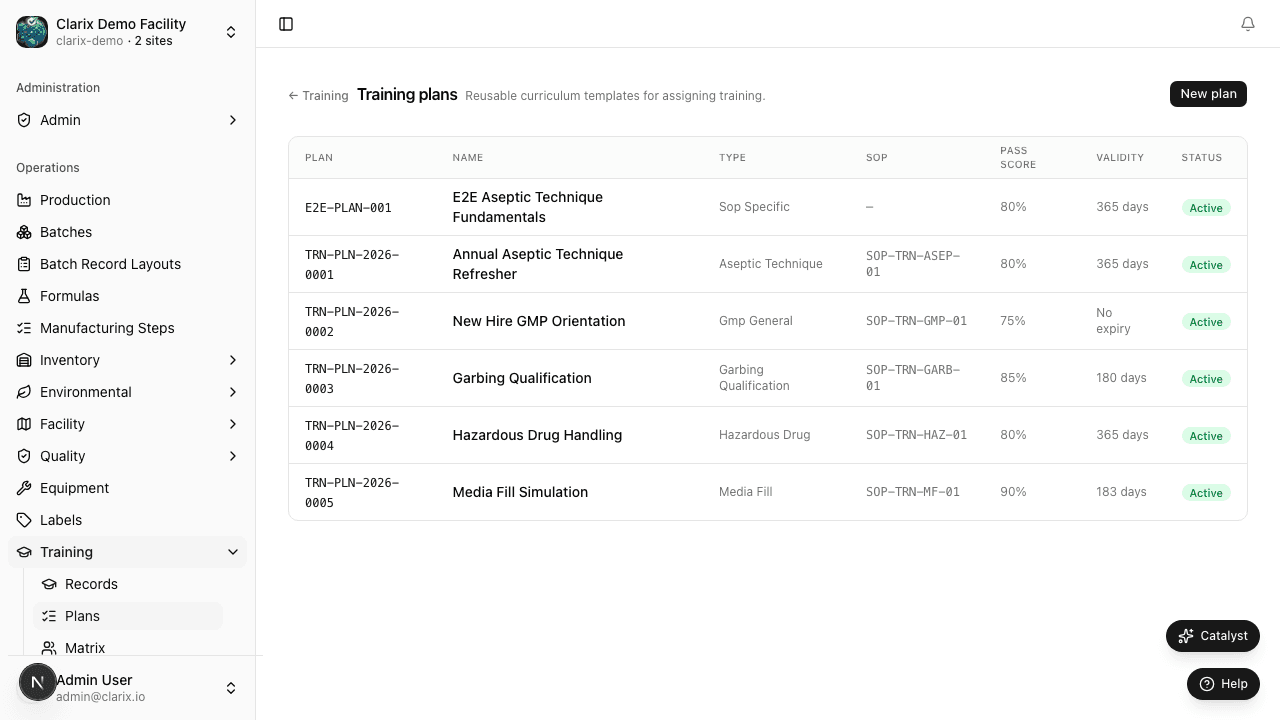
Viewing the plans list
The plans list shows all training plans in the system. Each row displays:
- Plan Name — the descriptive name of the training curriculum
- Target Role — the staff role(s) this plan applies to
- Validity (days) — how long the qualification lasts before retraining is required
- Status — Draft, Under Review, or Approved
- Required for Batch Compounding — whether completion of this plan is a prerequisite for performing compounding operations
Click any plan to view its full details, including the material list and assignment history.
Creating a new training plan
- Click New Plan from the training plans list.
- Enter the Plan Name — be descriptive and specific. Good plan names include the topic, the audience, and the frequency. Examples:
- "Aseptic Technique — Annual Refresher — All Compounders"
- "USP 797 Overview — Initial Training — New Staff"
- "HVAC Monitoring Procedures — Semi-Annual — Environmental Staff"
- Select the Target Role — the role(s) for which this training is intended. When you subsequently assign this plan to a user, the system will suggest it based on their role.
- Enter a Description explaining the purpose of the training, the regulatory basis, and the expected learning outcomes. A well-written description helps both trainees understand the importance of the material and inspectors understand the intent of the training program.
- Add Materials — the actual content the trainee must review. You can add multiple materials to a single plan. Supported material types:
- PDF / document upload — click Choose file to upload your SOP, policy, or reference document directly (PDF, XLSX, CSV, PNG, JPEG; up to 30 MB). The document is stored in Clarix's secure blob storage and displayed to the trainee within the training record. A SHA-256 checksum is stored for integrity verification.
- External URL — a link to a video training resource, online course, or external knowledge base article.
- Internal document link — link to an approved document in the Clarix Document Library, so that the trainee always reviews the current approved version.
- Enter the Valid for Days — the number of days from the completion date before retraining is required. Common intervals in sterile compounding:
- 365 days (annual) — most general SOPs and procedure training
- 180 days (semi-annual) — aseptic technique, gowning competency (USP 797 Category 2 minimum)
- 730 days (biennial) — initial qualification programs that require annual refresher overlap
- Check Required for Batch Compounding if completion of this training plan is a prerequisite before a technician may compound. If checked, the batch signing workflow in Clarix will verify that the compounding technician has a current, completed record for this plan and that the record has not expired. If the technician's qualification has expired, they will be blocked from starting or executing batch steps until retraining is completed and the record is updated. See Executing Steps — Training Qualification Gate.
- Click Save Draft to save the plan in draft status, or proceed directly to submission if the content is ready.
Submitting for approval
Training plans follow a review and approval workflow to ensure that training content is accurate and authorized before being deployed to staff:
- After creating the plan (or editing a draft), click Submit for Review.
- The plan enters Under Review status and a notification is sent to users with the Training Manager or Admin role.
- The Training Manager reviews the plan content, materials, and settings. They may add comments requesting changes.
- Once satisfied, the reviewer clicks Approve. The plan moves to Approved status and becomes available for assignment to staff members.
Only Approved plans can be assigned. This prevents trainees from completing training against draft or unapproved content.
Editing a plan
Approved plans can be edited by creating a new version. Editing a plan that already has active assignments does not retroactively change those records — existing assignments retain the materials that were current at the time of assignment. The revised version, once approved, is used for all new assignments going forward.
Linking plans to documents
When a training plan is based on a specific SOP or policy in the Document Library, linking the document to the training plan creates a traceability connection. When the linked document is superseded by a new version, Clarix can alert Training Managers that the associated training plan may need to be updated to reflect the new document content.
Role required: Training Managers and Admins can create and approve training plans. All staff can view approved plans.