
21 CFR Part 11
How Clarix is designed to support 21 CFR Part 11 control objectives. Customer validates for intended use.
21 CFR Part 11 — Electronic Records and Signatures
21 CFR Part 11 is the FDA regulation that governs electronic records and electronic signatures used in place of paper records and handwritten signatures. For a 503B outsourcing facility, Part 11 applies when electronic systems create, modify, or sign regulated records.
The core message of Part 11 is straightforward: if you use an electronic system to create, modify, or sign a regulated record, that system must help ensure the record is trustworthy, reliable, and non-repudiable. Every action must be attributable to a specific, verified individual. Every record must be tamper-evident. And every electronic signature must carry the same legal weight as a handwritten signature.
Important: Clarix is designed to support Part 11 control objectives (audit trails, e-signatures, access controls, and validation documentation). Clarix does not claim to be “Part 11 certified” or to make your facility compliant by itself. Your organization validates the system for its intended use and remains responsible for regulatory compliance.
Clarix makes these controls the default path in the product — the audit trail captures automatically, e-signatures are required at lifecycle gates, and records are not altered or deleted after creation in the normal workflow.
What inspectors look for
When an FDA inspector reviews your electronic records system under Part 11, they typically focus on five areas:
- Audit trail completeness — Is every create, modify, and delete action logged with the user, timestamp, and what changed?
- E-signature records — Can you prove that a specific, verified person signed a specific record at a specific time — and that the signature is linked inseparably to the record?
- Access controls — Are user accounts unique? Is there a process for revoking access when someone leaves? Is access limited by role?
- System validation — Is there documentation that the system was tested and validated for its intended use?
- Time synchronization — Are timestamps accurate and generated server-side, not by the end-user device?
Clarix addresses all five. The sections below explain how.
Subpart B — Controls for Closed Systems
Part 11 Subpart B (§ 11.10) covers the technical controls required for closed electronic systems — systems where access is controlled by the organization that operates them.
Validation (§ 11.10(a))
Clarix is a commercially available software system maintained by Fills AI. Validation documentation — including installation qualification, operational qualification, and system description — is available for your IQ/OQ binder upon request. Your facility is responsible for documenting the intended use and confirming the system performs as described.
Accurate and complete records (§ 11.10(b))
All records in Clarix can be exported as human-readable PDFs. The batch Master Batch Record (MBR) PDF includes every executed step, every ingredient weighed, every e-signature captured, and the complete audit trail for that batch. These PDFs can be generated at any time and printed or stored in your electronic document management system.
Record protection (§ 11.10(c))
Records in Clarix are stored in an append-only database with automated backups. Once a record is created, it cannot be modified or deleted — the system will not permit it. Any change to a record generates a new audit trail entry that shows exactly what changed, who changed it, and when. The original values are retained alongside the new values.
Limiting system access (§ 11.10(d))
Access to Clarix is controlled by role-based access control (RBAC). Each user account is unique — shared accounts are not permitted and cannot be created by design. Access is restricted to the specific functions required for each role. When a user leaves your facility, their account can be deactivated immediately from the Admin panel, which terminates all active sessions.
Audit trail (§ 11.10(e))
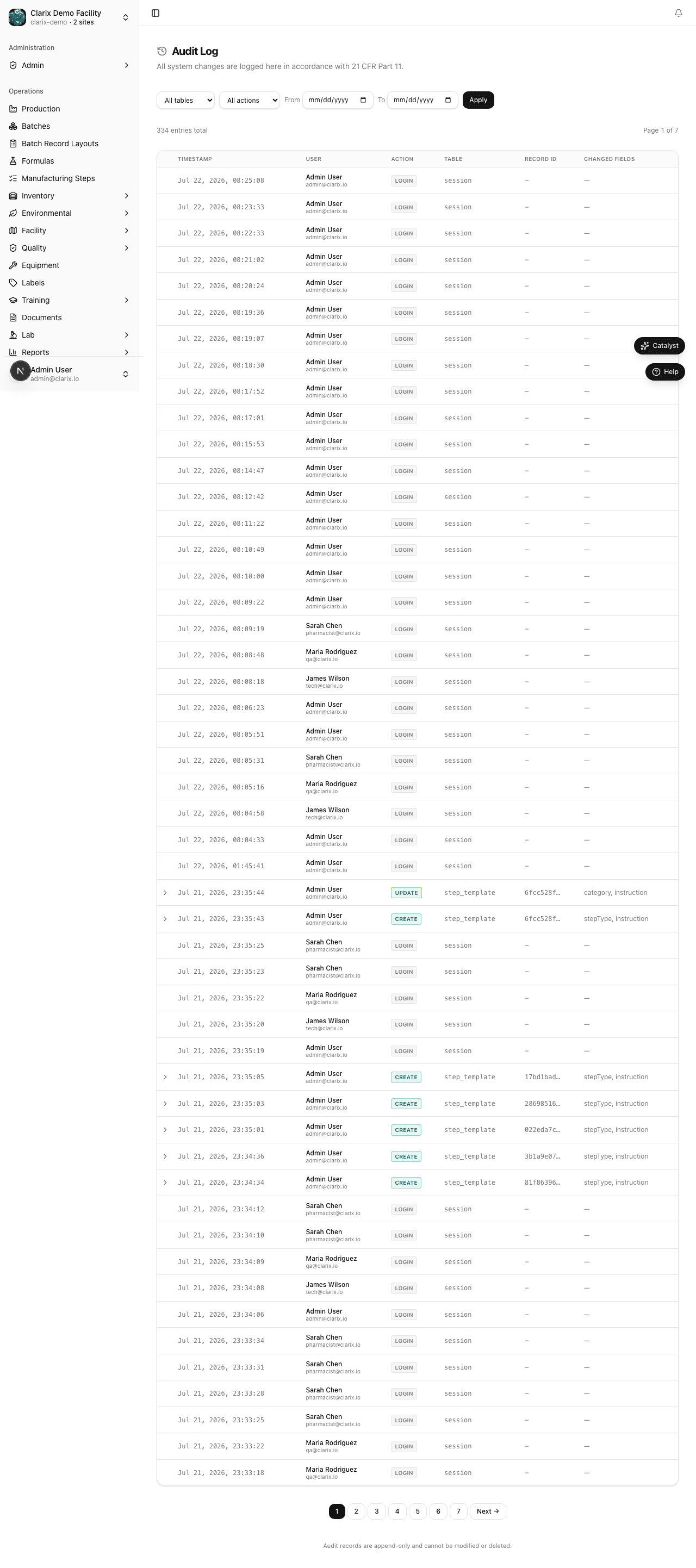
Every action that creates, modifies, or signs a record in Clarix is automatically recorded in the audit trail. Each audit trail entry captures:
- Who — the exact user account (name, user ID, role at the time of the action)
- What — the action taken (created, updated, signed, deleted) and which record was affected
- When — a server-side UTC timestamp that cannot be altered by the end user
- Where — the IP address of the device used
- Before and after — both the previous value and the new value for any field that was changed
The audit trail is INSERT-only — no audit trail record can ever be modified or deleted, including by system administrators.
Authority checks (§ 11.10(g))
Every action in Clarix is protected by role-based permission checks enforced on the server. A technician cannot approve a formula. A QA officer cannot perform a final PIC release. These rules are enforced at the API level, not just in the user interface — even a technically sophisticated user cannot bypass them.
In addition to role checks, Clarix enforces the following compliance gates that directly satisfy 21 CFR Part 211 requirements:
- Training qualification gate — Batch execution is blocked if the acting user has any expired training qualification required for compounding. This satisfies § 211.68 and USP <797> requirements for demonstrated personnel competency.
- Equipment calibration gate — Completing a step that captures a specific instrument is blocked if that instrument's calibration is overdue. This satisfies § 211.68 for calibrated instruments in the production process.
- Lab sample release gate — PIC release is blocked if any linked QC sample has a pending, missing, or failed result. This satisfies § 211.192 for investigation of discrepancies before batch disposition.
These gates are enforced server-side and are recorded in the audit trail when triggered.
Device checks (§ 11.10(k))
Each session is associated with the IP address and browser user-agent at the time of login. Unusual session activity — such as a session appearing from two very different locations — is flagged. Sessions expire automatically after a configurable inactivity period.
Subpart C — Electronic Signatures
Part 11 Subpart C (§ 11.50–11.200) governs what an electronic signature must contain and how it must be linked to the record being signed.
Signature components (§ 11.50)
Every e-signature captured in Clarix includes:
- The printed name of the signer as it appears on their account
- The date and time the signature was captured (server-side UTC)
- The meaning of the signature — for example, "Manufactured by", "QA Reviewed", "Approved for Release"
- The role of the signer at the time of signing
This information is stored alongside the signed record and is included in the PDF MBR export.
Signature uniqueness (§ 11.100)
Each electronic signature in Clarix belongs to one and only one individual. Signatures are non-transferable. Each user must authenticate with their own credentials to generate a signature — there is no mechanism for one user to sign on behalf of another.
Signature–record linking (§ 11.70)
E-signatures are cryptographically and logically bound to the specific record being signed. A batch QA review signature, for example, is linked to that exact batch record at the exact version that existed when the signature was captured. If the record were to change after signing (which Clarix does not permit), the link would be broken and detectable.
Non-repudiation
Because each signature requires authentication (PIN, password, passkey, or email OTP), and because each signature is tied to a verified user identity and logged in the immutable audit trail, a signer cannot later deny having signed a record. The audit trail provides the evidence.
What e-signatures are required
Clarix captures e-signatures at every major lifecycle gate:
| Gate | Who signs | Signature meaning |
|---|---|---|
| Batch start | Compounding Technician | Acknowledges formula, materials, and equipment are verified |
| Batch step completion (critical steps) | Technician + Second Verifier | Confirms step was performed as specified |
| QA batch review | QA Officer | Confirms batch record is complete and compliant |
| PIC release | Pharmacist-in-Charge | Authorizes release for dispensing |
| Formula approval | Pharmacist-in-Charge | Approves formula version for production use |
| Training completion | Staff member | Acknowledges completion of training item |
| Equipment calibration | Equipment Technician | Certifies calibration was performed |
| Deviation closing | QA Officer | Confirms investigation and disposition are complete |
| Lot release | QA Officer | Releases an inventory lot for use in batches |
Practical inspection tips
Before an inspection:
- Run the Audit Trail report (Reports → Audit Trail) to verify completeness. You can filter by date range, user, or record type.
- Review the User Management page (Admin → Users) to confirm that all active accounts belong to current employees, and that departed employees have been deactivated.
- Generate a sample batch MBR PDF for a recently released batch and verify that all signature blocks are populated with the signer's name, role, timestamp, and signature meaning.
- Review the Access Log to confirm no unusual session activity.
Ongoing practices:
- Ensure every person who uses Clarix has their own unique account. Never share credentials.
- Never share facility PINs between users. Each user should have their own PIN tied to their account.
- Disable accounts promptly when a staff member leaves. Do not reuse account names.
- Document your validation status in your SOP referencing Clarix as your electronic records system.
Related pages
- E-Signatures and Audit Trail — How to set up and use e-signature methods
- USP <797> and cGMP — Sterile compounding and manufacturing standards
- Roles and Permissions — Access control and role configuration
- Batch Overview — How the batch lifecycle enforces compliance gates