
Deviations
How to create, investigate, and close deviations in Clarix — covering severity classification, sources, lifecycle states, and automatic deviation rules for 503B compounding.
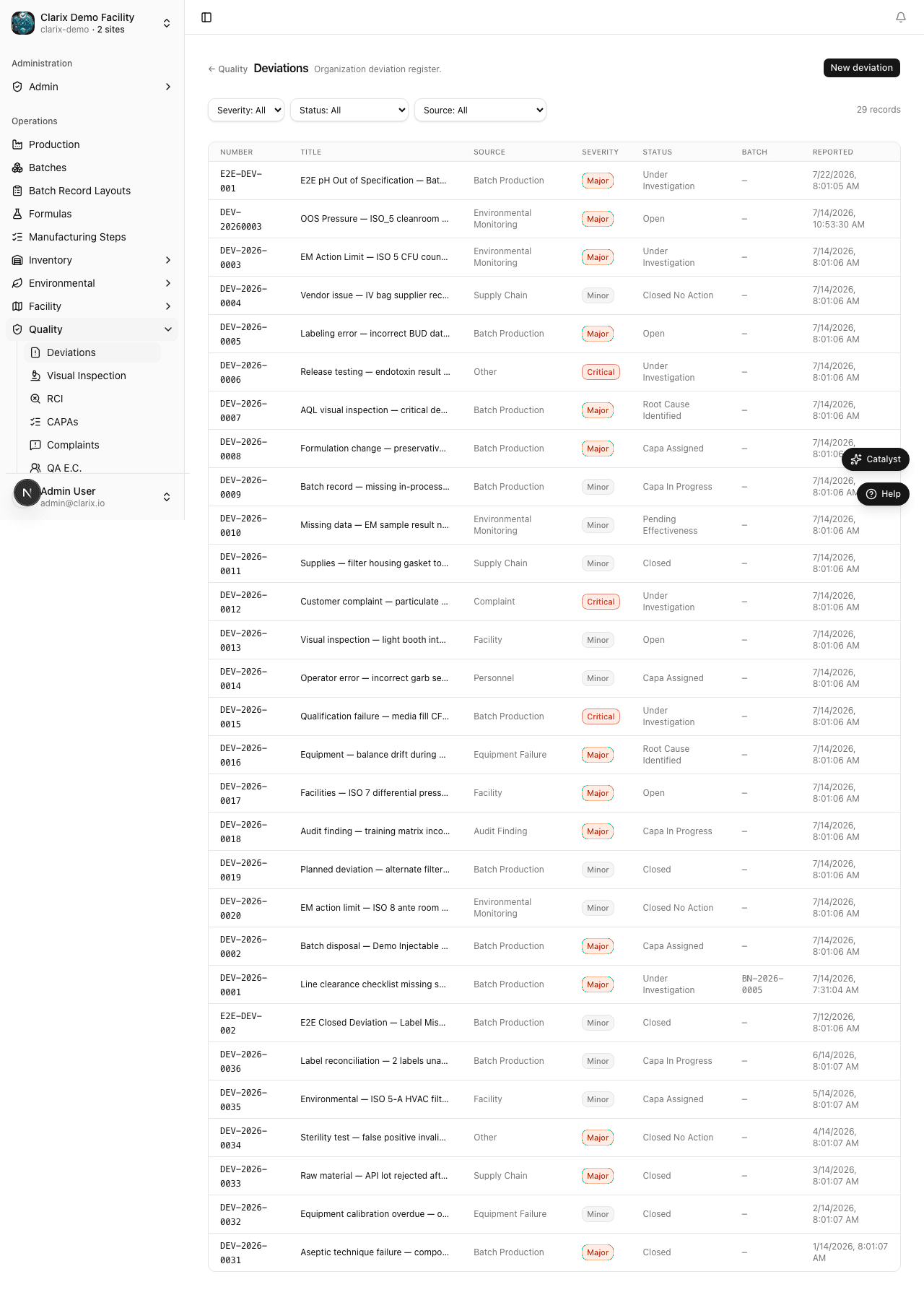
A deviation is any event in your facility that does not go according to plan — a departure from an approved procedure, a measurement outside its acceptable range, an environmental excursion, or an equipment failure. In 503B compounding, deviations are not signs of a failing system; they are a natural part of pharmaceutical manufacturing. What matters is that every deviation is captured promptly, investigated thoroughly, and resolved with evidence. The Clarix deviation module provides the framework to do all three.
Role required: Viewing deviations requires the QA Technician role or higher. Creating a deviation requires QA Officer. Closing or escalating a deviation requires QA Manager or PIC.
What triggers a deviation?
Deviations can arise from many areas of your operation. Clarix organizes them by source to make trending and investigation easier:
| Source | Common examples |
|---|---|
| Batch Production | Yield below threshold, ingredient weight out of tolerance, process time exceeded, wrong lot number used |
| Environmental | EM action limit exceeded, temperature excursion in ISO room, pressure differential out of range |
| Equipment | Autoclave failure, balance calibration failure, HVAC alarm, equipment used past PM due date |
| Vendor / Material | Raw material out of spec, supplier CoA missing, incorrect concentration received |
| Personnel | Training gap, gowning deficiency, unauthorized substitution, SOP deviation |
| Lab | Instrument malfunction during testing, sample handling error |
| Process | SOP not followed, step performed out of sequence, undocumented substitution |
Deviation severity
Every deviation must be assigned a severity level when it is created. If you are unsure, select the higher severity and downgrade after investigation if warranted — you cannot under-report a Critical event.
| Severity | Definition | Response time |
|---|---|---|
| Critical | Actual or potential patient safety impact — sterility failure, wrong drug, critical EM excursion in fill area | CAPA within 24 hours; PIC notification required |
| Major | Significant product quality or regulatory impact — yield below 75%, major EM excursion, GMP documentation failure | CAPA within 5 business days |
| Minor | Procedural or administrative — late entry, minor weight within spec, label correction | CAPA within 30 days if needed |
Creating a deviation
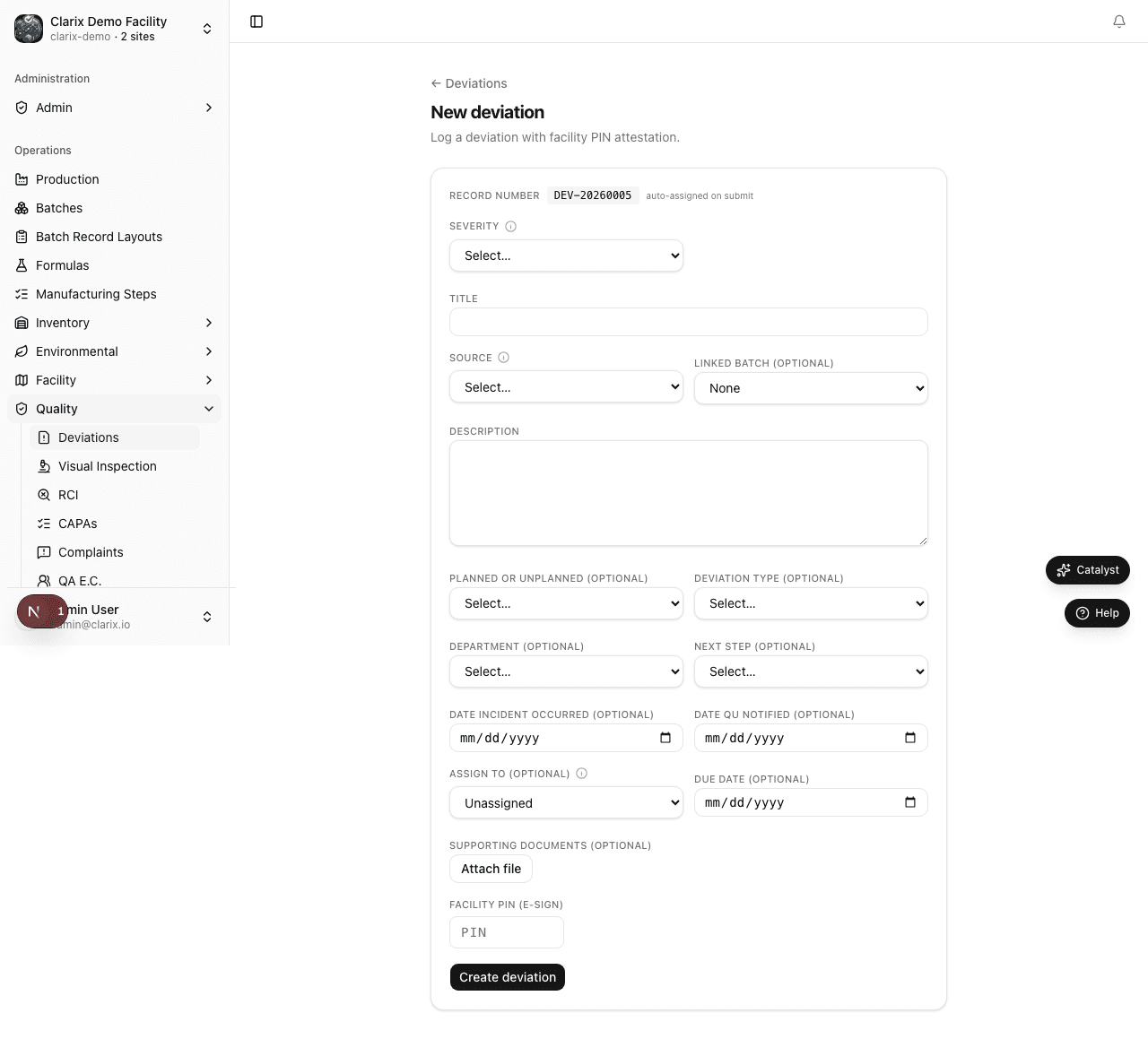
- In the sidebar, navigate to Quality → Deviations.
- Click New Deviation in the top-right corner.
- Fill in the required fields:
- Severity — Critical, Major, or Minor
- Source — select the category that best describes where the event originated
- Title — a short, descriptive summary (e.g., "Batch B-2026-0112 yield 68% below 75% threshold")
- Description — a full narrative of what happened, including the date and time of the event, who observed it, what product or batch was involved, and what immediate containment steps were taken
- Linked batch — if the deviation is related to a specific batch record, type the batch number (e.g., B-2026-0112) to link it
- Assigned investigator — the QA officer or pharmacist responsible for leading the investigation
- Click Create Deviation.
Clarix assigns the deviation a unique number in the format DEV-YYYY-NNNN — for example, DEV-2026-0001 is the first deviation created in 2026. This number is permanent and cannot be reused.
Deviation lifecycle
A deviation moves through four states from discovery to resolution:
| State | Meaning |
|---|---|
| Open | The deviation has been recorded. It has not yet been assigned or investigation has not started. |
| Under Investigation | An investigator has been assigned and work is actively in progress. A linked RCI may be in progress. |
| Resolved | The root cause has been confirmed and corrective actions have been taken or a CAPA has been opened. |
| Closed | A QA Manager or PIC has reviewed the resolution, confirmed effectiveness, and formally closed the record. |
Actions on an open deviation
From the deviation detail page, the following actions are available depending on your role and the current state:
- Assign — Assign or reassign the investigator responsible for the deviation. The assigned person receives a notification.
- Link to RCI — Opens a new Root Cause Investigation (RCI) record pre-populated with this deviation's details, and creates a permanent link between the two records. This is the recommended way to start a formal investigation.
- Add comment — Add a timestamped note to the deviation record. Comments are permanent and appear in the audit trail. Use this to document interim findings, containment actions, or communication with the batch record owner.
- Resolve — Mark the deviation as Resolved once corrective actions are complete. You must provide a resolution summary and confirm that a CAPA has been opened (if required by severity).
- Close — Available to QA Manager or PIC only. Closes the deviation after reviewing the resolution and confirming the CAPA is on track.
Automatic deviation creation
Two business rules in Clarix automatically open deviations without requiring manual entry:
Yield below 75%: When a batch's actual yield, as calculated by the formula calc engine at step completion, falls below 75% of the theoretical yield, Clarix automatically creates a Major deviation linked to that batch. The deviation title will read "Auto: Yield below threshold — [Batch Number]". You will find it in the deviations list with status Open and assigned to no investigator. A QA officer must review and assign it.
EM excursion (rule-enabled): When your organization has the EM excursion deviation rule turned on (under Settings → Rules), any environmental monitoring sample that exceeds its action limit will automatically generate a deviation. The deviation is linked to the EM record and the room or surface where the excursion occurred.
Automatic deviations use the same numbering, lifecycle, and investigation requirements as manually created ones. They cannot be dismissed or deleted — only resolved through the standard workflow.
Finding and filtering deviations
The deviations list supports several filters to help you manage your quality workload:
- Status — Open, Under Investigation, Resolved, Closed
- Severity — Critical, Major, Minor
- Source — Batch Production, Environmental, Equipment, etc.
- Assigned to — Filter to your own deviations or a specific team member
- Date range — Filter by event date or creation date
- Search — By deviation number (DEV-2026-0001) or title keyword
Deviations are sorted by creation date descending by default. Red rows indicate Critical deviations; amber rows indicate Major deviations open beyond their response deadline.
Related pages
Quality Management System
A complete overview of Clarix's Quality Management System — the hub for all quality events, investigations, corrective actions, and FDA readiness in your 503B facility.
Root Cause Investigations
How to conduct and document formal Root Cause Investigations (RCIs) in Clarix — linking deviations to confirmed root causes and preparing the foundation for CAPA actions.