
Calibration
Log calibration events, track due dates, and maintain a complete calibration history for every asset in your facility.
Calibration is the process of comparing an instrument's measurements against a traceable reference standard and verifying — or adjusting — its accuracy to within defined specifications. For a 503B sterile compounding facility, calibration is not optional: every instrument used in weighing, measuring, or otherwise assessing the quality of a drug product must be calibrated on a defined schedule, and every calibration event must be documented in a permanent, tamper-evident record. Clarix manages both the scheduling and the record-keeping end of this requirement.
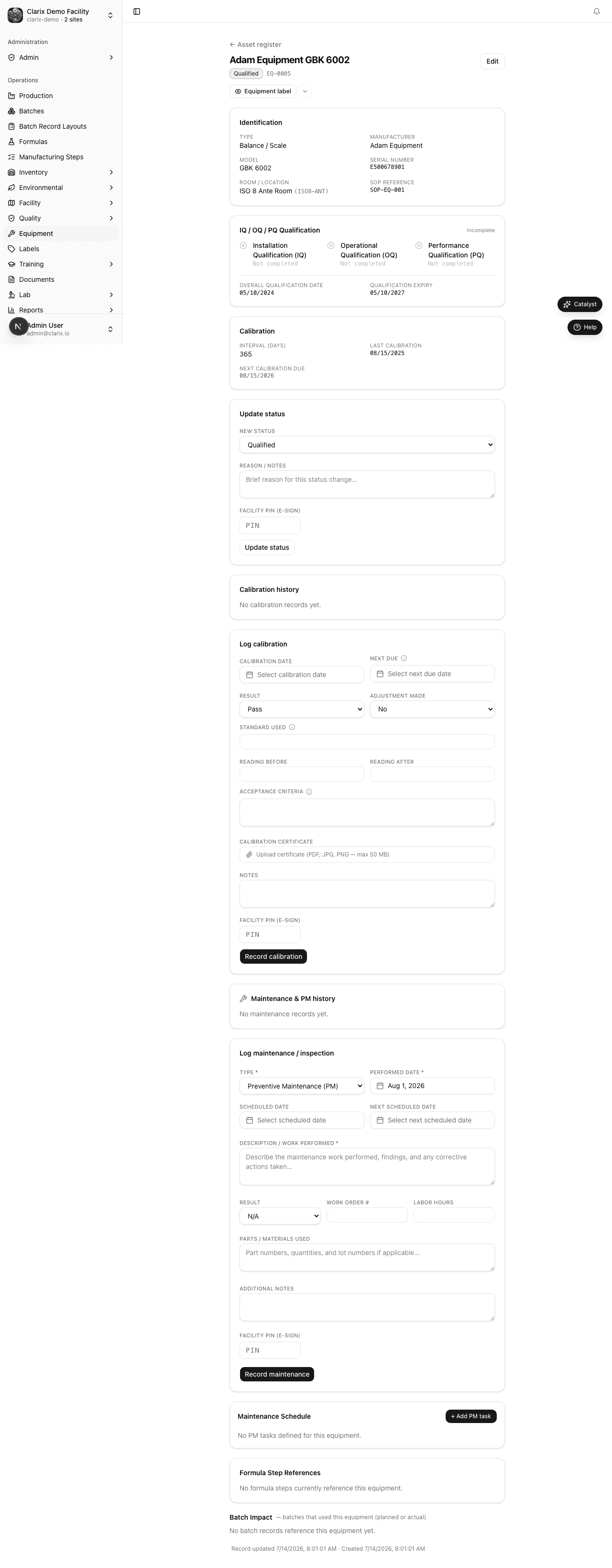
Viewing calibration status for an asset
Navigate to Equipment → Assets and click any asset to open its detail page. The detail page shows:
- The current calibration status (Current, Due Soon, or Overdue) prominently at the top
- The date of the most recent calibration
- The date the next calibration is due
- A Calibration History tab listing every calibration event in reverse chronological order
If an asset is overdue, a red banner appears at the top of the detail page. Do not use this instrument for GxP operations until the calibration is completed and logged.
Logging a calibration event
When a calibration has been performed — either by an internal metrology technician or by an accredited external vendor — log the results in Clarix as follows:
- Open the asset detail page for the instrument being calibrated.
- Click Log Calibration to open the calibration entry form.
- Enter the Date Calibrated — the date the calibration was actually performed (not the date you are entering it into the system).
- Enter the Next Due Date — this should be calculated as the calibration date plus the asset's calibration interval. For example, if an asset has a 365-day interval and was calibrated on January 15, 2026, the next due date is January 15, 2027. The system pre-fills this based on the interval, but you can override it if the vendor certificate specifies a different period.
- Select the Result: Pass or Fail.
- Pass means the instrument was found to be within specification (possibly after adjustment).
- Fail means the instrument could not be brought within specification and must be taken out of service pending repair or replacement.
- Enter the Reference Standard Used — the NIST-traceable or ISO-traceable reference standard used during the calibration (e.g., "NIST Class 1 Weights, Cert. No. 12345").
- Enter the Readings Before Calibration — the as-found measurements taken before any adjustment is made. This is required for a complete calibration record.
- Enter the Readings After Calibration — the as-left measurements confirming the instrument is within specification after any adjustments.
- Add any Technician Notes — for example, adjustments made, observations about instrument condition, or environmental conditions at time of calibration.
- Upload the Calibration Certificate — if calibration was performed by an external vendor, click Choose file to upload their signed certificate directly (PDF, PNG, or JPEG accepted; up to 10 MB). The file is stored permanently in Clarix's secure blob storage, linked to this calibration record, and can be retrieved instantly during an inspection. A SHA-256 checksum is computed at upload and stored alongside the file for integrity verification.
- Enter your Facility PIN to sign the record electronically. This constitutes your electronic signature and is recorded in the audit trail with a timestamp.
- Click Save Calibration to finalize the record.
The system immediately recalculates the next due date and updates the asset's calibration status. If the result was Pass, the status returns to Green (Current). If the result was Fail, the asset is flagged and a notification is sent to the Equipment Manager.
Due-date warnings and overdue alerts
Clarix automatically alerts staff when calibrations are approaching or past due:
- 14-day warning (Amber): Assets with a calibration due date within the next 14 calendar days appear in the Amber category on the equipment dashboard. An in-app notification is sent to users with the Equipment Manager role.
- Overdue (Red): Once a calibration due date passes without a logged calibration, the asset moves to Red status. It appears prominently on the dashboard and a red banner is shown on the asset detail page.
These alerts are designed to give your metrology team sufficient lead time to schedule vendor visits or complete internal calibrations before an instrument falls out of compliance.
Batch execution gate
When a batch step captures a specific instrument, Clarix automatically checks the calibration status of that instrument before allowing the step to be completed. If the instrument's calibration is overdue, the step is blocked until a new calibration is logged. This gate is enforced server-side and cannot be bypassed by any user.
See Executing Steps — Equipment Calibration Gate for how this affects batch production.
Calibration history
The Calibration History tab on the asset detail page shows a full chronological record of every calibration event logged for that instrument. Each entry shows the calibration date, result, technician, reference standard, and a link to the uploaded certificate. This history is immutable — entries cannot be deleted or edited after signing, only supplemented with new calibration records.
Audit trail
Every calibration entry, including the electronic signature, timestamp, and the identity of the signing user, is captured in Clarix's system-wide audit trail. During an FDA inspection or internal audit, this trail provides documented evidence that calibrations were performed on schedule, by qualified individuals, using appropriate reference standards.
Role required: All staff can view calibration history. Logging a new calibration event requires the Equipment Manager, QA, or Admin role. The electronic PIN signature is required from the technician performing or verifying the calibration.