
Equipment Overview
Understand the equipment calibration dashboard and how Clarix tracks asset status across your entire facility fleet.
The Equipment module is the central hub for managing every piece of equipment and instrumentation in your 503B sterile compounding facility. When you navigate to Equipment in the left sidebar, you land on the equipment dashboard — a real-time summary of the calibration health, preventive maintenance obligations, and asset counts across your entire fleet. For pharmacy technicians, QA staff, and PICs, this dashboard is the first place to check when starting a shift or preparing for an inspection.
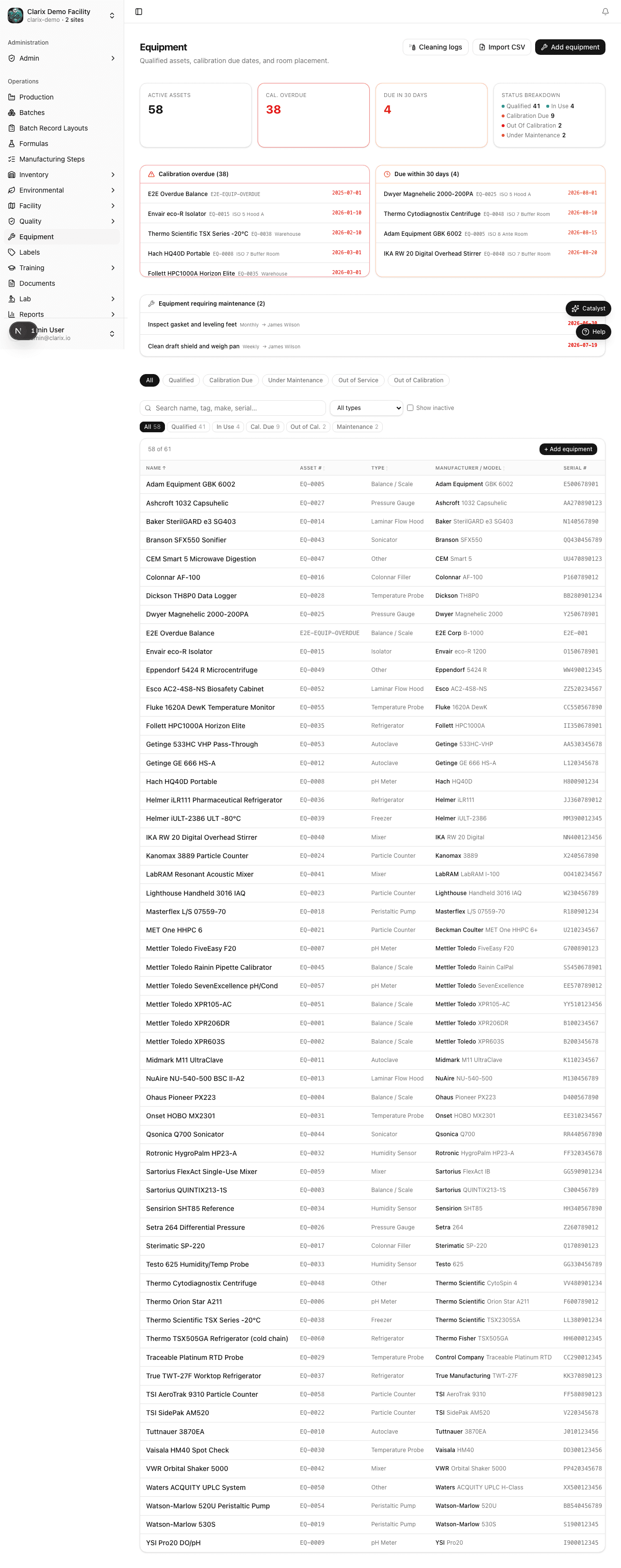
Dashboard overview
The equipment dashboard is organized into several key sections that give you an at-a-glance view of your facility's compliance posture.
Calibration status summary cards
At the top of the dashboard you will find color-coded summary cards representing the calibration state of every tracked asset:
- Red — Overdue: Assets whose calibration due date has already passed. Any asset in this state must not be used for GxP operations until calibrated and re-qualified. A red card count greater than zero is a critical finding during FDA inspections.
- Amber — Due within 14 days: Assets approaching their calibration due date. Plan calibration activities proactively so that work does not stop because an instrument falls overdue.
- Green — Current: Assets with calibrations that are fully up to date. This is the only acceptable state for instruments used in batch release decisions (e.g., analytical balances, HPLC systems, pH meters).
Clicking any summary card filters the asset list to show only assets in that status category, allowing you to quickly identify which specific instruments need attention.
PM tasks due soon
Below the calibration cards, the PM Tasks Due Soon list shows all preventive maintenance tasks scheduled to come due within the next 30 days. Each row shows the asset tag, asset name, PM schedule name, and the date the task is due. This list helps QA and maintenance staff prioritize their work queue and ensures PM tasks do not slip past their deadlines.
Asset count by type
The asset type breakdown panel shows a count of assets grouped by equipment category (e.g., balances, ovens, autoclaves, fillers, HEPA units, refrigerators). This summary is useful for inventory audits and for verifying that your equipment list is complete relative to your facility's validated state.
Quick link to asset register
A View All Assets button at the top of the dashboard takes you directly to the full asset register, where you can create new assets, view asset details, and access calibration and PM history for individual instruments.
Criticality classification
Each asset carries a criticality rating that classifies its risk to product quality and patient safety if it fails or is used out of calibration:
| Level | When to use |
|---|---|
| Low | Support equipment with limited direct impact on batch release decisions (e.g., general-purpose carts, non-GxP refrigerators) |
| Medium | Equipment that influences compounding conditions or environmental control but is not the primary measurement instrument (e.g., mixers, laminar flow hoods) |
| High | Instruments whose readings directly affect batch disposition, potency calculations, or sterility assurance (e.g., analytical balances, HPLC systems, autoclave cycle recorders) |
Criticality appears on the asset register and can be used to prioritize overdue calibrations during inspection preparation. High-criticality assets in an overdue state should be treated as stop-use until re-qualified.
System ID (CMMS integration)
The System ID field stores the asset's identifier in your external Computerized Maintenance Management System (CMMS) or enterprise asset management tool. When populated, it allows your maintenance team to cross-reference Clarix calibration records with work orders and service history in the CMMS without re-entering asset tags.
System ID is optional and does not affect due-date calculations or dashboard status in Clarix. It is primarily a linkage field for facilities that maintain parallel asset records in another system.
Scheduling modes
Clarix supports two scheduling modes for both calibration and preventive maintenance intervals. Each asset can have independent settings for calibration and maintenance.
| Mode | Behavior |
|---|---|
| Fixed | Due dates are calculated from a fixed calendar interval (e.g., every 6 months on the 1st). The next due date does not shift based on when the last event was actually completed. Use for regulatory-mandated intervals that must not slip. |
| Completion | Due dates are calculated from the date the last calibration or PM was completed (e.g., 6 months after the last calibration was logged). Use when your SOP defines intervals from the last service date rather than a fixed calendar anchor. |
Configure the scheduling mode per asset when creating or editing the asset record in the asset register.
Grace periods
Grace period days define how many calendar days after a calibration or maintenance due date an asset remains in a "due soon" state before Clarix treats it as overdue. Separate grace periods can be set for calibration and maintenance.
For example, if a balance is due for calibration on June 1 and the calibration grace period is 7 days, the asset stays in the amber "due soon" category through June 7 and moves to red "overdue" on June 8 if no calibration is logged.
Grace periods give maintenance staff a short buffer to complete scheduled work without immediately flagging an asset as stop-use, while still surfacing approaching deadlines on the dashboard. Set grace periods to zero if your SOP requires immediate stop-use on the due date.
Note: Grace periods affect dashboard status display only. Your facility SOP may still require stop-use on the due date regardless of the configured grace period in Clarix.
Why calibration records matter for FDA 503B compliance
Under 21 CFR Part 211.68, all instruments used to measure, weigh, or otherwise assess drug product quality must be calibrated on a defined schedule, and calibration records must be maintained. For 503B outsourcing facilities, FDA investigators routinely inspect calibration logs during surveillance inspections. Failures in this area — such as using an overdue balance to weigh active pharmaceutical ingredients — can result in 483 observations and, in serious cases, Warning Letters.
USP Chapter 1251 and the broader framework of USP 797 also require that equipment used in sterile compounding be qualified and maintained in a calibrated state. Clarix automates the due-date calculations, surfaces overdue items prominently, and maintains an immutable audit trail of every calibration event, making it straightforward to produce records on demand during an inspection.
Role required: All staff can view the equipment dashboard. Creating assets, logging calibrations, and managing PM schedules require the Equipment Manager or Admin role.