
483 Readiness
The pre-inspection checklist report for 503B facilities — a radar chart of readiness scores across all regulated domains, with a PDF export for FDA investigators.
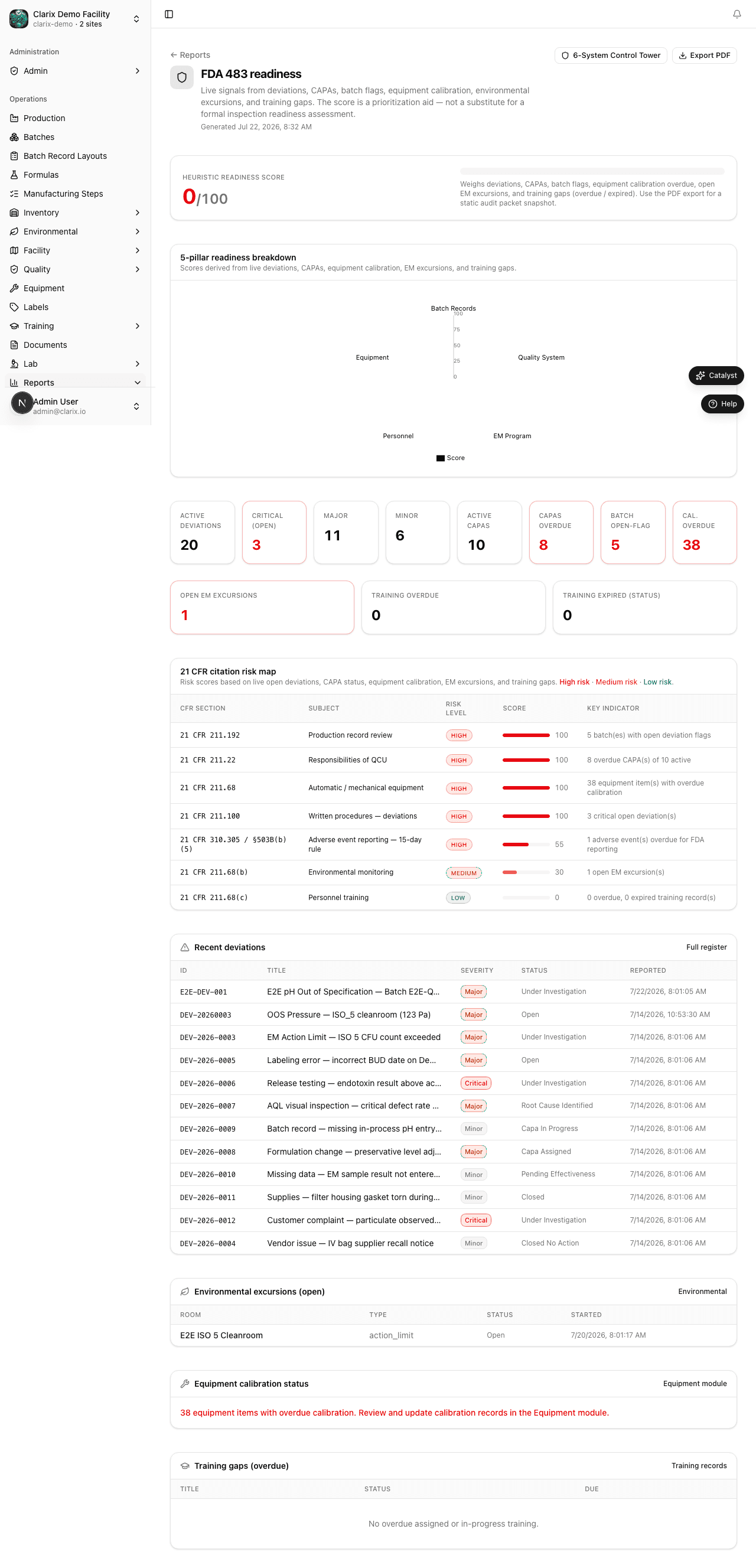
The 483 Readiness report is Clarix's most important report for regulatory compliance. Navigate to Reports → 483 Readiness to open it. This report is purpose-built for one scenario: an FDA investigator walks through your door — what does your data say right now? The report calculates a readiness score across every regulated domain of your facility and presents it as a radar chart, a domain-by-domain breakdown of open issues, and a compliance percentage for each area. When you are ready to hand something to an inspector, click Export PDF to generate a formatted summary document.
Role required: QA Officer or higher. Exporting the PDF requires QA Manager or PIC. This report is recommended for monthly review — not just before inspections.
What a Form 483 is
A Form 483 is an FDA document issued at the conclusion of an inspection listing observations where the investigator found conditions or practices that may indicate violations of the Food, Drug, and Cosmetic Act. The goal of the 483 Readiness report is to surface the same types of findings that an investigator would look for — before the investigator arrives — so that your team can proactively address them.
The radar chart
The centerpiece of the report is a radar (spider) chart with seven axes, one for each regulated domain:
| Domain | What it measures |
|---|---|
| Batch Records | Completeness of batch records, open exceptions, unsigned steps, batches with no release decision |
| Inventory | Lots in quarantine past standard hold time, lots with expired or missing CoAs, items with no recent cycle count |
| Equipment / Calibration | Assets with overdue calibration, assets with overdue preventive maintenance, equipment used while out of calibration |
| Environmental | EM samples with action limit excursions in the past 90 days, open EM-related deviations, rooms with no recent monitoring |
| Training | Personnel with lapsed training qualification, media fill coverage gaps, upcoming qualification expirations |
| Documentation | SOPs past their review date, documents in draft not yet approved, change controls not yet implemented |
| Quality | Open Critical and Major deviations past their response deadline, CAPAs overdue, open OOS results |
Each axis is scored from 0 to 100. A score of 100 means no open issues in that domain. A score below 70 appears in red and represents a domain that needs immediate attention. The radar chart gives your leadership team an instant gestalt of your overall readiness posture.
Domain detail panels
Below the radar chart, each domain has a detail panel showing:
- Open issue count — the number of individual records contributing to the score reduction
- Compliance % — the percentage of records in that domain that are in a compliant state
- Red flags — specific records that are most likely to generate an FDA observation (e.g., "BN-2026-0084 — batch completed 14 days ago with no release decision")
Red flag items are listed individually and are clickable — each one links directly to the affected record so you can investigate and resolve it without leaving the report.
Note: A "red flag" in the 483 Readiness report is a Clarix designation based on standard FDA inspection criteria for 503B facilities. It does not mean FDA has cited your facility; it means Clarix has detected a condition that an investigator is likely to ask about. Resolving red flags before an inspection is exactly the purpose of this report.
Exporting the PDF
- Ensure the date range is set appropriately (typically the past 90 days for a pre-inspection snapshot).
- Review the radar chart and all domain panels. Resolve any red flags you can.
- Click Export PDF in the top-right corner.
- The PDF is generated and downloads automatically. It includes:
- Your organization name, site, and the export date/time
- The radar chart as a printed graphic
- A table of all domain scores
- A list of all open red flags with record IDs
- The audit trail entry confirming when the report was generated and by whom
Keep the exported PDF in your inspection readiness binder and refresh it at least monthly.
What inspectors typically ask for
Based on 503B inspection patterns, investigators commonly request:
- Batch record review — "Show me your last 10 batch records for [product]." The Batch Records domain score tells you if any are incomplete.
- Calibration records — "Is all your production equipment currently calibrated?" The Equipment domain score answers this.
- EM data — "What were your EM results for the past six months in your ISO 5 cleanroom?" The Environmental domain score surfaces recent excursions.
- Training records — "Show me training records for the compounders who worked on these batches." The Training domain score highlights any gaps.
- Deviation log — "What quality events have you had in the past year?" The Quality domain score shows overdue responses.
Recommended monthly review workflow
Run the 483 Readiness report at the beginning of each month as part of your quality system review:
- Navigate to Reports → 483 Readiness.
- Review the radar chart. Note any domains below 70%.
- Click into each red-flagged domain and resolve or assign each open issue.
- Export the PDF and save it with the date in your inspection readiness file.
- Repeat the following month and compare radar charts to track improvement.
Related pages
Quality Metrics
Track deviation and CAPA counts, severity breakdowns, source analysis, and open vs. closed trends for QA review boards and corrective action effectiveness in Clarix.
Audit Packet
A compact pre-inspection summary PDF for 503B facility audits — covering open deviations, CAPA status, training compliance, environmental monitoring, and 21 CFR inspection risk, scoped to a configurable inspection window.