
QA Executive Committee
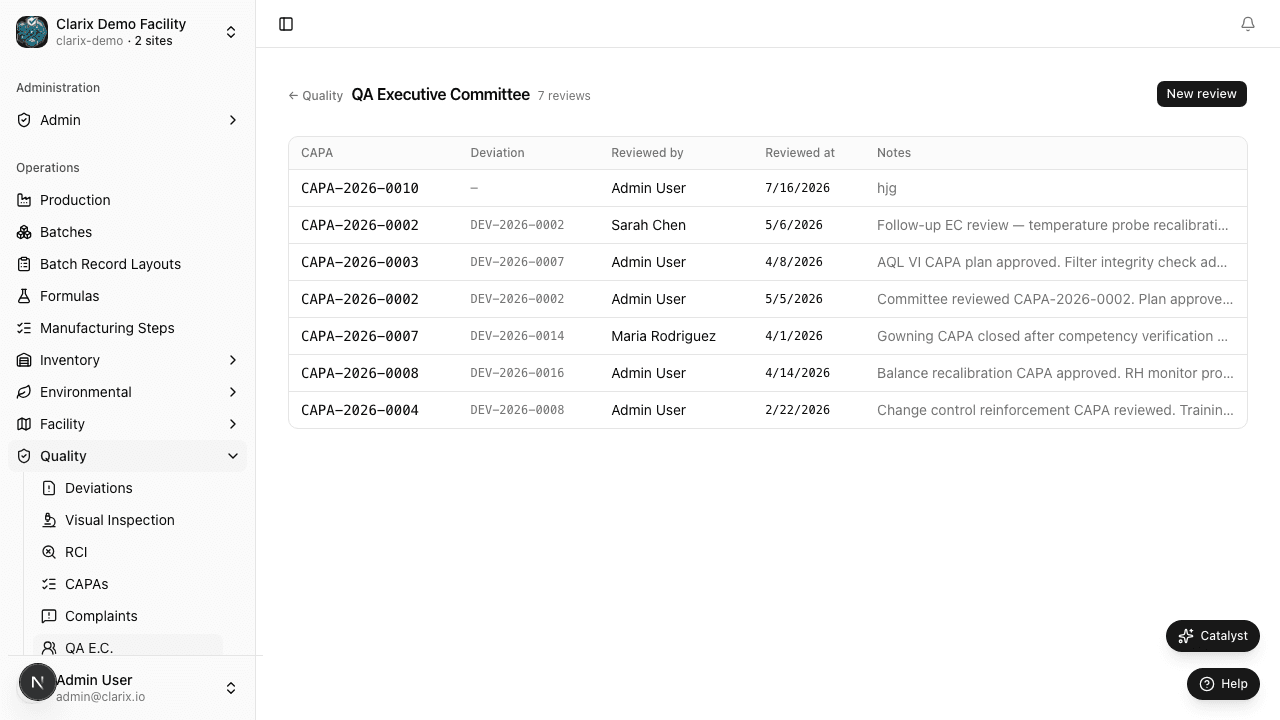
The QA Executive Committee (QA EC) hub — linking quality events, recording committee decisions, and driving quality governance cycles.
QA Executive Committee
Overview
The QA Executive Committee (QA EC) hub at /quality/qa-ec is where quality leadership links significant quality events — deviations, CAPAs, OOS results, complaints, and change control records — to formal committee review cycles. Each meeting record captures attendees, the agenda of linked quality events, committee decisions, and follow-up action items, creating an auditable record of quality governance activity.
The QA EC module is typically used for monthly or quarterly quality governance meetings required by regulatory SOP and USP 797 compliance frameworks.
Committee Meeting Records
Each QA EC meeting record contains:
| Field | Description |
|---|---|
| Meeting Date | The date the committee convened |
| Chairperson | The quality leader who chaired the meeting |
| Attendees | Names and roles of all participants |
| Agenda Items | Quality event records linked to this meeting (deviations, CAPAs, OOS, complaints, change control) |
| Decisions | Per-agenda-item outcome: Approved, Rejected, Deferred, or For Information |
| Action Items | Follow-up tasks from committee discussion, each with an owner and due date |
How to Create a QA EC Meeting Record
- Navigate to Quality → QA Executive Committee.
- Click New Meeting in the top-right corner.
- Enter the Meeting Date and select the Chairperson from the user list.
- Add Attendees by searching for users or entering names manually.
- Click Add Agenda Item and search for quality events to link (deviations, CAPAs, OOS results, complaints, or change control records).
- For each agenda item, record the committee Decision and add any Action Items with owners and due dates.
- Click Save to record the meeting.
Role required: QA Manager or Admin can create, edit, and close QA EC meeting records. All authenticated users with access to the Quality module can view meeting records.
Linking Quality Events
The following quality event types can be linked to a QA EC agenda item:
- Deviations — significant process deviations requiring committee-level review or closure approval
- CAPAs — corrective and preventive actions for committee tracking and effectiveness sign-off
- OOS Results — out-of-specification investigation outcomes requiring escalation
- Complaints — customer or patient complaints with regulatory significance
- Change Control Records — proposed changes requiring committee authorization
To link an event, click Add Agenda Item within a meeting record and search by event number, title, or date range.
Recording Decisions
Each linked agenda item receives a committee decision:
| Decision | Meaning |
|---|---|
| Approved | Committee accepts the event resolution or proposed change |
| Rejected | Committee does not accept — follow-up required before re-submission |
| Deferred | Decision postponed to a future meeting — reason should be documented in action items |
| For Information | Event presented for awareness only; no formal decision required |
Action items can be added to any agenda item. Each action item specifies a description, owner (assigned user), and due date.
Committee Review Cycle
Organizations typically schedule QA EC meetings on a monthly or quarterly cadence. Clarix supports this cycle by:
- Surfacing overdue action items from prior meetings at the top of the next meeting's agenda view, so nothing is lost between sessions.
- Providing a chronological meeting history with search and filter by date range, chairperson, or linked quality event.
- Tracking the status of each action item (Open, In Progress, Closed) independently of the meeting record itself.
Edge Cases
Note: Linking the same deviation to multiple meeting records is allowed. This is common when a deviation is initially presented for information at one meeting and then formally closed at a subsequent meeting. The deviation's detail page shows a history of all QA EC interactions, including each meeting it appeared in and the decision recorded.
Note: Action items that require formal corrective action can be escalated to a new CAPA directly from the action item row — click Create CAPA on the action item. The resulting CAPA record will include a back-link to the originating QA EC meeting record, preserving the governance chain.