
Stability Testing
Create and manage stability protocols for compounded sterile preparations under 21 CFR 211.166 and ICH Q1A(R2), with automated sample scheduling, ICH time points, and BUD support.
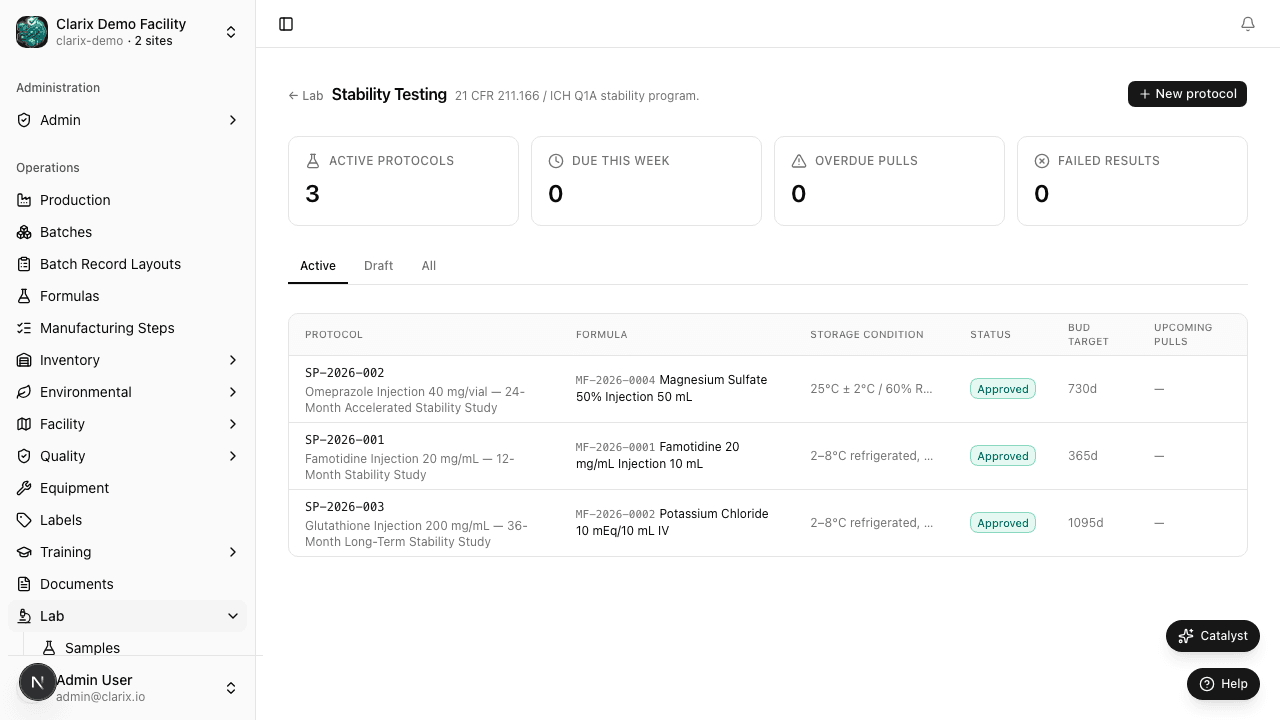
The Stability Testing module lets your laboratory establish formal stability protocols for compounded sterile preparations, automatically schedule sample pulls at ICH-defined time points, and track results from T=0 through long-term studies (24 months or beyond). Stability data is the scientific backbone of your beyond-use date (BUD) assignments — Clarix ensures samples are pulled on time, results are recorded against defined acceptance criteria, and any out-of-specification finding is linked to the QMS for investigation.
Navigate to Lab → Stability to access the stability program.
Role required: Viewing stability records requires QA Technician or higher. Creating and editing stability protocols requires Lab Analyst or QA Officer. Approving protocols and reviewing trending results requires QA Manager or PIC.
Regulatory and guidance basis
| Authority | Requirement |
|---|---|
| 21 CFR 211.166 | Written stability testing program for drug products; data to support dating period (BUD/expiry) |
| 21 CFR 211.170 | Reserve samples retained under conditions consistent with labeling |
| ICH Q1A(R2) | Stability testing of new drug substances and products — time points, storage conditions, statistical analysis |
| USP ⟨1150⟩ | Pharmaceutical stability guidance for compounded and manufactured preparations |
| USP ⟨797⟩ (2023) | BUD dating requires either published stability data or facility-conducted stability studies |
Under USP ⟨797⟩ (2023), compounded sterile preparations assigned BUDs beyond the default conservative limits must have supporting stability data — either peer-reviewed literature or facility-conducted stability studies. Clarix's stability module supports both citation-based justification and full in-house study management.
Creating a stability protocol
- Navigate to Lab → Stability and click New Protocol.
- Complete the protocol setup:
Protocol header
| Field | Required | Description |
|---|---|---|
| Protocol title | Yes | Descriptive name (e.g., "Vancomycin 25 mg/mL IV Bags — 12-Month Stability Study") |
| Formula | Yes | Link to the Clarix formula record for the product being studied |
| Study type | Yes | Long-term, Accelerated, or Intermediate (per ICH Q1A) |
| Study purpose | Yes | Initial BUD assignment, BUD extension, or BUD confirmation |
| Target BUD | Yes | The beyond-use date being supported by this study (e.g., 90 days refrigerated) |
| Storage condition | Yes | Temperature and relative humidity during storage (e.g., 5°C ± 3°C / 60% RH ± 5%) |
| Container/closure | Yes | Vial type, bag material, and closure system being evaluated |
| Batch numbers | No | Link specific compounding batches from which samples will be drawn |
Acceptance criteria
For each test being evaluated, define the acceptance criterion that will be applied at each time point:
| Test | Example acceptance criterion |
|---|---|
| Potency / assay | 90.0–110.0% of initial (T=0) result |
| pH | Within ±0.5 of T=0 value, or within formulation specification range |
| Appearance / color | No change from T=0; solution must remain clear and colorless (or per specification) |
| Particulate matter | Passes USP ⟨788⟩ sub-visible particulate limits |
| Osmolality | Within ±10% of T=0 |
| Sterility | No growth (for studies including microbiological testing) |
ICH time points and automated sample scheduling
Once a protocol is approved and activated, Clarix automatically generates the sample pull schedule based on your selected time points. The standard ICH Q1A(R2) time points for long-term studies at refrigerated (5°C) conditions are:
| Time point | Nominal interval | Acceptable window |
|---|---|---|
| T=0 | Day 0 (initial) | Within 1 day of production |
| 1 Month | 30 days | ± 3 days |
| 3 Months | 90 days | ± 7 days |
| 6 Months | 180 days | ± 14 days |
| 12 Months | 365 days | ± 30 days |
| 18 Months | 547 days | ± 30 days |
| 24 Months | 730 days | ± 30 days |
For accelerated studies (25°C / 60% RH), the standard time points are T=0, 1M, 3M, and 6M. You can customize the time points for your protocol; Clarix's defaults follow ICH guidance.
Sample pull alerts
Clarix sends an alert to the assigned Lab Analyst 7 days before each scheduled sample pull. The alert appears in the Lab Hub and as an in-app notification. On the sample pull date, the record moves from Scheduled to Due.
Recording sample results
For each time point:
- Open the stability protocol and select the scheduled time point.
- Click Record Results.
- Enter the actual pull date and confirm the time point is within the acceptable window.
- Enter the result for each test (potency %, pH, appearance, etc.).
- The system automatically evaluates each result against its acceptance criterion and flags any out-of-specification (OOS) finding.
- Upload the lab report or certificate of analysis for the time point.
- Enter your Facility PIN to sign the result entry.
- Click Save Results.
Out-of-specification results in stability
If any result at any time point fails an acceptance criterion, Clarix:
- Marks that time point as OOS
- Automatically creates a linked OOS record in the QMS
- Flags the stability protocol as On Hold
A confirmed OOS finding in a stability study requires a full Phase I and Phase II investigation before any BUD determination can be continued. If the OOS is confirmed, the BUD must be revised downward to the last passing time point.
Stability protocol lifecycle
| Status | Meaning |
|---|---|
| Draft | Protocol is being authored; sample schedule not yet generated |
| Approved | Protocol has been reviewed and approved by QA Manager; sample schedule is generated and active |
| Active | Study is in progress; samples are being pulled and results entered |
| On Hold | An OOS finding or protocol deviation has paused the study pending investigation |
| Completed | All time points have been sampled and evaluated; BUD determination is documented |
BUD determination and documentation
When a study reaches Completed status, the QA Manager documents the BUD determination directly in the protocol record:
- Confirmed BUD (e.g., "90 days refrigerated at 2–8°C")
- Supporting time points (all passing time points documented)
- Storage conditions under which the BUD is valid
- Container/closure system qualification scope
- Reviewer signature and date (facility PIN required)
The completed stability protocol is automatically linked to the formula record as a stability document. Future batches of the formula display the active BUD and its supporting study reference.
Related pages
QC Samples
Create and track quality control sample submissions from collection through testing, result entry, and OOS investigation.
Document Library Overview
Manage controlled documents — SOPs, work instructions, policies, forms, and protocols — through a structured approval and version control lifecycle.