
Labels Overview
Understand how Clarix manages Zebra ZPL label templates with version control and approval workflows to ensure every dispensed product carries an FDA-compliant label.
Every compounded sterile preparation dispensed from a 503B outsourcing facility must carry a label that meets the requirements of 21 CFR Part 201 (labeling requirements for drugs). This is not a trivial requirement: a non-compliant label — missing required elements, using incorrect font sizes, carrying incorrect or outdated information — can result in 483 observations, Warning Letters, and in the worst case, patient safety incidents if a product is misidentified. The Clarix Label Management module provides centralized control over the ZPL (Zebra Programming Language) templates used to print product labels, with a full version history, approval workflow, and integration with batch and inventory records.
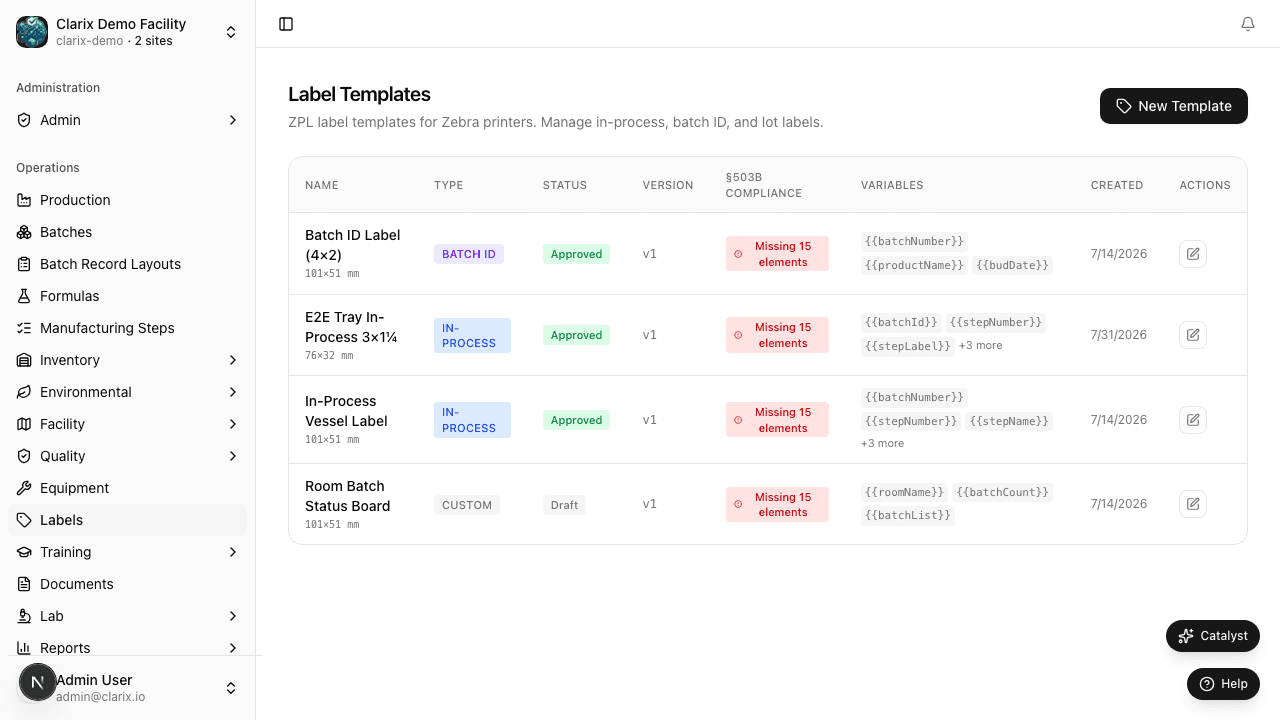
Navigate to Labels in the left sidebar to access the label management module.
Why centralized label management matters for 503B
In facilities without a centralized label management system, label templates often exist as files on a printer, a workstation, or a shared network drive. Under these conditions, it is difficult to know which template is current, whether a template has been modified since it was last approved, or whether the template in use on a given day matches the template that was validated and approved. These gaps are exactly the kind of system weakness that FDA investigators look for.
Clarix addresses these risks by:
- Storing all templates in the system — no label template exists outside of Clarix. Templates cannot be loaded directly onto a printer without going through the Clarix approval workflow.
- Version control — every change to a template creates a new version. The previous version is archived but no longer available for production use.
- Approval workflow — every template must be reviewed and approved by a Document Controller or Admin before it can be used to print production labels. Unapproved or draft templates cannot be printed from production batch or inventory records.
- Audit trail — every label print event is logged: which template was used (including version), which batch or lot it was printed for, who initiated the print, and when.
Label types
Clarix supports the following label types, covering the full range of labels used in a 503B compounding operation:
| Label Type | Typical Use |
|---|---|
| In-Process Vessel Label | Applied to containers during compounding to identify the product, batch number, and in-process status |
| Batch ID Label | A primary identification label affixed to the bulk batch container or secondary packaging |
| Inventory Lot Label | Applied to received raw material or component lots for traceability through inventory management |
| Custom | Any facility-specific label type not covered by the above categories |
The label type determines which variable fields are available in the template (e.g., an Inventory Lot Label uses {{lotNumber}} and {{itemName}}, while a Batch ID Label uses {{batchNumber}} and {{productName}}).
FDA-required label elements for CSPs
Under 21 CFR Part 201 and USP 17 (labeling), a dispensed CSP label for a 503B outsourcing facility must include at minimum:
- Name and address of the outsourcing facility
- Date of preparation (compounding date)
- Beyond-use date (BUD) and recommended storage conditions
- Lot number (or batch number)
- Active ingredient(s) and strength
- Dosage form and route of administration
- Quantity dispensed
- Statement: "Not for resale" and "Sterile" (as applicable)
- Federal caution statement
Clarix label templates are designed to include all required fields via ZPL variables that are populated automatically from batch and inventory records at the time of printing, eliminating the risk of manual transcription errors.
Only approved templates can be used in production
The most important control in the Clarix label system is this: only templates in Approved status appear in the print dialog on batch and inventory records. If a template is in Draft or Under Review status, it is not available for selection in production. This hard control prevents the accidental use of unapproved or in-development templates on released product.
Role required: All production staff can print labels using Approved templates. Creating and editing templates requires the Label Designer or Admin role. Approving templates requires the Document Controller or Admin role.