
Receiving Lot Import
Bulk-receive inventory lots at /inventory/receiving/import — create lot records with quantities, COA data, expiry, and vendor links from CSV.
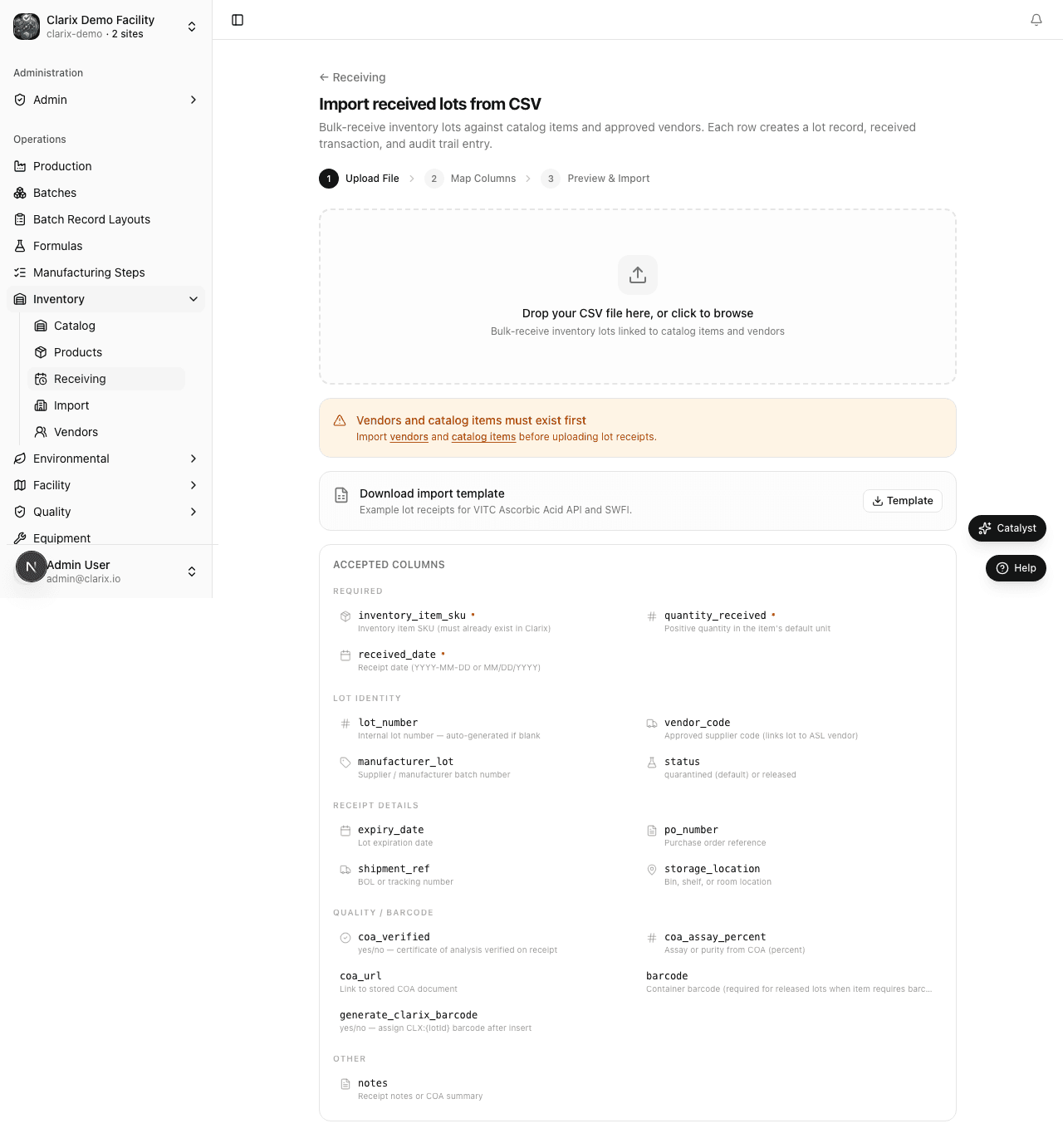
Use Receiving Lot Import (/inventory/receiving/import) to record many incoming shipments at once. Each CSV row creates a lot, received transaction, and audit trail entry against an existing inventory item SKU.
Distinct from items import:
/inventory/importcreates material master records. This page creates lots on items that already exist in your catalog.
When to use lot import
- Initial stock load after importing inventory items
- Large vendor shipments with many lot lines (APIs, diluents, packaging)
- Demo or validation datasets (e.g., VITC raw material lots)
For single-lot receiving, use Inventory → Receiving and click Receive lot instead.
Import workflow
- Go to Inventory → Receiving.
- Click Import lots (or open
/inventory/receiving/import). - Click Download template for the CSV layout.
- Fill in one row per lot (see columns below).
- Upload the CSV file.
- Review column mapping and row-level validation in the preview.
- Enter your facility PIN and click Confirm import.
New lots default to Quarantined status unless you specify otherwise. QA must release lots before batch issuance.
CSV columns
| Column | Required | Description |
|---|---|---|
inventory_item_sku | Yes | SKU of an existing inventory item |
quantity_received | Yes | Positive quantity in the item's default unit |
received_date | Yes | Receipt date (YYYY-MM-DD) |
lot_number | No | Internal lot number (auto-generated if blank) |
vendor_code | No | Approved vendor code from your ASL |
expiry_date | No | Lot expiration date |
manufacturer_lot | No | Supplier batch number |
po_number, shipment_ref | No | Purchase order or shipment reference |
storage_location | No | Storeroom or location code |
status | No | quarantined, released, etc. |
coa_verified, coa_assay_percent, coa_url | No | COA quality data |
barcode, generate_clarix_barcode | No | Barcode assignment |
notes | No | Free-text notes |
Clarix detects common header aliases (sku, qty, receipt date, etc.).
Prerequisites
- Inventory item SKUs must exist (import at
/inventory/importfirst) - Vendor codes must exist on your Approved Supplier List if specified
- COA assay values feed purity-adjusted calculations in batch execution
Example: VITC raw materials
After importing VITC inventory items, import lots for SKUs such as VITC-INV-001 (Ascorbic Acid), VITC-INV-005 (SWFI), and packaging components — then release via QA before compounding.
Role requirements
| Action | Minimum role |
|---|---|
| Import lots | Technician with receiving permission or above |
| Release quarantined lots | QA Officer or above |
Regulatory reference
21 CFR 211.84 — Testing and approval or rejection of components. Lot-level receiving with quarantine status and COA capture supports incoming material control before use in sterile compounding under USP 797 expectations.
Related pages
- Inventory Import — Material master (items) import
- Receiving Lots
- Lot Management
- Master Formula Bundle
Receiving Lots
Complete walkthrough for receiving a shipment into Clarix inventory — lot number, quantity, COA assay, barcode, and quarantine release workflow.
Lot Management
Managing lot statuses, performing lot actions (release, dispose, adjust, print label, trace), and understanding the lot lifecycle in Clarix.