
Master Formula Bundle Import
Import a complete master formula in one transaction at /formulas/import — formula.csv, bom.csv, admix-supplies.csv, and procedure.jsonl.
The Import Master Formula Bundle section at /formulas/import is the fastest path to stand up a production-ready master formula. Upload four coordinated files and Clarix creates the draft formula, BOM lines, admix supplies, and phased manufacturing steps in a single transactional import.
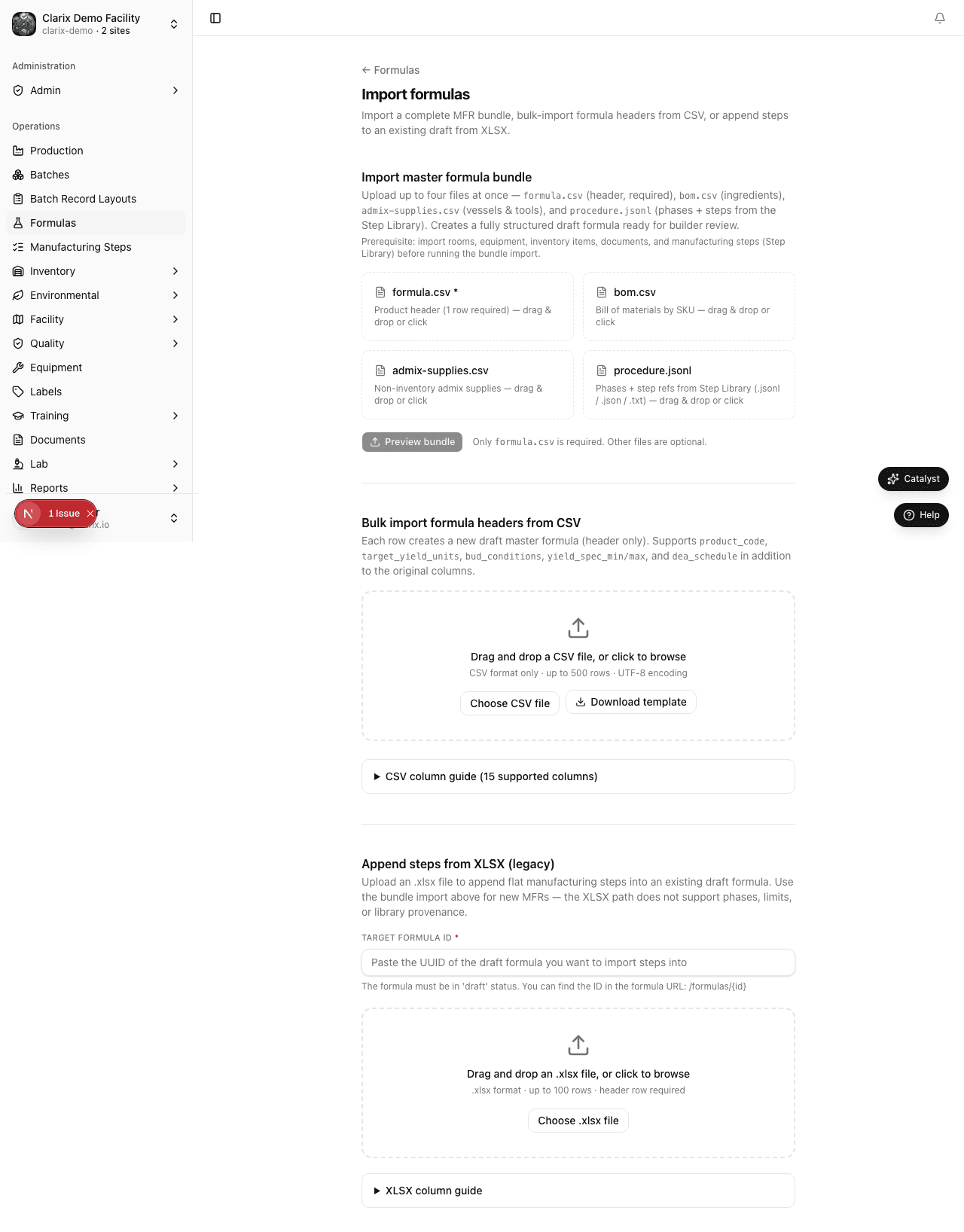
Recommended path: Use the bundle import for new products. Use the legacy header CSV import only when you need empty formula shells without BOM or steps.
The four files
| File | Creates |
|---|---|
formula.csv | Draft master formula header (product identity, batch size, BUD, storage) |
bom.csv | Bill of Materials lines linked to inventory SKUs |
admix-supplies.csv | Non-inventory admix supplies (vessels, stir bars, etc.) |
procedure.jsonl | Manufacturing phases and step references by shortLabel |
Import order inside the bundle:
formula.csv— creates the formula recordbom.csv— adds ingredient linesadmix-supplies.csv— adds admix supply rowsprocedure.jsonl— creates phases and pulls steps from the Step Library
If any step fails validation, the entire bundle rolls back — no partial formulas.
Prerequisites
Before importing a bundle:
- Inventory items referenced in
bom.csvmust exist (import SKUs at/inventory/import). - Step Library steps referenced in
procedure.jsonlmust exist — import JSONL at/manufacturing-steps/importfirst. - Optional document and equipment codes in step resources should exist for full linkage.
Product example: VITC-489 Ascorbic Acid
The demo dataset documents Ascorbic Acid 500 mg/mL 30 mL IV (VITC-489):
| File | Contents |
|---|---|
formula.csv | Sterile injectable header — 7296 mL batch, 243 vials, refrigerated BUD |
bom.csv | Five ingredients: Ascorbic Acid, EDTA, NaOH, Phenol, SWFI (by SKU) |
admix-supplies.csv | Mixing vessel, stir bar, filtration supplies |
procedure.jsonl | 18 phases, 74 steps referencing VITC-* shortLabels |
formula.csv key columns
| Column | Required | Notes |
|---|---|---|
product_code | Yes | e.g., VITC-489 |
product_name | Yes | Full product name |
batch_size_quantity / batch_size_unit | Yes | Numeric size and UOM (ml, g, vial, etc.) |
target_yield_units | Expected finished units | |
bud_days, bud_conditions, storage_conditions | BUD and storage | |
sterile, hazardous_drug, preservative_free | Boolean flags | |
route_of_administration, unit_size | e.g., IV, 30 mL |
bom.csv key columns
| Column | Required | Notes |
|---|---|---|
sku | Yes | Must match an inventory item SKU |
quantity_per_batch | Yes | Total batch quantity |
unit | Yes | Valid UOM |
is_active_ingredient, is_critical, quantum_satis | BOM flags | |
sort_order | Display order |
admix-supplies.csv key columns
| Column | Required | Notes |
|---|---|---|
material_name | Yes | Free-text supply name |
expected_quantity | Yes | Numeric quantity |
unit | Yes | e.g., each, ml |
procedure.jsonl record types
Phase:
{"type":"phase","phaseNumber":2,"name":"Admix Preparation","predecessors":[1],"description":"..."}Step (references Step Library):
{"type":"step","phaseNumber":2,"shortLabel":"VITC-TARE-WEIGHT","stepNumber":14}Each shortLabel must match an active step in /manufacturing-steps.
Step-by-step: import the bundle
- Complete prerequisites (inventory items, Step Library JSONL).
- Go to Formulas → Import (
/formulas/import). - Scroll to Import Master Formula Bundle.
- Upload all four files (formula, BOM, admix supplies, procedure).
- Review the preview summary: formula attributes, BOM row count, phase/step counts, and errors.
- Click Import bundle.
- Open the created draft formula and verify phases in the Builder tab.
- Submit for pharmacist review and approve with facility PIN when ready.
After import
- Formula status is Draft with auto-generated formula number.
- Calculation step variables referencing other steps may need wiring in the builder (UUIDs are unknown at import time).
- Submit through your normal approval workflow.
Role requirements
| Action | Minimum role |
|---|---|
| Import master formula bundle | PIC, QA Manager, or formula editor |
| Approve imported formula | PIC (facility PIN) |
Regulatory reference
21 CFR 211.186 — Master production and control records must be prepared before batch production. The bundle import assembles header, BOM, supplies, and procedure structure under controlled validation so the approved master formula reflects your validated manufacturing record.
Related pages
- Formula Import — Legacy header CSV and per-formula step import
- Manufacturing Steps JSONL Import
- Bill of Materials
- Approval Workflow
Formula Import
Import paths at /formulas/import — master formula bundle (recommended), header CSV bulk import, and per-formula step import.
Manufacturing Steps Overview
Build and maintain a reusable Step Library at /manufacturing-steps — define steps once by shortLabel and insert them into master formulas.