
Receiving Lots
Complete walkthrough for receiving a shipment into Clarix inventory — lot number, quantity, COA assay, barcode, and quarantine release workflow.
Receiving a lot into Clarix creates a traceable record of every raw material shipment entering your facility. The receiving workflow captures all the information needed for lot-level traceability, COA-based purity calculations, and FIFO-compliant dispensing. Every received lot starts in Quarantined status and must be released by QA before it is available for batch production.
Role required: Compounder, QA Officer, or Admin can receive lots. Releasing lots from quarantine requires QA Officer or Admin.
Opening the receive lot form
- In the sidebar, click Inventory.
- Find the item you are receiving — search by name or NDC.
- Click the item name to open its detail page.
- Click the Receive lot button in the top-right corner of the Lots tab.
The receive lot form slides in from the right.
Filling in the receive lot form
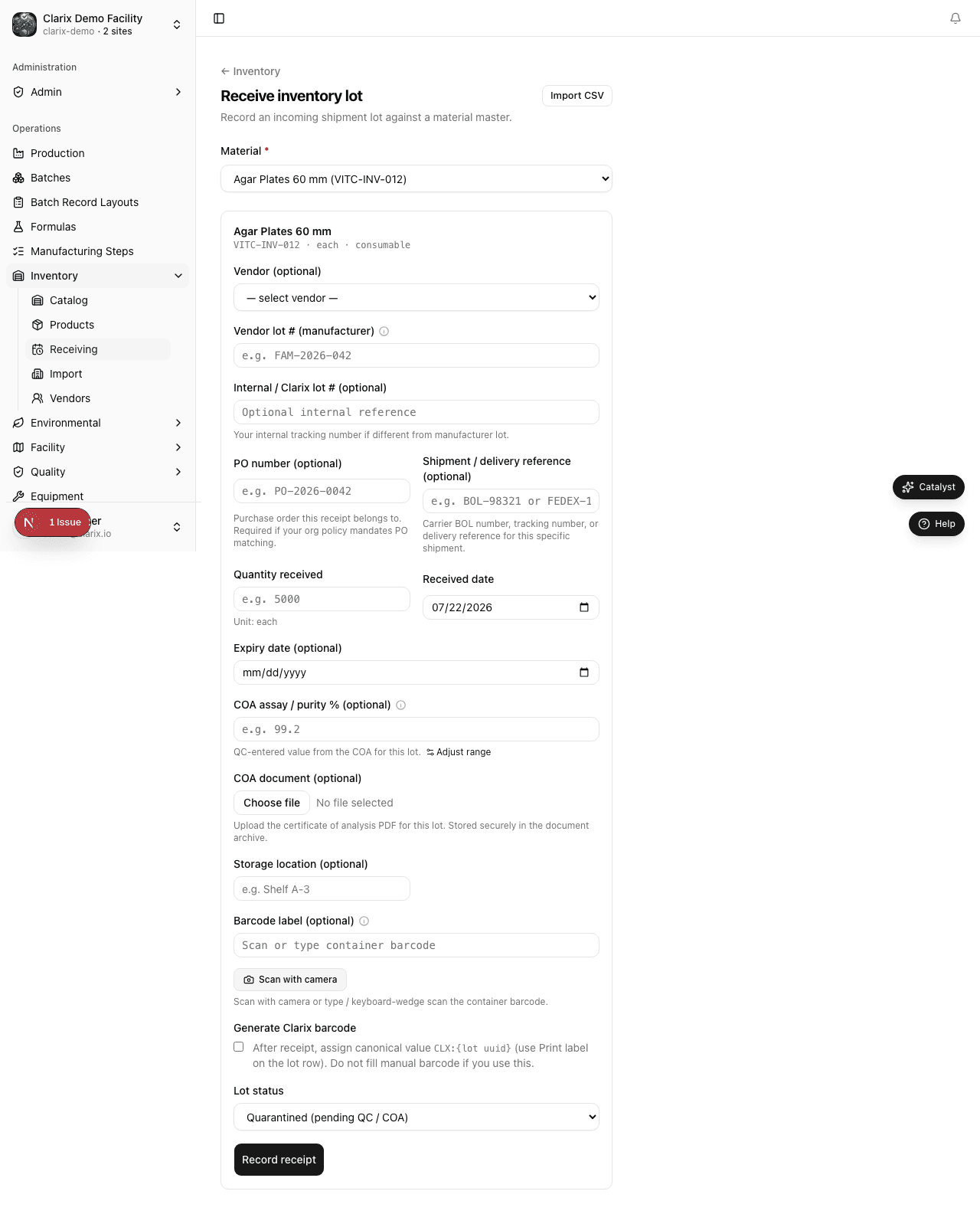
Manufacturer lot number
Enter the lot number exactly as printed on the supplier's Certificate of Analysis and container label. This number is how Clarix traces the material back to the original manufacturer's batch.
- Use the full alphanumeric lot number (e.g., "2024-A-047")
- Do not abbreviate or truncate
- Lot number uniqueness is enforced per the Lot Duplicate Policy configured in your organization (see Lot duplicate policy below)
Quantity received
Enter the quantity and confirm the unit of measure:
- Quantity — the amount in the shipment (e.g., 500)
- Unit — auto-filled from the item's default unit; can be changed if the shipment uses a different unit (e.g., item default is g, but shipment is in kg — change and enter 0.5)
Expiry date
Enter the expiry date from the container label or COA. This date is enforced throughout the system:
- Expired lots cannot be issued to batches
- Lots expiring within 30 days appear on the low-stock / expiring-soon dashboard
- Expiry date is printed on all batch records that use this lot
Container barcode (optional)
If your facility uses barcode-based lot verification, scan or type the barcode printed on the material container. When the item has Require container barcode enabled, this field is required.
The container barcode is used during batch execution in Barcode Scan steps to verify that the correct material is being used. Use the barcode exactly as printed — typically the lot number in Code 128 or DataMatrix format.
COA Assay percentage
Enter the assay value from the Certificate of Analysis as a percentage. For example, if the COA states "Assay: 97.2% (by HPLC)", enter 97.2.
Important notes on assay values:
- Values above 100% are accepted and expected for some ultra-pure APIs. USP and FDA recognize that highly purified reference standards or certain pharmaceutical-grade materials can have assay values slightly above 100% (e.g., 100.4%) due to moisture correction or measurement methodology. Clarix accepts values between 50% and 110%.
- Leave the assay field blank only if the COA does not include an assay value. Blank assay means purity-adjusted calculations in formula steps cannot run for this lot — the
component["Name"].purityvariable will return 1.0 (100%) as a default. - The assay is stored as entered and displayed as a percentage throughout the system. Internally, calculation steps convert it to a decimal (e.g., 97.2% → 0.972) when computing purity-adjusted weights.
PO number
If your organization requires Purchase Order matching (configured in Settings → Inventory Policy), the PO number field is required and must match an open PO in your system. If PO matching is not required, the field is optional but recommended for receiving records.
Order number
An optional internal order or reference number for this receipt (e.g., your procurement system's order ID or internal requisition number). The order number is stored on the lot record and appears in the lot detail and transaction history. Use it to tie a received lot back to the purchase order or internal order that authorized the shipment.
Shipment / delivery reference
An optional free-text field for your delivery note number, carrier tracking number, or other shipment reference. This helps match the digital record to physical receiving paperwork. Distinct from the Order number field, which tracks your internal procurement reference.
Notes
Any additional notes about the shipment, condition on arrival, or inspection findings. These notes are stored permanently with the lot record and appear in the lot detail and audit log.
Submitting the receive form
- Fill in all required fields (manufacturer lot number, quantity, expiry date, and PO number if required).
- Click Receive lot.
The lot is created with Quarantined status. A success notification confirms the lot number and quantity received.
Quarantine workflow
Every new lot starts in Quarantined status. During quarantine:
- The lot appears in the Lots tab with a Quarantined badge
- The quantity is counted in "Total on hand" inventory figures but labeled as quarantined
- The lot cannot be issued to a batch, even if there is demand
- A QA-level user must review the physical material and COA against the lot record before releasing
Releasing a lot
After QA inspection:
- Open the item detail page.
- Find the quarantined lot in the Lots tab.
- Click Release on the lot row (or open the lot and click Release in the header).
- Optionally enter a release note (e.g., "COA reviewed, passed incoming QC per SOP QC-012").
- Click Confirm release.
The lot status changes to Released and it becomes available for batch issuance.
Role required: QA Officer or Admin is required to release lots from quarantine.
Lot duplicate policy
Receiving the same manufacturer lot number twice is a common scenario — for example, when a large shipment is split across multiple deliveries. Clarix allows your organization to configure how duplicate lot numbers are handled.
This policy is set in Settings → Inventory Policy → Lot duplicate policy:
| Mode | Behavior |
|---|---|
| Strict | Duplicate lot numbers are rejected. Every lot number must be unique across all items. Use when your receiving SOP prohibits splitting lot records. |
| Allow on different date | The same lot number can be received again if the receiving date is different from any prior receipt of that lot. Use when the same lot is received in multiple deliveries on different days. |
| Allow under different PO | The same lot number can be received again if it is associated with a different PO number. Use when the same manufacturer lot is procured through multiple purchase orders. |
| Allow all | Duplicate lot numbers are always allowed. Clarix appends a suffix (-2, -3, etc.) to differentiate records internally while preserving the original lot number for label printing. Use when your manufacturing partners reuse lot numbers. |
After receiving
Once a lot is received:
- It appears in the Lots tab on the item detail page
- Its quantity is included in the item's on-hand total (as quarantined until released)
- A Received transaction is added to the item's transaction history
- The lot is available for label printing (see Labels and Barcodes)
- After QA release, it appears in batch lot selection when a formula calls for this ingredient
Related pages
Managing Inventory Items
How to create, configure, and manage material master records (inventory items) in Clarix, including barcode policy and item settings.
Receiving Lot Import
Bulk-receive inventory lots at /inventory/receiving/import — create lot records with quantities, COA data, expiry, and vendor links from CSV.