
Inventory Policy
Configure lot duplicate handling, CoA assay range, PO number requirements, and default receipt status for incoming inventory in Clarix 503B compounding facilities.
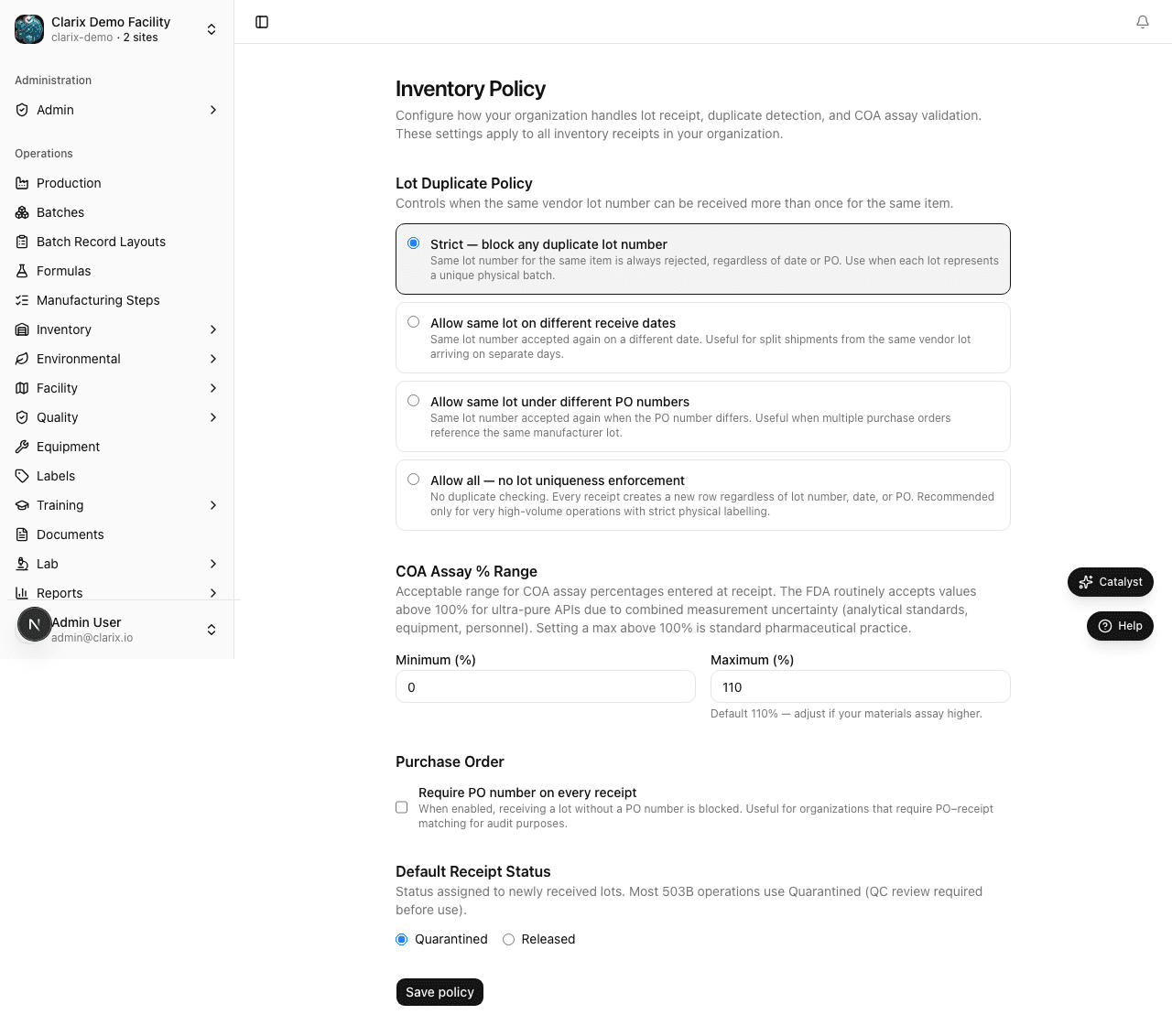
The Inventory Policy settings page at /settings/inventory-policy controls how Clarix handles incoming inventory lots and what rules apply when materials are received into your facility. These settings balance operational flexibility with the strict traceability requirements of 503B pharmaceutical compounding. Configuring these policies correctly ensures your receiving workflow matches your facility's quality system and that your inventory records can withstand FDA scrutiny.
Role required: Administrator only. Policy changes apply to all future receiving transactions immediately upon saving. Existing lot records are not affected by policy changes.
Lot duplicate policy
The lot duplicate policy controls what happens when a user attempts to receive a lot number that already exists in your inventory for the same material.
In pharmaceutical manufacturing, receiving a duplicate lot number for the same ingredient should be unusual — each lot from a manufacturer represents a distinct batch of raw material with its own Certificate of Analysis. However, certain legitimate scenarios may require receiving the same lot number more than once (partial shipments, split deliveries, materials purchased through multiple distributors under the same manufacturer lot).
Clarix provides four options:
Strict (recommended for most 503B facilities)
The system blocks receipt of any lot with the same lot number as an existing lot for the same material, regardless of any other conditions. The receiving user sees an error message and cannot proceed. This is the safest option and forces manual review of any potential duplicate.
If you need to receive a shipment that genuinely has the same lot number as an existing lot, an administrator must first change the policy temporarily, complete the receipt, and change it back — creating a clear audit trail of the exception.
Allow on different date
Receipt of a duplicate lot number is allowed if the receipt date is different from the original receipt date. This accommodates facilities that receive partial shipments of the same manufacturer lot on different calendar days.
Allow under different PO
Receipt of a duplicate lot number is allowed if a different purchase order number is provided. This accommodates facilities where the same manufacturer lot is purchased through multiple orders (e.g., a spot buy and a standing order fulfillment).
Allow all
No duplicate lot checking is performed. Any lot number can be received regardless of existing records. Use this option only if your materials management process has external controls to prevent genuine duplicates.
Note: Even with "Allow all" selected, every lot receipt creates a distinct lot record in Clarix with its own lot ID. The lot duplicate policy only controls whether the receiving form blocks entry — all lot data is always preserved independently.
CoA Assay range
The CoA Assay range defines the acceptable range for the potency assay value on a raw material's Certificate of Analysis. When a lot is received and a CoA is uploaded, Clarix can validate that the assay value falls within your configured range.
The default range is 0–110% of label claim. This accommodates the common pharmaceutical convention where an assay of slightly above 100% is acceptable for high-purity APIs.
Note: FDA and USP allow assay values above 100% of label claim for ultra-pure active pharmaceutical ingredients. For example, a highly pure anhydrous API may assay at 101.2% — this is analytically correct and complies with USP monograph limits. Adjust the upper CoA assay range limit if your formulary includes materials with accepted assay values above 100%.
To change the CoA assay range:
- Enter the minimum acceptable assay percentage in the Min field.
- Enter the maximum acceptable assay percentage in the Max field.
- Click Save Policy.
Lots received with a CoA assay outside this range will be flagged with a warning. Depending on your receiving workflow, this may trigger a hold or require QA review before the lot can be released for production use.
Require PO number
When this toggle is enabled, the Purchase Order (PO) number field becomes mandatory when receiving a lot. The user cannot complete the receiving transaction without entering a valid PO number.
When disabled, the PO number field is optional. Users can enter a PO number if they have one, but they are not required to.
Enable PO number requirement if your facility uses purchase orders as a control document for procurement and you want Clarix to enforce this requirement at the point of receipt rather than relying on users to remember.
Default receipt status
This setting determines the initial status assigned to every newly received lot.
Quarantined (default) — New lots enter quarantine status automatically. A lot in quarantine cannot be used in batch production. A QA review step is required to move the lot to Released status. This is the recommended setting for 503B facilities operating under USP <797> and cGMP requirements. It enforces a mandatory review of every incoming material before it enters production.
Released on receipt — New lots are immediately assigned Released status upon receipt. This bypasses the quarantine review step. Use this setting only if your receiving process includes an equivalent review (e.g., CoA review is completed during the receiving transaction itself) and your quality system documents this approval.
Note: FDA inspectors expect to see evidence that incoming materials are quarantined until quality review is complete. Using "Released on receipt" should be carefully evaluated against your current SOPs and validation documentation. Any change from Quarantined to Released on receipt should be treated as a significant quality system change with appropriate documentation.
Saving policy changes
After adjusting any combination of the above settings, click Save Policy at the bottom of the page. A confirmation message confirms the save. Changes take effect for all receiving transactions completed after the save — existing lot records are not affected.
Related pages
Business Rules
Configure automated alerts, blocks, and CAPA triggers based on system events — including yield thresholds, calibration due dates, EM excursions, and lot expiration warnings in Clarix.
Formula Policy
Configure draft validation mode for formula authoring in Clarix — choose between Soft (warnings only) and Strict (errors block save) to match your formula development workflow.