
Review by Exception
Triage batches flagged for QA attention — low yield, failed steps, open deviations, and amendments.
Review by Exception
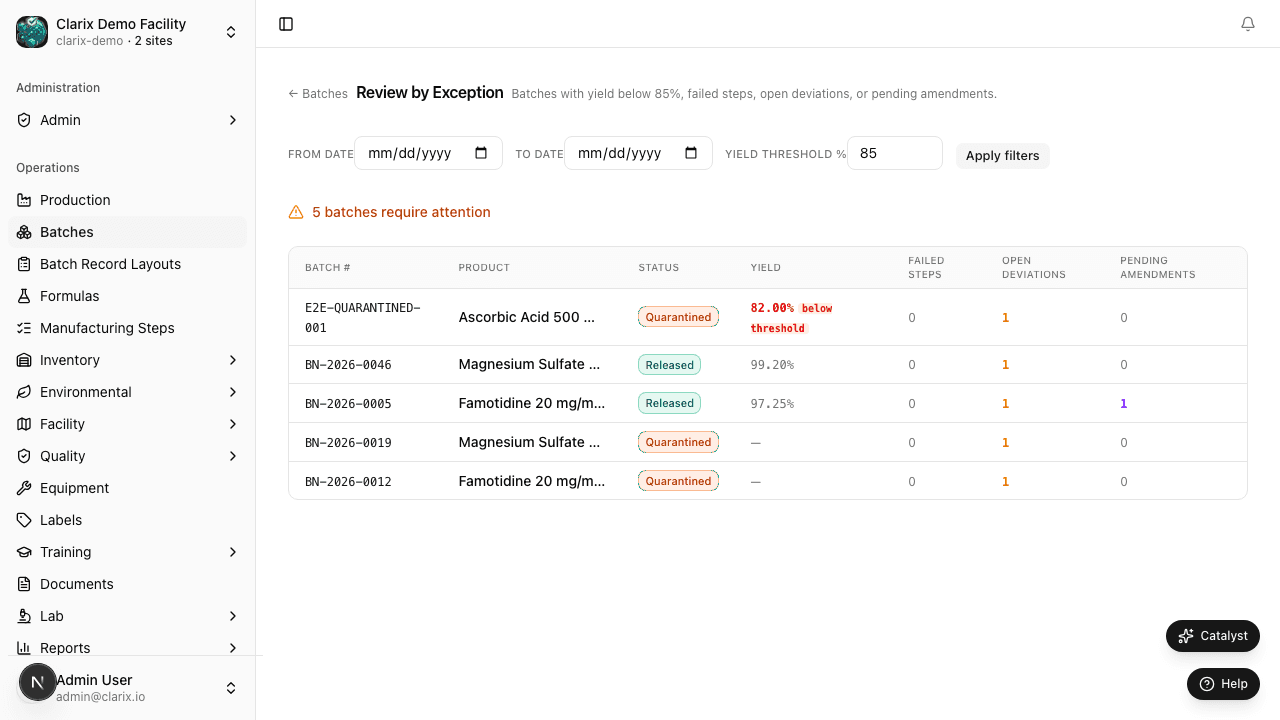
The Review by Exception (RBE) page at /batches/rbe surfaces every batch that needs QA attention in one consolidated view — instead of manually checking each batch record individually.
What gets flagged
A batch appears in the RBE view when one or more of the following conditions is true:
| Flag | Condition |
|---|---|
| Low yield | Batch yield is below the configured threshold (default: 85%) |
| Failed step | One or more steps recorded an out-of-tolerance value |
| Open deviation | A deviation is linked to this batch and is still open |
| Amendment pending | A step correction (amendment) has been requested and not yet approved |
| Deviation required | Yield below the block threshold (default: 75%) and no deviation opened yet |
| QA hold | Batch has been manually placed on QA hold |
Using the RBE view
- Navigate to Batches → Review by Exception from the top of the batch catalog, or directly via
/batches/rbe. - Each row shows the batch number, formula, technician, current status, and all active exception flags.
- Click a batch row to open the full batch record and review the details.
- From the batch record you can: approve or reject the batch, link a deviation, or close an amendment request.
Who should use this
Role recommended: QA Officer, QA Manager, Pharmacist-in-Charge
This view is designed for QA officers who are responsible for reviewing multiple batches each day. Rather than scanning the full batch catalog, use RBE as your daily starting point — if a batch isn't in this list, it meets all thresholds and is ready for normal review.
Clearing flags
Flags clear automatically when the underlying condition is resolved:
- Low yield flag — clears when the deviation is opened and linked to the batch
- Failed step flag — cleared by submitting a step amendment and having it approved
- Open deviation flag — clears when the linked deviation is closed
- Amendment pending — clears when the amendment is approved or rejected by a QA officer
Integration with bulk actions
After triaging the RBE list, use the main batch catalog's multi-select to bulk-quarantine or re-assign problematic batches. See Bulk Actions for details.
Related pages
Batch Import
Import batches into Clarix via CSV/XLSX file upload, barcode scan, AI document extraction, or automated webhooks.
Production Batch Templates
Save recurring batch configurations as templates and spin up new production runs in seconds — without re-entering formula, batch size, or setup details each time.