
Audit Packet
A compact pre-inspection summary PDF for 503B facility audits — covering open deviations, CAPA status, training compliance, environmental monitoring, and 21 CFR inspection risk, scoped to a configurable inspection window.
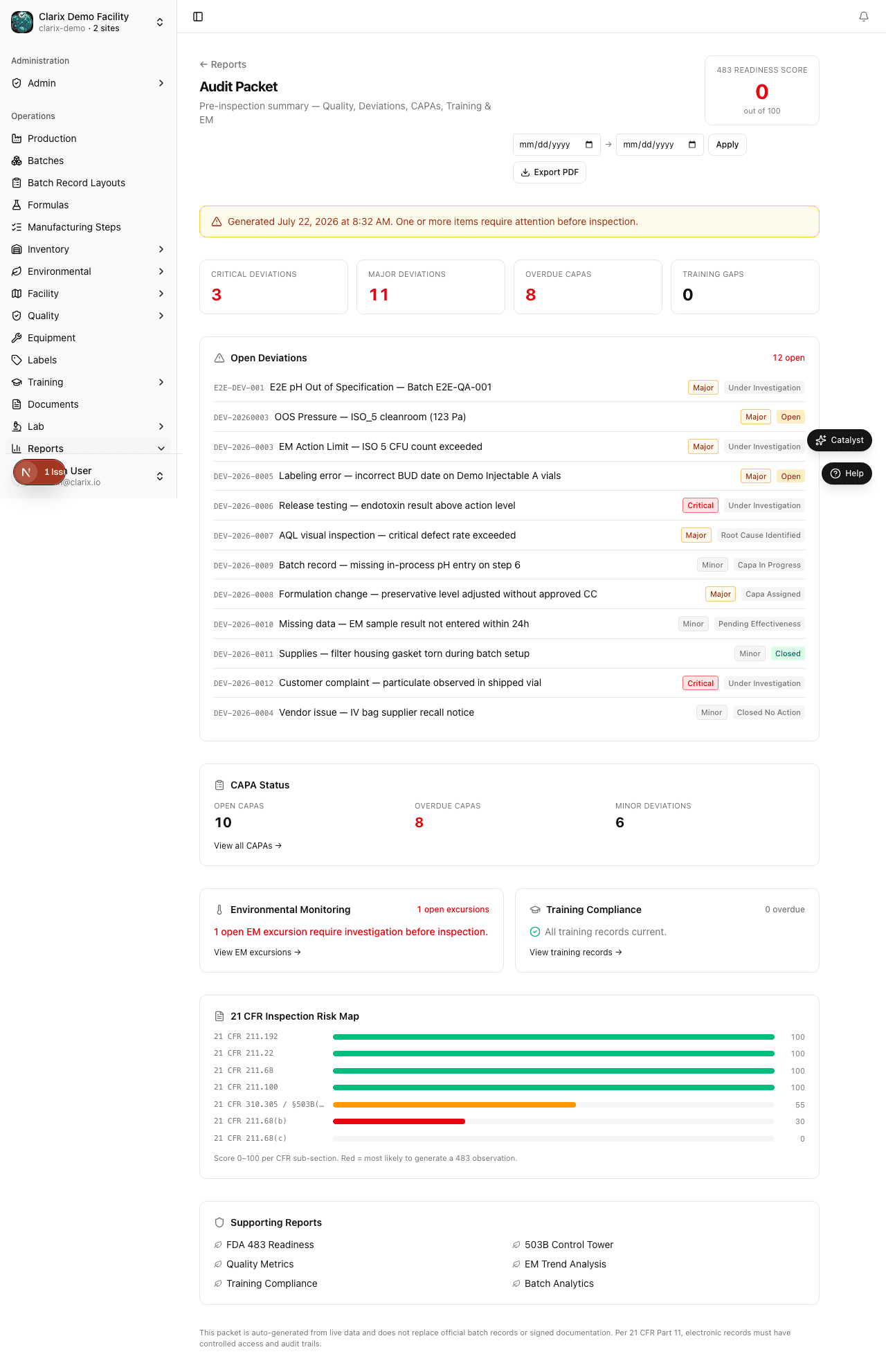
The Audit Packet report is Clarix's single-page pre-inspection summary. Navigate to Reports → Audit Packet to open it. Unlike the full 483 Readiness report — which provides a domain-by-domain radar chart analysis — the Audit Packet is designed to be handed directly to an inspector or shared with a third-party auditor as a concise snapshot of your facility's current quality posture. Set your inspection window dates, click Export PDF, and you have an audit-ready document in seconds.
Role required: QA Officer or higher. Exporting the PDF requires QA Manager or PIC.
Inspection window
The Audit Packet is date-aware. Unlike most reports that filter charted trend data, the inspection window on the Audit Packet sets the header context printed on the exported PDF — identifying the period covered by the audit.
To set the inspection window:
- Use the start date and end date pickers in the report header.
- Click Apply to update the page URL with your dates.
- The inspection window is displayed below the report title and is embedded in any exported PDF.
If no dates are selected, the PDF is generated with "as-of today" context, reflecting the current state of all open items at the time of export.
Report sections
The Audit Packet presents five compliance domains:
483 Readiness Score
The headline number at the top right of the page. This is the same composite readiness score calculated by the full 483 Readiness report — a 0–100 heuristic across all regulated domains. The color indicates:
| Score | Color | Interpretation |
|---|---|---|
| ≥ 80 | Green | Inspection-ready — no critical items |
| 55 – 79 | Amber | Needs attention — address highlighted items |
| < 55 | Red | At risk — critical findings require immediate resolution |
Summary tiles
Four quick-reference tiles show the most inspection-critical counts at a glance:
- Critical deviations — open deviations with severity
critical - Major deviations — open deviations with severity
major - Overdue CAPAs — CAPAs past their due date that are not yet closed
- Training gaps — personnel with overdue training records
If all four tiles show zero, a green banner confirms No critical or overdue items found, which is the ideal state for an inspection.
Open deviations
A full list of all currently open deviation records, sorted by reported date (newest first). Each entry shows:
- Deviation number (e.g.,
DEV-2026-0042) - Title and description
- Severity pill (
critical,major,minor) - Status pill (
open,investigating,in_progress)
During an inspection, an FDA investigator will typically ask to review your deviation log. This section gives you a single view of all open items you will need to explain.
CAPA status
A summary panel showing:
- Total open CAPAs
- Number of CAPAs that are overdue (past their due date)
- Count of minor deviations (which typically generate CAPAs)
- A direct link to the full CAPA management page
Environmental monitoring
The number of open EM excursions in the current period, with a direct link to the excursions log. If your EM program is current and no excursions are open, a green confirmation is displayed.
Training compliance
The number of overdue training records — personnel assigned a training task that has passed its due date without completion. Each overdue record represents a potential 21 CFR 211.68 citation. A link to the full training records module is provided for drill-down.
21 CFR Inspection Risk Map
A bar-chart breakdown of your readiness score across individual 21 CFR sub-sections. Each bar represents one regulated area (e.g., 211.22 – Quality Control Unit, 211.68 – Equipment / Calibration). A short bar indicates higher inspection risk — that sub-section has more open issues contributing to a score reduction.
The risk map is included in the exported PDF as a visual aid for QA leadership planning.
Exporting the PDF
Click Export PDF in the report header to download a formatted PDF. The PDF includes:
- Your facility name and the generation timestamp
- The configured inspection window (if set)
- All five sections described above
- A disclaimer that this document does not replace official batch records or signed documentation per 21 CFR Part 11
The PDF filename includes your facility name and the date range, for example:
audit-packet-clarix-compounding-2026-01-01-to-2026-12-31.pdf
Tip: Regenerate the PDF within 24 hours of an inspection start. Data in Clarix is real-time; a packet generated weeks earlier will not reflect any new deviations, CAPAs, or training gaps that occurred since then.
Difference from 483 Readiness
Both reports are designed for inspection prep, but they serve different purposes:
| Feature | Audit Packet | 483 Readiness |
|---|---|---|
| Scope | Current open items | Full domain scoring + trend context |
| Length | Compact (1–3 pages) | Comprehensive (5–10 pages) |
| Best for | Handing to an auditor | Internal QA review and monthly tracking |
| Inspection window | Configurable date range | Always "as of today" |
| CFR risk map | Yes (compact bar chart) | Yes (full 21 CFR sub-section table) |
For the most thorough pre-inspection review, use 483 Readiness as your internal document and Audit Packet as the handout for the investigator.
Related pages
483 Readiness
The pre-inspection checklist report for 503B facilities — a radar chart of readiness scores across all regulated domains, with a PDF export for FDA investigators.
EM Trends
Visualise environmental monitoring trends by sampling pathway, season, and room to spot patterns before excursions occur.