
503B Bulks List Monitor
Track your facility's bulk drug substances against the FDA §503B(a)(2)(A) bulks list — with live status badges, Federal Register citations, and sync updates as FDA amends the list.
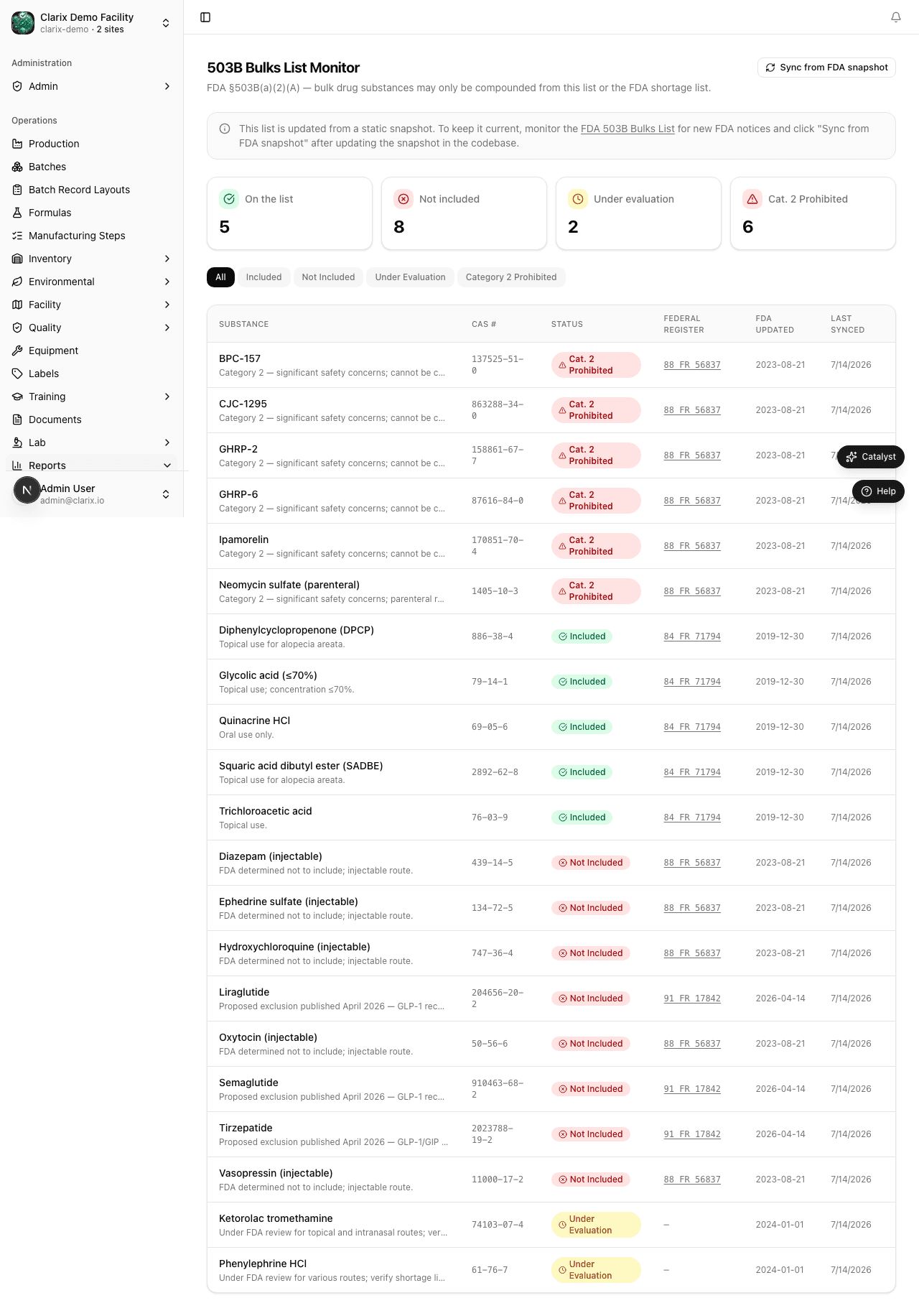
The 503B Bulks List Monitor gives your facility a real-time view of which bulk drug substances your formulas use and whether each substance is on the FDA's nominated and evaluated bulk drug substances list under FDCA §503B(a)(2)(A). Compounding with a bulk drug substance not on an applicable FDA list — or one that appears on the Category 2 (prohibited) list — exposes your facility to significant regulatory risk. Clarix maps every bulk substance in your formula catalog against the current FDA list status and alerts you to any changes after each list sync.
Navigate to Reports → Bulks List to open the monitor.
Role required: Viewing the bulks list monitor requires QA Officer or higher. Triggering a manual sync requires QA Manager or Admin. Read-only — formulary decisions based on this data must be documented in your quality system separately.
Regulatory basis
| Requirement | Source |
|---|---|
| Bulk drug substance list for outsourcing facilities | FDCA §503B(a)(2)(A) |
| FDA authority to evaluate and list bulk drug substances | FDCA §503B(a)(2)(A)(i)–(ii) |
| Federal Register nominations and evaluations | Published in the Federal Register; updated as FDA makes new determinations |
Under §503B(a)(2)(A), an outsourcing facility may compound a drug using a bulk drug substance only if:
- The bulk drug substance appears on a list FDA develops (the "503B bulks list"), or
- The drug is a drug product that has been withdrawn or removed from the market for safety or effectiveness reasons — and appears on an FDA-published list for this purpose
Substances not yet on the list or under evaluation exist in a regulatory grey zone. Substances on the Category 2 list have been evaluated by FDA and found not to meet the standard for inclusion — compounding with them is prohibited.
Status badges
Each bulk drug substance in the monitor displays one of four status badges based on FDA's current determination:
| Badge | Meaning |
|---|---|
| 🟢 Included | The substance appears on the final FDA 503B bulks list. Compounding is permitted subject to all other §503B requirements. |
| 🟡 Under Evaluation | The substance has been nominated and FDA is actively evaluating it. No final determination has been made. Compounding may continue pending FDA action; monitor closely. |
| 🔵 Not Included | The substance was nominated but has not been included on the list. No final negative determination (Category 2) has been made, but the substance is not affirmatively listed. |
| 🔴 Category 2 Prohibited | FDA has evaluated the substance and determined that it does not meet the §503B(a)(2)(A) standard. Compounding with this substance is prohibited. |
Substance list table
The monitor displays a table of all bulk drug substances referenced in your active and archived formulas:
| Column | Description |
|---|---|
| Substance name | INN or USAN nonproprietary name of the bulk drug substance |
| CAS number | Chemical Abstracts Service registry number |
| Status | Current FDA list status (badge) |
| Federal Register citation | Volume and page or docket number of the Federal Register notice establishing the current status |
| FDA determination date | Date of FDA's published determination for this substance |
| Formulas using this substance | Count of active formulas in your catalog that reference this API |
| Last synced | Date and time of the most recent sync with the FDA published list |
Click any row to expand the substance detail, which shows:
- The full Federal Register citation text excerpt
- A link to FDA's current bulks list page on FDA.gov
- The list of specific formulas in your catalog that use this substance
Substances requiring immediate attention
At the top of the monitor, a Requires Attention panel surfaces any substances where action may be needed:
| Alert type | Condition |
|---|---|
| Category 2 — Compounding Prohibited | Any active formula uses a substance with Category 2 status |
| Status changed since last sync | A substance's status changed from the previous sync (any direction) |
| Under Evaluation — approaching decision | FDA has published a proposed determination; final rule expected within 90 days |
Any Category 2 alert requires immediate review by the QA Manager and PIC. Formulas using a Category 2 substance must be suspended from production until the compliance team determines the appropriate course of action.
Syncing with the FDA list
The FDA 503B bulks list is updated periodically via Federal Register notice. Clarix checks for list updates automatically and displays the Last synced timestamp in the page header.
To manually trigger a sync:
- Click Sync Now in the top-right corner.
- Clarix fetches the current FDA 503B bulks list from FDA's published data source.
- Any status changes are applied and highlighted in the table for 7 days following the sync.
- If any substance used in your formulas changed status, a notification is sent to all QA Manager and PIC users.
Note: Manual sync results are logged in the audit trail, including the user who triggered the sync, the timestamp, and a summary of status changes detected.
Linking to formulas
From the substance detail view, click View Formulas to see every formula in your catalog that uses this bulk drug substance. For each formula you can see:
- Formula name and version
- Current formula status (Active, Archived, Draft)
- Date last produced
This view is particularly useful when a substance changes to Category 2 — it allows you to immediately identify all affected formulas without searching the formula catalog manually.
Related pages
Biannual Product Report
Generate and review semiannual product activity reports required under FDCA §503B(b)(4), covering products compounded, adverse events, and reporting compliance for each H1/H2 period.
Batch Analytics
Understand batch volume, average yield, rejection rates, and release velocity over time using the Batch Analytics report in Clarix.