
503B Control Tower
Real-time readiness scoring across all six FDA Compliance Program 7356.040 quality systems — your always-current inspection readiness dashboard for 503B outsourcing facilities.
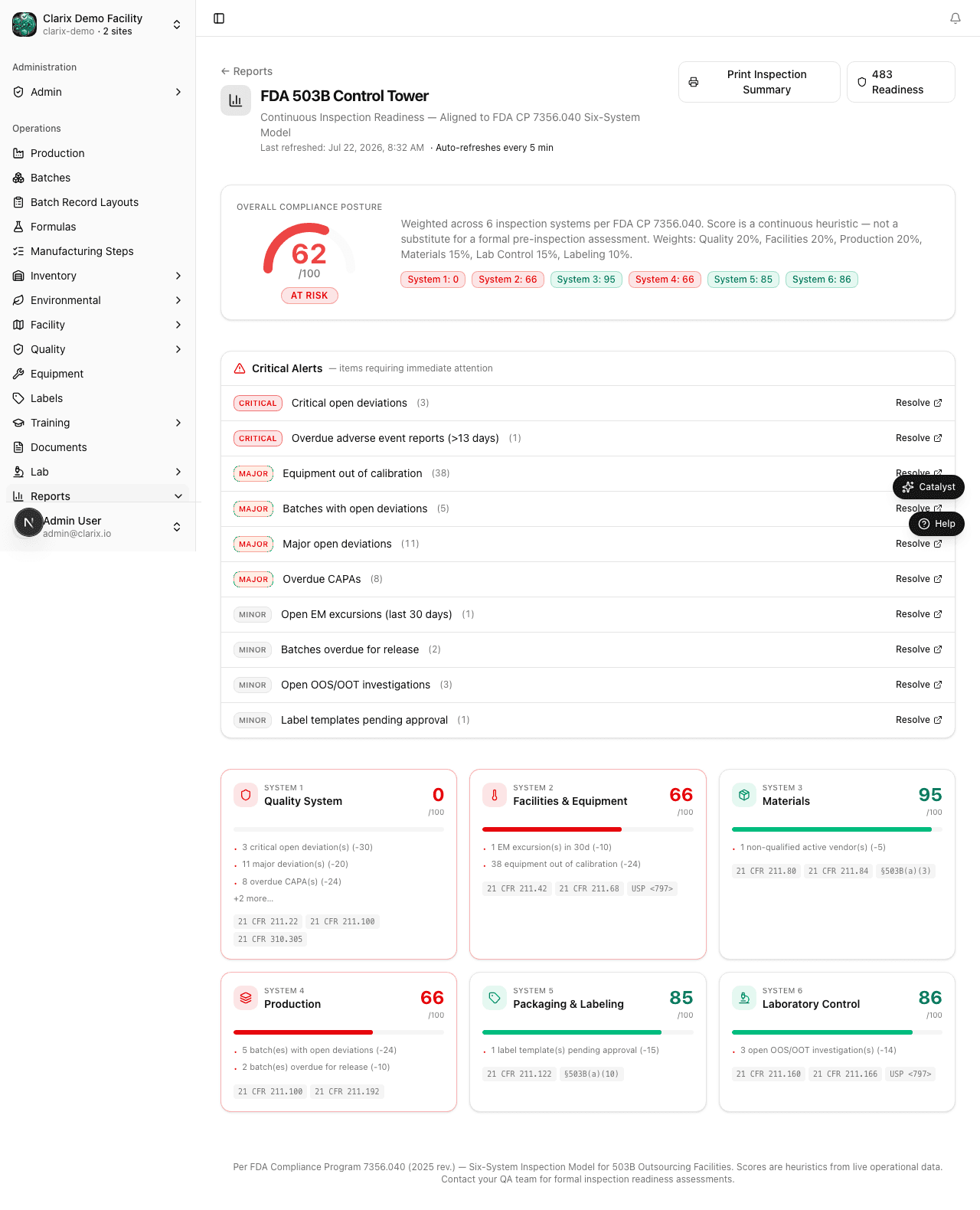
The 503B Control Tower is Clarix's top-level inspection readiness dashboard. It maps live facility data to the six quality systems defined in FDA Compliance Program 7356.040 — the exact framework FDA investigators use when conducting inspections of outsourcing facilities. Each system displays a color-coded readiness score that reflects the current state of your records at the moment you open the page. No manual scoring, no stale data.
Navigate to Reports → Control Tower to open the dashboard.
Role required: Viewing the Control Tower requires QA Officer or higher. Only QA Manager and PIC roles can see the full system-level detail with individual finding breakdowns. Read-only — no data can be modified from this page.
The FDA 7356.040 six-system model
FDA Compliance Program 7356.040 structures outsourcing facility inspections around six interconnected quality systems. An inspection finding in any system can affect the overall compliance picture. The Control Tower evaluates each system independently:
| System | What FDA looks at | Clarix data sources |
|---|---|---|
| 1. Quality System | QMS records, CAPA effectiveness, deviation rates, change control, management review | Deviations, CAPAs, Change Control, Document Change Requests |
| 2. Facilities & Equipment | Cleanroom qualification, HVAC certification, equipment calibration, cleaning logs | Environmental Monitoring, Equipment, Calibration, Cleaning Logs |
| 3. Materials | Vendor qualification, lot receipt/testing, CoA review, raw material controls | Inventory, Vendors/ASL, Lot Management |
| 4. Production | Batch record completeness, yield, process controls, PIC oversight | Batches, EBR execution, Media Fills, Visual Inspection |
| 5. Packaging & Labeling | Label accuracy, label reconciliation, container integrity | Labels, Batch Labeling Steps |
| 6. Laboratory Controls | Stability program, OOS handling, method validation, QC sample turnaround | QC Samples, OOS Records, Stability Protocols |
Reading the Control Tower
System score cards
Each of the six systems is displayed as a score card showing:
- System name and the Compliance Program reference
- Readiness score (0–100)
- Color indicator:
- 🟢 Green (80–100) — No critical gaps; inspection-ready
- 🟡 Amber (60–79) — Active issues requiring attention before inspection
- 🔴 Red (0–59) — Significant gaps; immediate corrective action recommended
- Top findings — the two or three most impactful open issues within the system
Click any system card to expand to the System Detail view, which lists every individual finding with its source record and recommended action.
Overall readiness score
The top of the page shows your Overall 503B Readiness Score — a weighted composite of the six system scores. The weighting reflects the relative inspection emphasis FDA places on each system. Quality System and Laboratory Controls are weighted most heavily for sterile compounding facilities.
What each system scores
System 1 — Quality System
| Finding type | Impact |
|---|---|
| Overdue CAPAs | High |
| Open deviations > 30 days without RCI | High |
| Critical deviations without linked CAPA | Critical |
| Change controls pending approval > target date | Medium |
| Document change requests open > 60 days | Low |
| Complaint records pending investigation > 15 days | High |
System 2 — Facilities & Equipment
| Finding type | Impact |
|---|---|
| Environmental monitoring rooms with active excursions | High |
| EM trending alert (Action Level breaches in last 90 days) | Medium |
| Calibration records overdue | High |
| Preventive maintenance past due | Medium |
| Cleaning logs missing for production days | High |
| Media fills overdue (> 6 months since last successful fill) | Critical |
System 3 — Materials
| Finding type | Impact |
|---|---|
| Active lots from vendors with Pending or Disqualified status | High |
| Lots with expired CoA | Medium |
| Inventory items without a linked qualified vendor | Medium |
| Lots in quarantine without open deviation | Medium |
System 4 — Production
| Finding type | Impact |
|---|---|
| Batches released without PIC signature | Critical |
| Batches with unresolved deviations | High |
| Visual inspection sessions incomplete for released batches | High |
| Yield deviations unresolved | Medium |
| EBR steps with missing or unsigned entries | Medium |
System 5 — Packaging & Labeling
| Finding type | Impact |
|---|---|
| Batches released with label reconciliation incomplete | High |
| Label templates not approved for active formulas | Medium |
System 6 — Laboratory Controls
| Finding type | Impact |
|---|---|
| QC samples overdue for result entry | High |
| Open OOS records not resolved within 30 days | High |
| Stability protocols with overdue sample pulls | Medium |
| Stability protocols in On Hold status | Medium |
| Method validations with expired review dates | Medium |
Using the Control Tower for inspection preparation
The Control Tower is designed to be reviewed on a weekly basis by the QA Manager or PIC. A practical pre-inspection workflow:
- Open the Control Tower and review the overall score and any red system scores.
- Expand each amber or red system to see the individual findings list.
- Assign action owners for each open finding from the finding detail.
- Use the Export PDF button to generate a dated snapshot of the readiness state for your inspection readiness file.
- Re-check after completing remediation actions to confirm scores have improved.
Tip: The 483 Readiness report provides a complementary list-format view of the same data optimized for direct hand-off to an FDA investigator. Run both the Control Tower (for internal management) and the 483 Readiness report (for inspector-facing output) during inspection preparation.
Related pages
Reports Overview
Pre-built analytics reports for FDA inspections and internal performance review in Clarix — covering batch production, quality, environmental monitoring, training, inventory, and audit readiness.
Biannual Product Report
Generate and review semiannual product activity reports required under FDCA §503B(b)(4), covering products compounded, adverse events, and reporting compliance for each H1/H2 period.