
Change Control
How to manage facility, equipment, process, and supplier changes through Clarix's structured change control workflow — ensuring that every significant change is assessed, approved, and verified before implementation.
Change Control is the systematic process for managing changes to your facility, equipment, processes, materials, and personnel that could affect product quality, patient safety, or regulatory compliance. In 503B sterile compounding, uncontrolled changes are a leading cause of 483 observations and Warning Letters — not because change is inherently bad, but because change without assessment, approval, and verification introduces unknown risk.
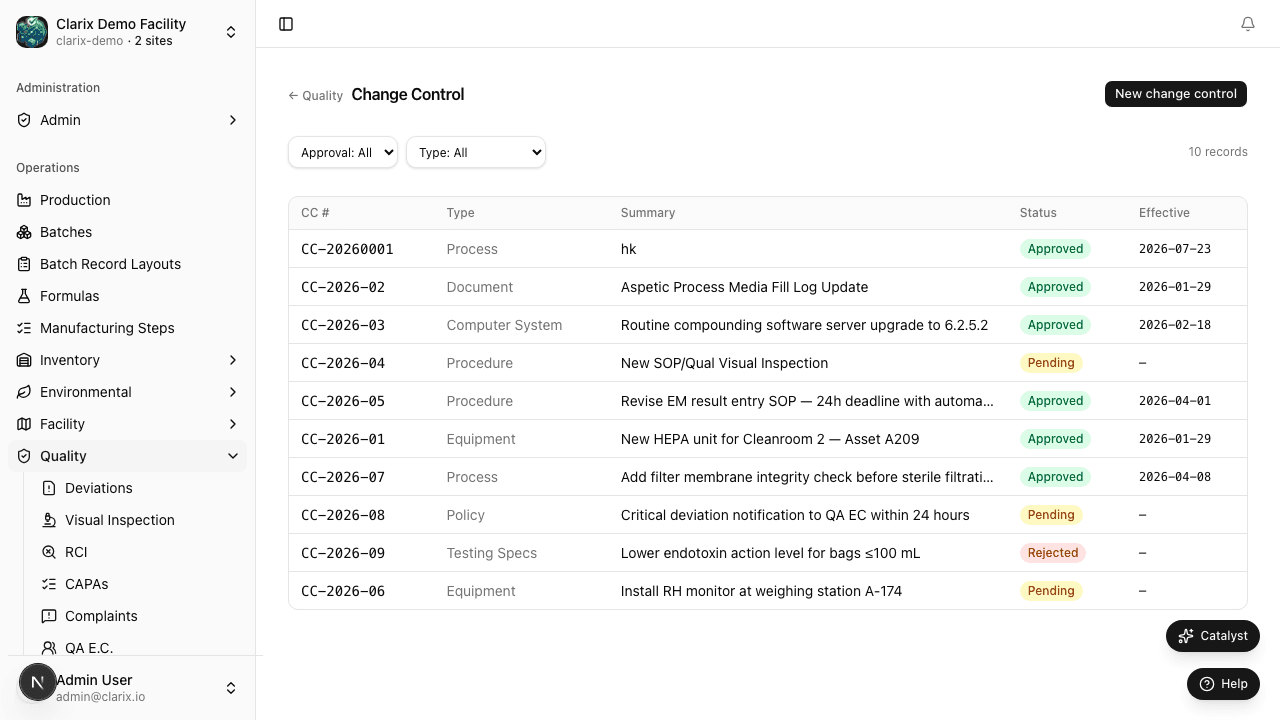
The Clarix Change Control module provides a structured workflow that ensures every significant change is properly documented from the moment it is proposed, assessed for risk and regulatory impact, approved by the right people, implemented in a controlled way, and verified to have achieved the intended outcome without unintended consequences.
Role required: Viewing change controls requires the QA Technician role or higher. Creating a change request requires QA Officer or Facility Manager. Approving a change control requires QA Manager or PIC. For Major changes, Director-level or above approval may also be required per your organization's configuration.
Types of changes that require change control
Change control is not needed for every small operational decision, but it is required for any change that could affect product quality, validated processes, or regulatory compliance. Common categories include:
| Area | Examples |
|---|---|
| Facility | HVAC modifications, ISO room re-classification, construction or renovation, utility changes |
| Equipment | New equipment introduction, replacement of existing equipment, major repairs, relocation of equipment |
| Process | Changes to a validated process, new product introduction, changes to environmental monitoring frequency or locations |
| Material / Supplier | New raw material supplier, change to a different grade or specification, packaging material changes |
| Personnel | New Pharmacist-in-Charge, changes to key quality personnel roles |
| Software | New QMS software, changes to validated laboratory software, ERP system upgrades |
If you are unsure whether a proposed change requires formal change control, open a Draft change request and discuss it with your QA Manager before proceeding. It is always better to open and close a change control than to implement a change without one.
Major vs. Minor changes
Every change request is classified as either Major or Minor based on its potential impact:
Major change
A Major change has significant potential to affect product quality, process validation, environmental controls, or regulatory filing. Major changes require:
- Full risk assessment
- Validation or requalification (a linked Protocol Validation record)
- Extended review and approval (typically QA Manager + PIC)
- Implementation verification through objective evidence
Examples of Major changes: Installing a new laminar airflow workbench, changing an autoclave cycle parameter, introducing a new container closure system, adding a new product family, changing the cleanroom HVAC design.
Minor change
A Minor change has limited potential impact and does not affect validated parameters or regulatory filings. Minor changes require:
- Impact assessment documenting why the change is considered minor
- Standard review and approval
- Implementation confirmation
Examples of Minor changes: Relocating a storage cabinet within a room (not affecting ISO zones), replacing a like-for-like calibrated thermometer, updating a label to add a barcode (no content change), replacing a cleaning supply with a pre-approved equivalent.
Creating a change request
- In the sidebar, navigate to Quality → Change Control.
- Click New Change Request in the top-right corner.
- Complete the required fields:
- Change type — Major or Minor (see above; your QA Manager can reclassify during review)
- Title — a concise description (e.g., "Replace ISO Class 5 LAF Workbench Unit 3 — Model XYZ")
- Affected area — select all that apply: Facility, Equipment, Process, Material, Personnel, Software
- Description of change — a full explanation of what is being changed, what the change involves, and what the new state will be after implementation
- Reason for change — why this change is needed (compliance requirement, equipment failure, capacity expansion, quality improvement, regulatory change)
- Risk assessment summary — a brief narrative of the potential risks associated with this change and why they are acceptable. For Major changes, a formal risk assessment record should be linked.
- Required approvals — the approvers required before implementation can begin (configured per your organization's approval matrix)
- Proposed implementation date — the target date for completing implementation
- Related records — link to any associated DCR, Risk Assessment, Protocol Validation, or CAPA records
- Click Create Change Request.
Clarix assigns a unique number in the format CC-YYYY-NNNN — for example, CC-2026-0001.
Change control lifecycle
| State | Meaning |
|---|---|
| Draft | The change request has been created and is being developed. All fields can be freely edited. |
| Under Review | The change request has been submitted and is being reviewed by the designated approvers. The submitter cannot edit content (but can add comments). |
| Approved | All required approvers have approved the change. The owner may begin implementation. |
| Implementation | Implementation is actively in progress. The owner documents completion of each step as tasks are finished. |
| Verified | Implementation is complete and has been confirmed — effectiveness checks, re-tests, or post-implementation review have been conducted and documented. |
| Closed | A QA Manager or PIC has reviewed the verification evidence and formally closed the record. |
Implementation planning
Once a change control is Approved, the owner creates an implementation plan within the record. For Major changes this typically includes:
- Pre-implementation steps — decommission existing equipment, schedule downtime, notify affected staff
- Validation activities — link or create Protocol Validation records for IQ/OQ/PQ as required
- Document updates — open Document Change Requests for any SOPs or work instructions that reference the changed area
- Training — schedule and document staff training on any new procedures or equipment
- Post-implementation review — define what data will be collected to confirm the change achieved the intended outcome without unintended effects
Each step is documented with a completion date and the name of the person who completed it.
Verification and closure
Before a change control can move to Verified, the owner must document evidence that:
- All implementation tasks are complete
- All linked validation protocols have been executed and approved
- All linked DCRs are at least Approved
- Post-implementation monitoring data (e.g., EM data, batch release data) confirms no adverse effects from the change
The QA Manager or PIC reviews this evidence and, if satisfied, moves the record to Closed. For Major changes affecting validated processes, the verification period may extend 30–90 days to collect sufficient post-implementation data.
Related pages
Document Change Requests
How to submit, review, approve, and implement Document Change Requests (DCRs) in Clarix to manage controlled document revisions under your quality system.
Risk Assessments
How to create, score, and approve Risk Assessment records in Clarix — documenting hazard identification, likelihood and severity scoring, and mitigation actions for processes and products.