
Risk Assessments
How to create, score, and approve Risk Assessment records in Clarix — documenting hazard identification, likelihood and severity scoring, and mitigation actions for processes and products.
A Risk Assessment is a documented, systematic evaluation of the risks associated with a process, product, change, or quality event. In pharmaceutical manufacturing, risk assessment is not a one-time exercise — it is an ongoing, living part of your quality system. ICH Q9 (Quality Risk Management) and USP ⟨1790⟩ describe risk management principles that apply directly to 503B compounding operations.
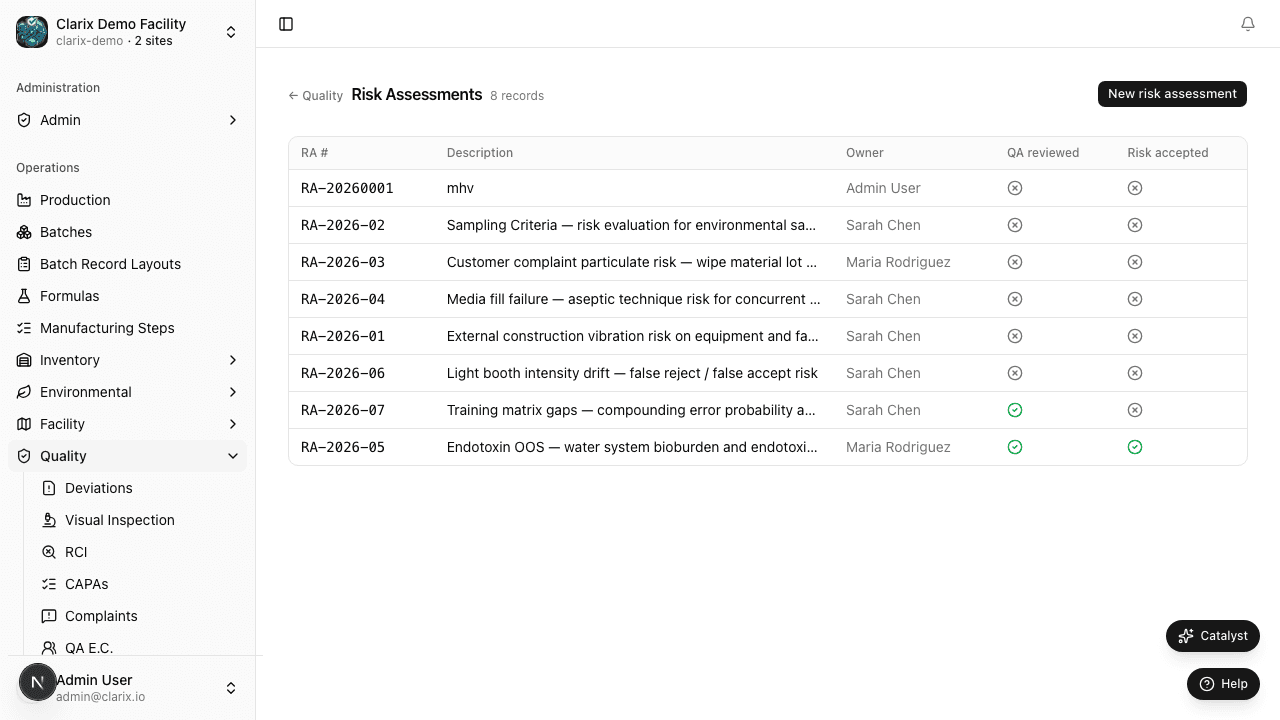
Clarix's Risk Assessment module provides a structured record for identifying hazards, scoring their likelihood and severity, defining mitigation actions, and tracking residual risk. Risk assessments are commonly linked to other QMS records — a Change Control may require a risk assessment, a new product introduction should have one, and a pattern of environmental excursions might trigger one.
Role required: Viewing risk assessments requires the QA Technician role or higher. Creating a risk assessment requires QA Officer. Approving a risk assessment requires QA Manager or PIC.
When to conduct a risk assessment
Risk assessments are used across a wide range of situations in your facility:
- New product introduction — assessing the risks of adding a new formulation, particularly high-potency or hazardous drugs
- Process changes — before approving a Major change control, understanding what could go wrong with the new process
- Equipment qualification — as part of IQ/OQ/PQ planning to define the critical parameters to be challenged
- Environmental excursion patterns — when recurring EM alerts in a room suggest a systemic risk that needs to be formally characterized
- Supplier changes — assessing the quality risk of moving to a new raw material supplier
- CAPA effectiveness — as a prospective check that the preventive action does not introduce new risks
- Annual product review — a formal risk re-evaluation for each product family as part of the annual quality review
Creating a risk assessment
- In the sidebar, navigate to Quality → Risk Assessment.
- Click New Risk Assessment in the top-right corner.
- Complete the required fields:
- Title — a descriptive name (e.g., "Risk Assessment: Introduction of Bag Compounding Line — ISO 5 Zone Expansion")
- Scope — the process, product, area, or change being assessed
- Risk assessment method — the methodology used (Failure Mode and Effects Analysis/FMEA, Hazard Analysis/HAZOP, preliminary hazard analysis, or narrative risk ranking)
- Related records — link to any associated Change Control, CAPA, Protocol Validation, or Deviation that triggered this assessment
- Click Create Risk Assessment.
Clarix assigns a unique number in the format RA-YYYY-NNNN — for example, RA-2026-0001.
Hazard identification
The core of any risk assessment is the hazard table. For each identified hazard, you document:
| Field | Description |
|---|---|
| Hazard | The specific failure mode or adverse event that could occur (e.g., "Microbiological contamination of filled vials due to inadequate LAF airflow") |
| Potential cause | What could cause this hazard to occur (e.g., "Blocked HEPA filter, personnel obstruction of airflow, equipment failure") |
| Potential effect | The consequence if the hazard occurs (e.g., "Contaminated batch dispensed to patient, potential patient infection") |
| Likelihood score (L) | How likely this hazard is to occur, on a scale of 1 to 5 (see below) |
| Severity score (S) | How serious the consequences would be if it occurs, on a scale of 1 to 5 (see below) |
| Risk Priority Number (RPN) | Calculated automatically: RPN = L × S |
| Mitigation actions | The specific controls in place or to be put in place to reduce likelihood or severity |
| Residual likelihood score | Likelihood after mitigation (1–5) |
| Residual severity score | Severity after mitigation (1–5) |
| Residual RPN | Calculated: residual L × residual S |
| Acceptability | Whether the residual risk is Acceptable, Acceptable with monitoring, or Unacceptable |
Likelihood and severity scoring
Use the following standard 1–5 scales when scoring. Apply them consistently across all risk assessments in your facility for meaningful trending.
Likelihood (1–5)
| Score | Definition |
|---|---|
| 1 | Remote — virtually no chance of occurrence; no known historical incidents |
| 2 | Unlikely — could occur under unusual circumstances; rare historical precedent |
| 3 | Possible — might occur in some circumstances; occasional historical occurrence |
| 4 | Likely — will probably occur in many circumstances; known to occur regularly |
| 5 | Almost certain — expected to occur in most circumstances; frequent historical occurrence |
Severity (1–5)
| Score | Definition |
|---|---|
| 1 | Negligible — no significant patient or product impact; cosmetic issue only |
| 2 | Minor — limited product quality impact; no patient harm expected |
| 3 | Moderate — significant product quality impact; potential for patient harm with treatment |
| 4 | Major** — serious patient injury possible; batch rejection likely |
| 5 | Critical — life-threatening patient harm; regulatory action likely |
Interpreting the RPN
| RPN range | Risk level | Action required |
|---|---|---|
| 1–4 | Low | Acceptable; document and monitor |
| 5–9 | Medium | Acceptable with mitigation controls in place and verified |
| 10–14 | High | Requires mitigation; re-score after controls; management awareness |
| 15–25 | Critical | Unacceptable until mitigated below 15; escalate to QA Manager immediately |
Any unmitigated Critical RPN (≥ 15) blocks the associated change or product introduction until mitigation is documented and the residual RPN is reduced to an acceptable level.
Risk assessment lifecycle
| State | Meaning |
|---|---|
| Draft | The risk assessment is being developed and can be freely edited. |
| Under Review | The assessment has been submitted for QA Manager or PIC review. |
| Approved | The risk assessment has been reviewed and accepted. It serves as the authorization to proceed with the associated activity. |
| Reviewed | The risk assessment has been re-evaluated during a periodic review cycle (typically annual). The review date and reviewer are documented. |
Periodic review
Risk assessments do not expire, but they should be reviewed periodically — at minimum annually, or whenever the process, product, or environment they assess changes significantly. Clarix tracks the last review date for each risk assessment. Risk assessments that have not been reviewed within 12 months appear on the 483 Readiness report.
To perform a periodic review:
- Open the risk assessment record.
- Review each hazard row and update scores if conditions have changed.
- Add or remove hazards to reflect current understanding.
- Click Mark Reviewed and enter your review notes.
- The record moves to Reviewed state and the last review date is updated.
Related pages
Change Control
How to manage facility, equipment, process, and supplier changes through Clarix's structured change control workflow — ensuring that every significant change is assessed, approved, and verified before implementation.
Protocol Validation
Manage IQ/OQ/PQ validation protocols and method validation execution records for equipment and processes.