
CAPAs
How to create, manage, and verify Corrective and Preventive Actions (CAPAs) in Clarix — closing the quality loop after root cause investigations and preventing deviation recurrence.
A CAPA — Corrective and Preventive Action — is the documented plan to eliminate the root cause of a quality event and prevent it from recurring. It is the third and final link in the Clarix quality chain: Deviation → Root Cause Investigation → CAPA. Where the deviation records what happened and the RCI explains why it happened, the CAPA defines what will change so it cannot happen again.
In 503B pharmaceutical manufacturing, CAPAs are a cornerstone of your quality system. FDA investigators specifically look for CAPAs during inspections and assess whether they are timely, appropriately scoped, and effectively verified. Overdue or inadequately verified CAPAs are among the most common 483 observations. Clarix's CAPA module is designed to make compliance straightforward: clear ownership, due dates, status tracking, and a mandatory verification step before closure.
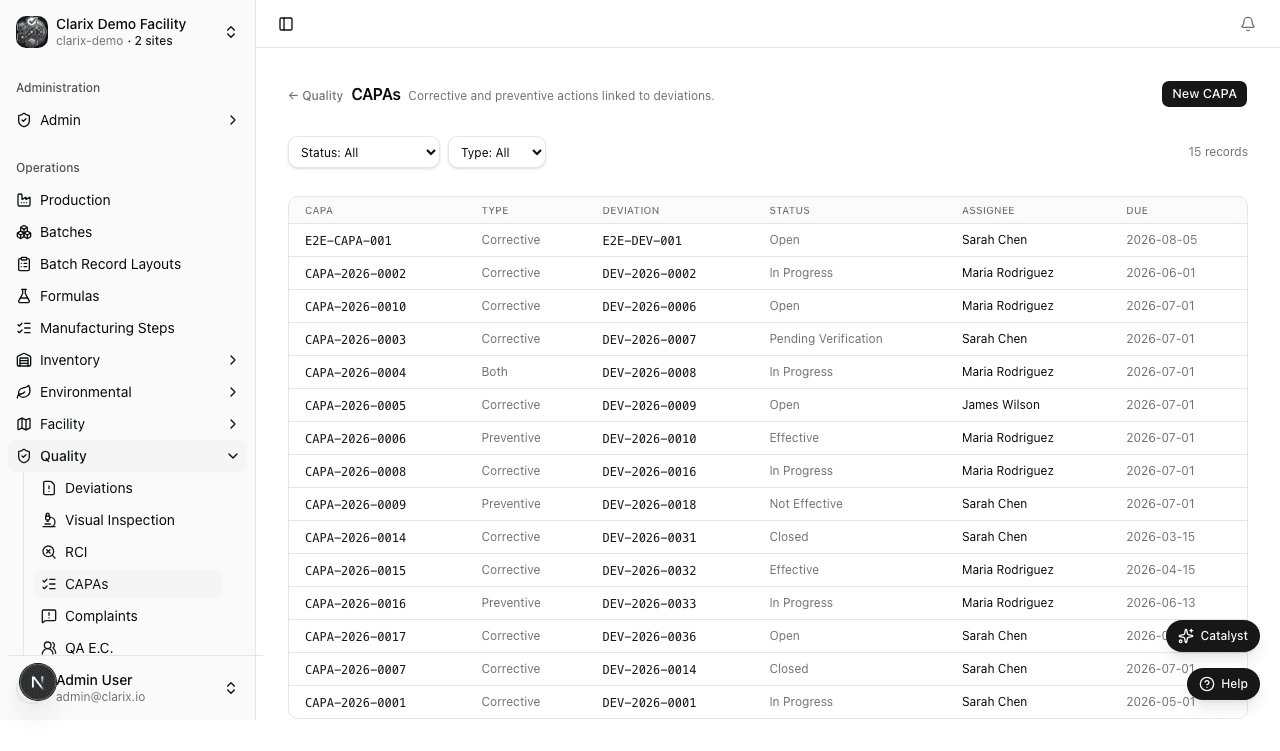
Role required: Viewing CAPAs requires the QA Technician role or higher. Creating a CAPA requires QA Officer. Verifying effectiveness and closing a CAPA requires QA Manager or PIC — and a different person than the one who implemented the action.
Corrective vs. preventive actions
A CAPA typically contains two distinct components, and both should be documented:
- Corrective action — What you are doing to fix the immediate problem and address its confirmed root cause. For example: "Retrain all compounding staff on SOP-FILL-002 gowning procedure; document completion in training records by 2026-07-15."
- Preventive action — What you are changing in the system to prevent the same root cause from causing future events. For example: "Add gowning competency assessment to annual requalification program, effective 2026-09-01; update SOP-TRAIN-001 to include assessment criteria."
If your root cause is primarily systemic (a process gap), the preventive action is often more important than the corrective action. Document both even if one is brief.
Creating a CAPA
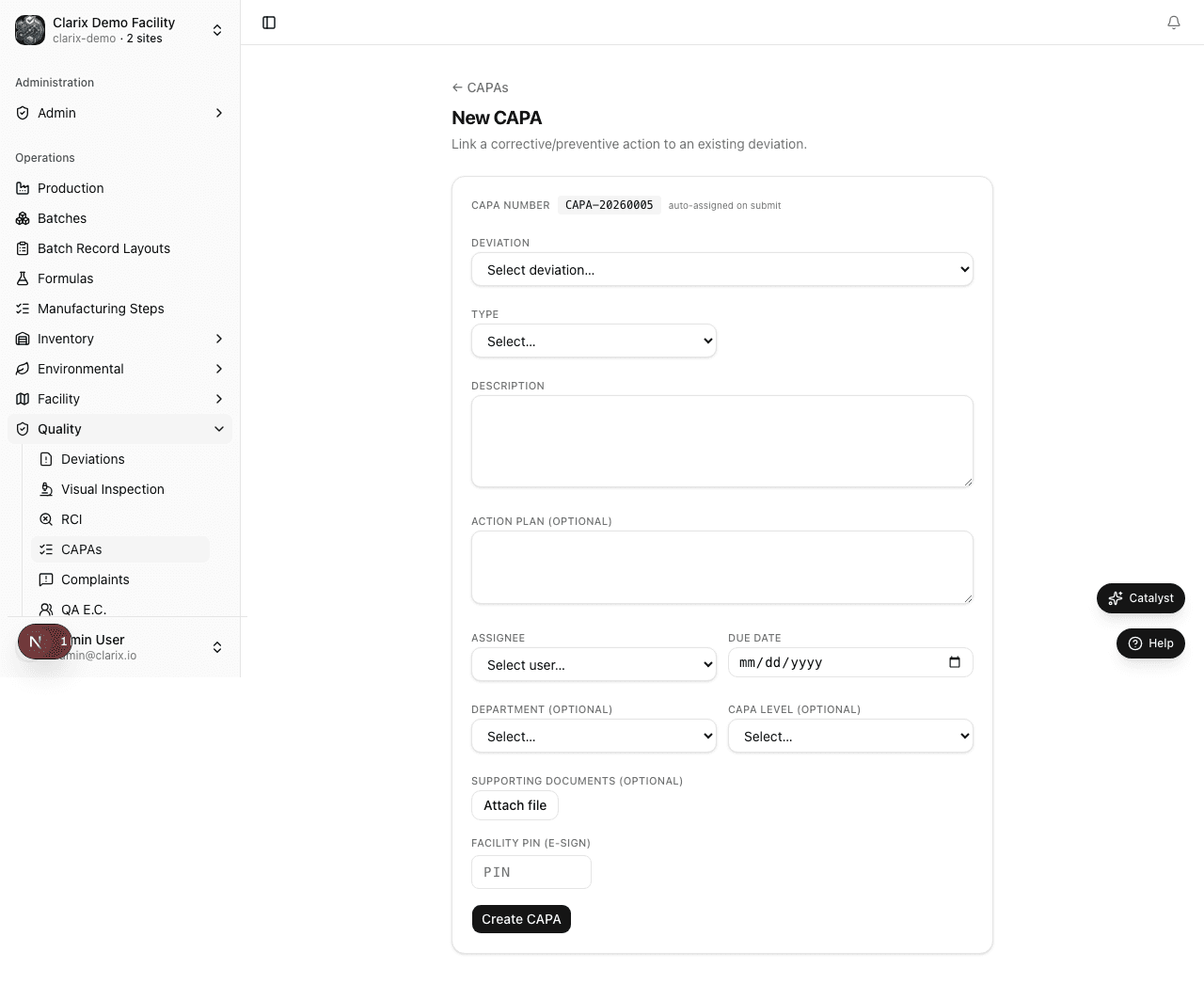
There are two ways to create a CAPA:
Option A — From a completed RCI (recommended)
- Open the RCI record that has been marked Complete (e.g., RCI-2026-0023).
- Click Open CAPA in the action menu.
- A new CAPA form opens, pre-populated with the RCI number, confirmed root cause category, and corrective action summary from the investigation.
- Complete the remaining fields and click Create CAPA.
This approach creates the permanent link between the RCI and the CAPA automatically.
Option B — From the CAPA list
- In the sidebar, navigate to Quality → CAPAs.
- Click New CAPA in the top-right corner.
- In the Related records fields, link the relevant RCI and/or deviation numbers.
- Complete all fields and click Create CAPA.
Clarix assigns the CAPA a unique number in the format CAPA-YYYY-NNNN — for example, CAPA-2026-0001 is the first CAPA created in 2026.
CAPA fields
| Field | Description |
|---|---|
| Related RCI | The RCI-YYYY-NNNN number of the root cause investigation this CAPA addresses |
| Related deviation | The DEV-YYYY-NNNN number of the originating deviation (may be populated automatically if created from RCI) |
| CAPA title | A concise description (e.g., "Gowning retraining and competency program update — Personnel/Critical") |
| Corrective action description | The specific actions to be taken to fix the immediate problem. Include what will be done, who is responsible, and the target date. |
| Preventive action description | The systemic changes to prevent recurrence. Include what will be changed (process, procedure, training, equipment), who is responsible, and target date. |
| Due date | The date by which both corrective and preventive actions must be complete and ready for verification. Driven by the deviation severity. |
| Assigned owner | The person responsible for implementing the CAPA. They receive a notification and the CAPA appears in their task queue. |
| Verification method | How the effectiveness of this CAPA will be confirmed. Examples: "Review of 3 consecutive compliant batches," "Audit of training records," "30-day EM data review showing no recurrence" |
| Verification due date | When the effectiveness check will be completed — typically 30 to 90 days after implementation |
CAPA lifecycle
| State | Meaning |
|---|---|
| Open | The CAPA has been created and assigned. Actions have not yet started. |
| In Progress | The assigned owner is actively implementing the corrective and preventive actions. |
| Verification | Implementation is complete. The CAPA is waiting for the QA Manager or PIC to confirm that the actions were effective using the defined verification method. |
| Closed | Verification has been completed and documented. The CAPA is formally closed. No further action is required unless the event recurs. |
The verification requirement
CAPA verification cannot be performed by the same person who implemented the CAPA. This segregation of duties is a GMP requirement and is enforced by Clarix — the system will not allow the assigned owner to mark their own CAPA as verified and close it.
When moving a CAPA into Verification, add a comment documenting:
- What actions were actually taken (which may differ slightly from the plan — document any changes)
- The completion dates for each action
- Any evidence collected (training records reviewed, batches checked, re-test results)
The QA Manager or PIC who closes the CAPA adds a second comment confirming that the verification method was applied and the result was satisfactory.
CAPA due date and escalation rules
| Deviation severity | CAPA due date | Escalation |
|---|---|---|
| Critical | 24 hours for corrective action initiation; full CAPA within 30 days | PIC notification immediately; VP notification if overdue |
| Major | Within 30 calendar days of RCI completion | QA Manager notification at 25 days if still open |
| Minor | Within 60 calendar days of RCI completion | QA Manager notification at 50 days if still open |
Overdue CAPAs are highlighted in red on the CAPA list and appear prominently on the 483 Readiness report. An overdue CAPA is one of the most visible signals of a quality system gap to an FDA investigator.
Finding and filtering CAPAs
The CAPA list supports filtering by:
- Status — Open, In Progress, Verification, Closed
- Due date — Overdue, due this week, due this month
- Assigned owner — filter to your own CAPAs or a specific team member
- Root cause category — Personnel, Equipment, Environment, Material, Process, Management System
- Search — by CAPA number (CAPA-2026-0001), title keyword, or linked deviation number
Use the root cause category filter with a date range to identify trending causes — if you have had four Personnel CAPAs this quarter, your training program deserves a focused review.
Related pages
Root Cause Investigations
How to conduct and document formal Root Cause Investigations (RCIs) in Clarix — linking deviations to confirmed root causes and preparing the foundation for CAPA actions.
Out-of-Specification Results
How to record, investigate, and resolve Out-of-Specification (OOS) lab results for finished compounded products in Clarix.