
Root Cause Investigations
How to conduct and document formal Root Cause Investigations (RCIs) in Clarix — linking deviations to confirmed root causes and preparing the foundation for CAPA actions.
A Root Cause Investigation (RCI) is the formal, documented process of determining why a deviation occurred. Opening a deviation tells you that something went wrong. The RCI answers the harder question: what was the underlying cause? Without a confirmed root cause, any corrective action is guesswork — you might fix the symptom while the system failure that caused it remains in place, ready to cause the next event.
In 503B compounding, rigorous root cause analysis is not just good practice — it is an FDA expectation. Form 483 observations and Warning Letters frequently cite inadequate investigations. A complete, documented RCI in Clarix provides the evidence that your facility takes quality events seriously and acts on systemic causes rather than isolated incidents.
Role required: Viewing RCI records requires the QA Technician role or higher. Creating an RCI requires QA Officer. Completing and approving an RCI requires QA Manager or PIC.
When to open an RCI
Not every deviation automatically requires a formal RCI. As a general rule:
- Critical deviations — always require an RCI, regardless of whether the root cause seems obvious
- Major deviations — require an RCI unless the quality manager determines the event is fully isolated and self-evident
- Minor deviations — an RCI is at the quality manager's discretion; simple procedural errors with clear one-time causes may be resolved without one
- Repeat deviations — any deviation with the same source and category that has occurred before (within 12 months) requires an RCI, regardless of severity, to determine why the system failed to prevent recurrence
Creating an RCI
There are two ways to create an RCI:
Option A — From a deviation record (recommended)
- Open the deviation you are investigating (e.g., DEV-2026-0047).
- Click Link to RCI in the action menu.
- A new RCI form opens, pre-populated with the deviation number and title.
- Complete the remaining fields (see below) and click Create RCI.
This approach automatically creates the permanent link between the deviation and the RCI. The deviation record will show the RCI number in its linked records section, and the RCI will show the deviation number.
Option B — From the RCI list
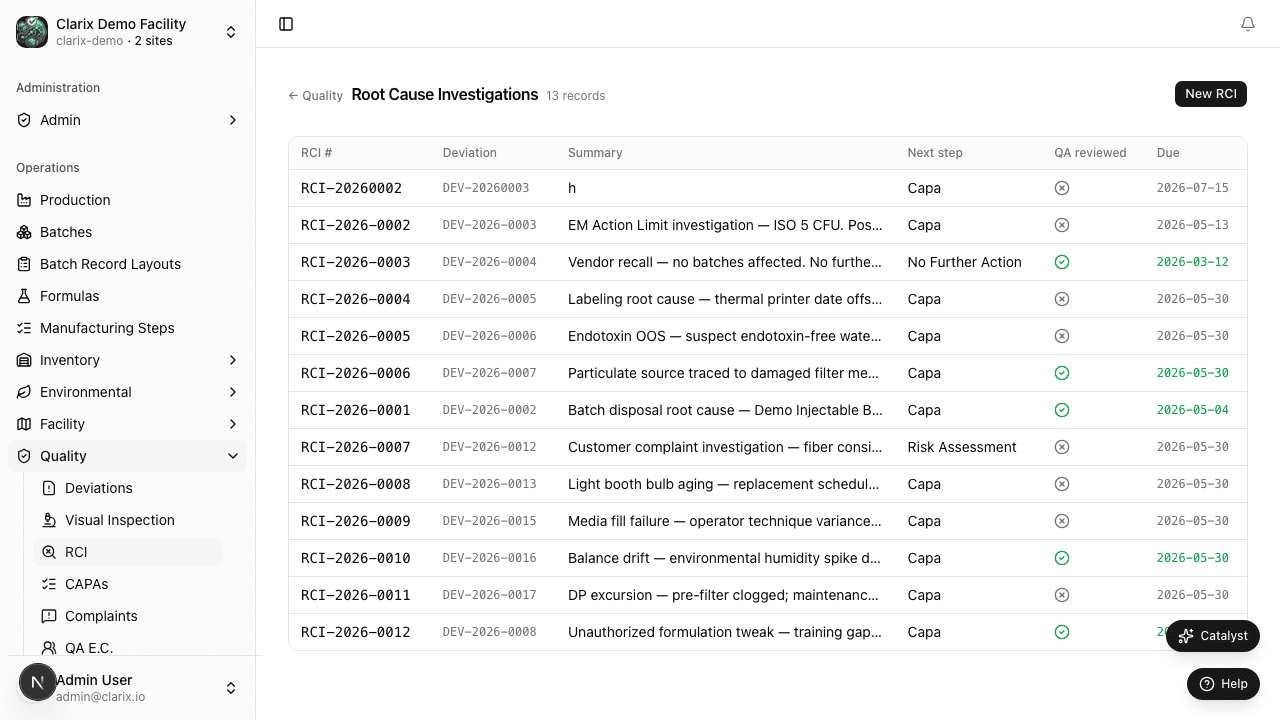
- In the sidebar, navigate to Quality → RCI.
- Click New RCI in the top-right corner.
- In the Related deviation field, type or search for the deviation number to link.
- Complete the remaining fields and click Create RCI.
Clarix assigns the investigation a unique number in the format RCI-YYYY-NNNN — for example, RCI-2026-0001.
RCI fields
| Field | Description |
|---|---|
| Related deviation | The DEV-YYYY-NNNN number of the deviation being investigated. One RCI can link to multiple deviations if they share a root cause. |
| Investigation title | A descriptive title that names the event and scope (e.g., "Investigation: Repeated yield failures in Vancomycin 500 mg/50 mL — Q1 2026") |
| Methodology | The analytical approach used. Common methods in pharmaceutical QA include 5-Why analysis, Fishbone (Ishikawa) diagram, Fault Tree Analysis (FTA), and Process Failure Mode and Effects Analysis (pFMEA). Document which method(s) you used and attach supporting worksheets as comments. |
| Investigation findings | A narrative summary of what the investigation revealed at each step — what was ruled out, what evidence was found, and how the team narrowed to the root cause |
| Confirmed root cause category | The category the confirmed root cause falls into (see below) |
| Root cause description | A precise statement of the confirmed root cause in your own words (e.g., "The autoclave load configuration used for these batches did not match the validated configuration in SOP-STER-004, because a step in the BPR did not reference the correct diagram") |
| Corrective action summary | A brief summary of what was immediately done to contain the problem and address the root cause. The full corrective action is documented in the linked CAPA. |
| Assigned investigator | The QA officer or pharmacist conducting the investigation |
| Investigation start date | When the formal investigation began |
| Target completion date | The deadline for completing the investigation, based on deviation severity |
Root cause categories
When you confirm the root cause, you classify it into one of six standard categories. This classification enables trending — if you see repeated Personnel root causes, your training program needs attention; repeated Equipment causes suggest your PM program has gaps.
| Category | What it covers |
|---|---|
| Personnel | Inadequate training, human error, fatigue, incorrect technique, SOP not followed |
| Equipment | Instrument failure, calibration drift, inadequate maintenance, wrong equipment used |
| Environment | HVAC failure, ISO room contamination, temperature excursion in storage |
| Material | Raw material variability, vendor issue, incorrect component, expired ingredient used |
| Process | SOP gap, inadequate procedure, process parameters not robust, inadequate controls |
| Management System | Inadequate oversight, review failure, scheduling pressure, resource constraints |
RCI lifecycle
| State | Meaning |
|---|---|
| Open | The RCI has been created and linked to its deviation. Investigation has not formally started. |
| In Progress | The investigator has begun collecting evidence and applying the chosen methodology. |
| Complete | The root cause has been confirmed, findings are documented, and a QA Manager has reviewed and approved the investigation. |
When the RCI is marked Complete, Clarix prompts you to open a CAPA if one is needed. Clicking Open CAPA from the completed RCI creates a new CAPA pre-populated with the RCI number, the confirmed root cause category, and the corrective action summary — so you are not re-entering information you already documented.
Investigation timelines
FDA expects investigations to be completed within a reasonable timeframe. Clarix tracks:
- Critical deviations: RCI must be completed within 30 calendar days
- Major deviations: RCI must be completed within 45 calendar days
- Minor deviations: RCI must be completed within 60 calendar days (if required)
Overdue RCIs surface on the 483 Readiness report. If an investigation requires more time (e.g., microbiological testing has a 14-day incubation), document the reason for the extension in a comment on the RCI record — this creates an audit trail justification.
Adding investigation evidence
Use the Add comment action on any RCI to attach timestamped notes during the investigation. You can paste in 5-Why tables, describe photographs taken, record interviews with operators, or note results from re-tests. All comments are permanent and form part of the investigation record that FDA reviewers may examine.
Related pages
Deviations
How to create, investigate, and close deviations in Clarix — covering severity classification, sources, lifecycle states, and automatic deviation rules for 503B compounding.
CAPAs
How to create, manage, and verify Corrective and Preventive Actions (CAPAs) in Clarix — closing the quality loop after root cause investigations and preventing deviation recurrence.