
Complaints & Adverse Events
How to record, investigate, and report product complaints and adverse events under 21 CFR 211.198 and FDCA §503B(b)(5), including the 15-day FDA reporting window for serious adverse events.
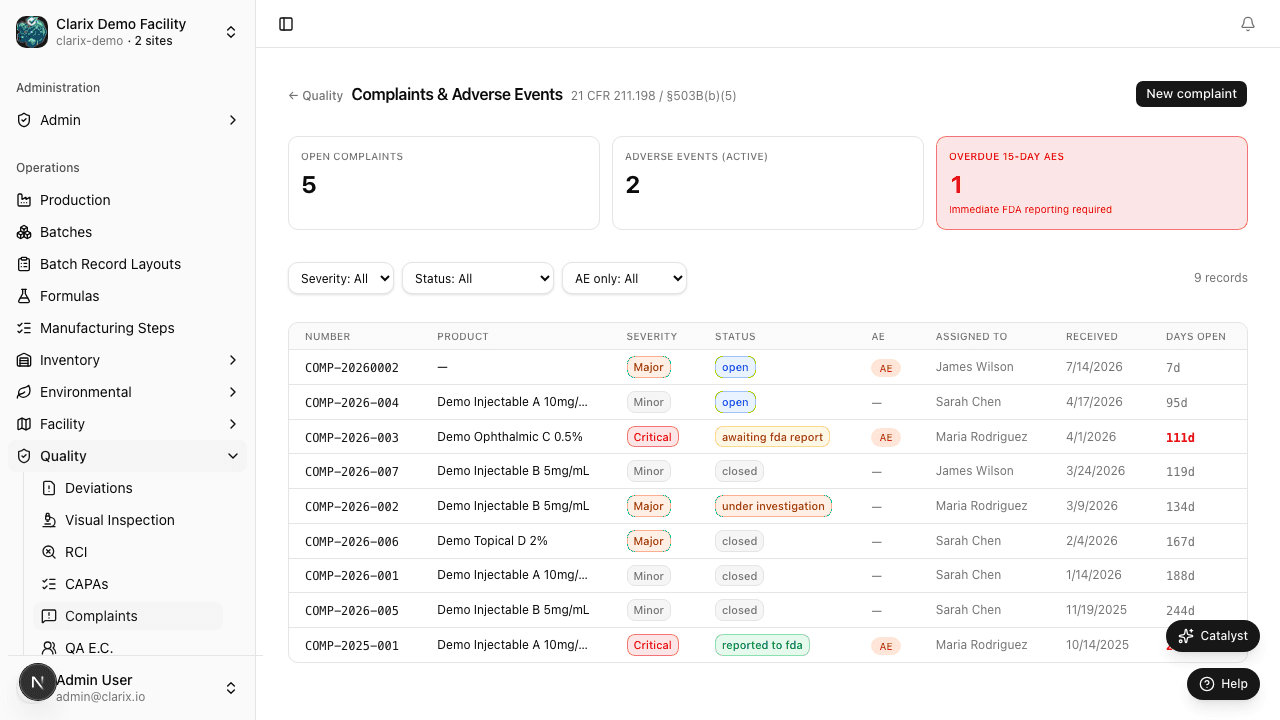
The Complaints & Adverse Events module gives your 503B facility a structured system for capturing every complaint received about a compounded product — from a simple labeling question to a serious adverse event requiring FDA MedWatch submission. All complaints are tracked from initial receipt through investigation, product assessment, and final disposition, with automatic numbering, configurable severity escalation, and a hard 15-day reporting clock for serious events.
Role required: Any authenticated user can submit a complaint. Reviewing and investigating complaints requires QA Officer or higher. Closing complaints and making FDA reportability determinations requires QA Manager or PIC.
Regulatory basis
| Regulation | Requirement |
|---|---|
| 21 CFR 211.198 | Written procedures for handling complaints; all complaints evaluated for potential need to file a report with FDA |
| FDCA §503B(b)(5) | 503B outsourcing facilities must submit adverse event reports in the same manner as required for manufacturers |
| 21 CFR 314.81(b)(1) | 15-calendar-day expedited report for serious and unexpected adverse drug experiences |
| FDA MedWatch 3500A | Mandatory reporting form for serious adverse events from compounded sterile preparations |
Under §503B, your facility is treated as a drug manufacturer for adverse event reporting purposes. This means the 15-day expedited reporting window — the same standard that applies to NDA holders — applies to serious and unexpected adverse events linked to your compounded products.
Complaint numbering
Every complaint receives a unique identifier in the format COMP-YYYY-NNNN — for example, COMP-2026-0001. Numbers are assigned sequentially per calendar year and cannot be edited after creation.
Creating a complaint record
- Navigate to Quality → Complaints in the sidebar.
- Click New Complaint in the top-right corner.
- Complete the intake fields:
Complaint source and product
| Field | Required | Description |
|---|---|---|
| Complaint date | Yes | Date the complaint was received by your facility |
| Reported by | Yes | Name and contact information of the reporter (patient, caregiver, prescriber, or healthcare professional) |
| Reporter type | Yes | Patient, Caregiver, Prescriber, Pharmacist, Nurse, Other |
| Product name | Yes | Name of the compounded preparation as labeled |
| Batch number | Yes | The batch (lot) number from the label of the product in question |
| NDC or catalog number | No | NDC or internal catalog number if assigned |
| Quantity remaining | No | Number of units the reporter still has on hand (relevant for sample retrieval) |
Complaint description
| Field | Required | Description |
|---|---|---|
| Complaint description | Yes | Verbatim description of the complaint as reported; do not paraphrase |
| Complaint category | Yes | Product defect, Adverse event, Labeling error, Packaging defect, Efficacy concern, Other |
| Severity | Yes | Critical, Major, or Minor (see table below) |
| Adverse event? | Yes | Toggle on if the complaint involves any clinical sign, symptom, or outcome in a patient |
- Click Create Complaint. The record is assigned a COMP number and status Open.
Complaint severity classifications
| Severity | Definition | Examples |
|---|---|---|
| Critical | Potential or actual patient harm; may require immediate product quarantine or recall | Suspected contamination, wrong drug or dose, serious adverse event, death |
| Major | Significant product or quality defect; investigation required before further distribution | Visible particulates, vial breach, labeling error affecting drug identity or dose |
| Minor | Administrative or low-risk concern | Packaging cosmetic defect, label misalignment, minor documentation question |
Complaint lifecycle
| Status | Meaning |
|---|---|
| Open | Complaint received; investigation not yet started |
| Under Investigation | QA is actively investigating; batch record, retention sample, and EM data under review |
| Pending FDA Review | Investigation complete; awaiting PIC determination on FDA reportability |
| FDA Report Submitted | MedWatch 3500A has been submitted; submission date recorded in the record |
| Closed | Investigation complete; reportability determination made; all follow-up actions documented |
Adverse event reporting — the 15-day clock
When the Adverse event toggle is enabled on a complaint, Clarix activates the 15-day FDA reporting window. A countdown banner appears at the top of the complaint record showing the number of calendar days remaining before the expedited report deadline.
The 15-day clock starts on the date your facility first receives information about the serious and unexpected adverse event — not the date the event occurred.
What triggers expedited reporting
An adverse event requires an expedited (15-day) report when it meets all three criteria:
- Serious — death, life-threatening event, hospitalization (initial or prolonged), significant disability, congenital anomaly, or medically important event
- Unexpected — not listed in the labeling or not known to be associated with the compounded drug at that dose
- Causally related — there is a reasonable possibility the compounded product caused or contributed to the event
If the event is serious and unexpected, file the report even if causality is uncertain.
Submitting the MedWatch report
- Open the complaint record.
- Click Submit FDA Report in the Actions panel.
- Complete the MedWatch 3500A fields (the form pre-populates from the complaint record).
- Enter your Facility PIN to sign the submission.
- Click Submit. The submission date, report number, and reporter identity are saved permanently to the complaint record.
Note: MedWatch 3500A submissions are made through FDA's MedWatch Online portal. Clarix records the submission metadata; the actual electronic submission is completed on FDA's portal. Attach the submission confirmation to the complaint record using the Documents tab.
Investigation checklist
For any Critical or Major complaint involving a potential product defect, the investigation should address:
- Batch record review — were there any deviations during production?
- Environmental monitoring data for the compounding period
- Retention sample evaluation (visual inspection or lab testing)
- Component lot review — were API and excipient lots within specification?
- Label and package review — was the correct label applied?
- Distribution review — were other lots or other customers affected?
- Is a field alert report (FAR) or product recall warranted?
Document all investigation findings in the Investigation Notes field on the complaint record. Link any generated deviations, OOS records, or CAPAs using the Linked Records panel.
Linking to other quality records
Complaints can be linked to:
- Deviations — if the complaint reveals a production defect
- OOS Records — if retention sample testing produces an out-of-specification result
- CAPAs — if the investigation identifies a systemic root cause requiring corrective action
- Batches — the source batch is automatically linked from the batch number entered on creation
Related pages
Out-of-Specification Results
How to record, investigate, and resolve Out-of-Specification (OOS) lab results for finished compounded products in Clarix.
Visual Inspection
How to conduct and record 100% first-pass and AQL second-pass visual inspections for compounded sterile preparations under FDA VI Guidance (Dec 2021) and USP ⟨790⟩.