
Document Policy
Configure upload size limits and accepted file formats for the controlled Documents module in Clarix.
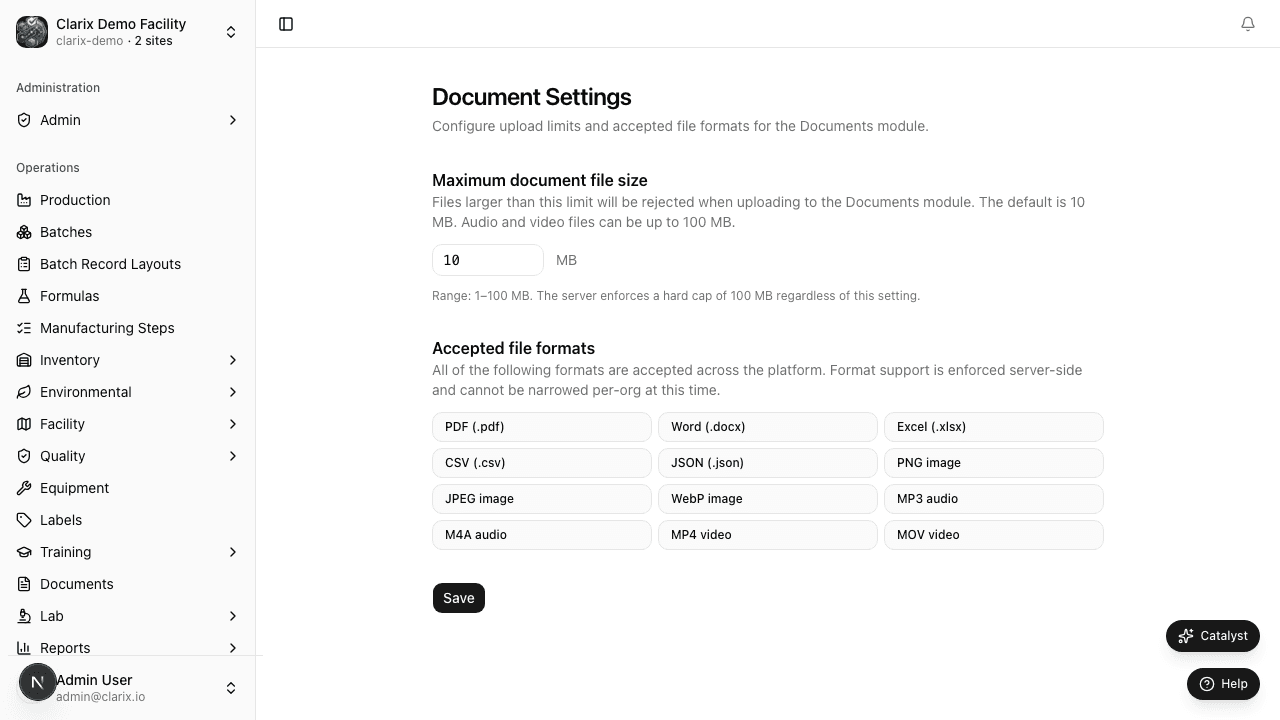
The Document Settings page at /settings/documents controls how Clarix handles file uploads in the Documents module. Administrators can set the maximum file size allowed per upload; format support is enforced server-side for all organizations.
Role required: Administrator only. Non-administrators can view the accepted formats list but cannot change the upload limit.
Maximum document file size
The Maximum document file size field sets the per-file upload cap for controlled documents, COAs attached to lots, and other document uploads across the platform.
- Default: 10 MB
- Range: 1–100 MB
- The server enforces a hard cap of 100 MB regardless of this setting
Larger files (audio and video attachments) may require raising the limit toward the 100 MB maximum. Changes take effect immediately for all subsequent uploads.
Accepted file formats
Clarix accepts the following formats for document uploads:
| Format | Extension |
|---|---|
.pdf | |
| Word | .docx |
| Excel | .xlsx |
| CSV | .csv |
| JSON | .json |
| Images | .png, .jpeg, .webp |
| Audio | .mp3, .m4a |
| Video | .mp4, .mov |
Format support is enforced server-side and cannot be narrowed per organization at this time. The settings page displays the full list for reference.
Changing document settings
- Navigate to Settings → Document Settings (or
/settings/documents). - Adjust the Maximum document file size value.
- Click Save Policy.
- A confirmation toast appears when settings are saved successfully.
All changes are logged in the audit trail with the previous and new values.
Related pages
EBR Document Templates
Create and manage branded PDF templates for Electronic Batch Records using the visual Puck editor — with custom headers, footers, cover pages, and merge fields.
Notification Preferences
Choose which Clarix notifications you receive and through which channels — in-app, email, and push.