
Custom Numbering
Configure auto-numbering schemes for each Clarix record type — set prefixes, year formats, sequence lengths, and reset rules for batches, formulas, deviations, CAPAs, and more.
The Custom Numbering settings page at /settings/numbering allows administrators to configure how Clarix automatically assigns unique identifiers to new records. Each record type in Clarix — batches, formulas, deviations, CAPAs, and others — receives a sequential number when it is created. The numbering scheme controls the format of that number, including its prefix, how the year is incorporated, and how many digits the sequence uses.
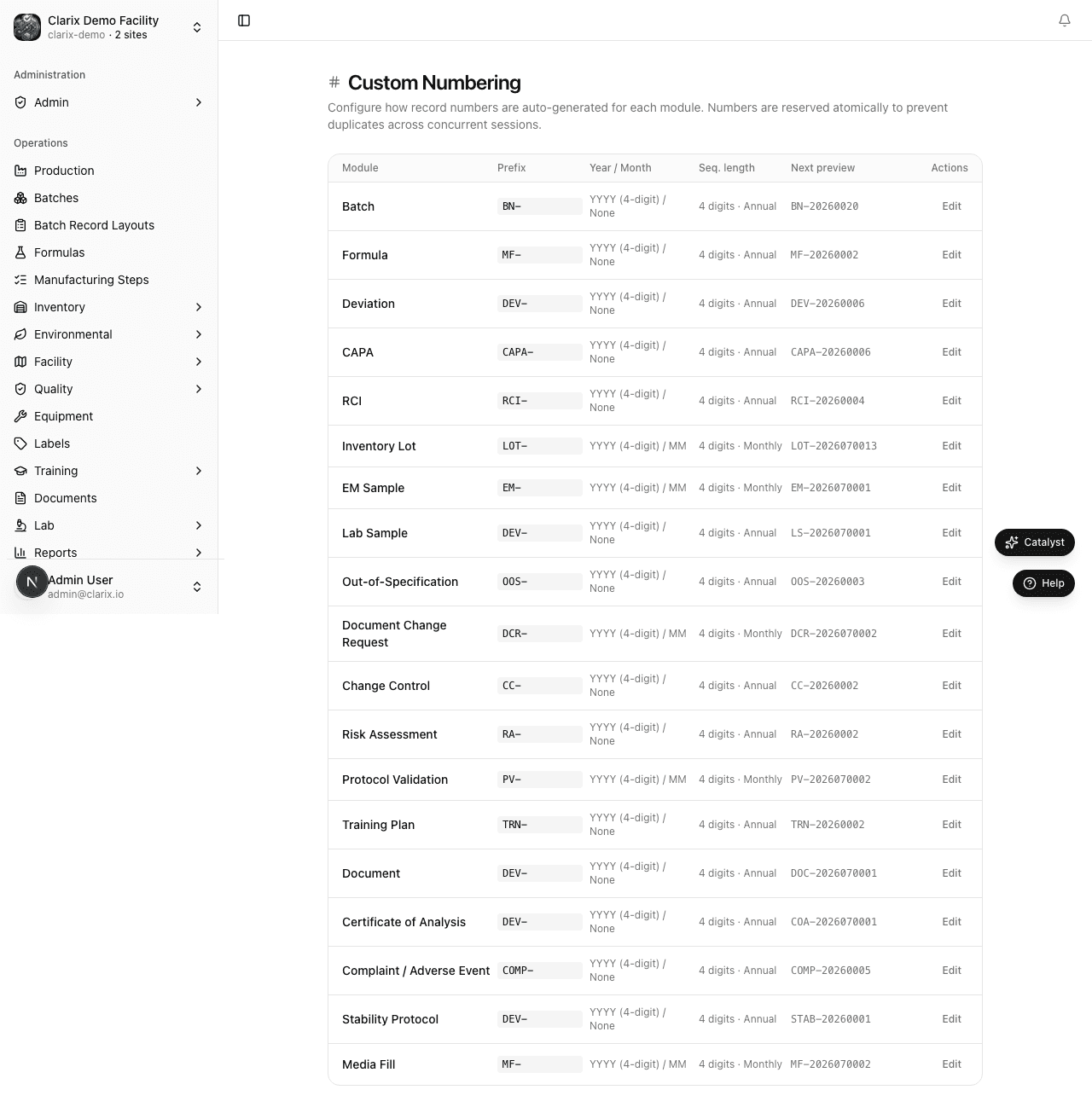
Role required: Administrator only. Numbering changes only affect records created after the change — existing record numbers are never modified. All numbering changes are recorded in the audit trail.
Record types with configurable numbering
| Record type | Default format | Example |
|---|---|---|
| Batch | BN-YYYY-NNNN | BN-2026-0001 |
| Formula | MF-YYYY-NNNN | MF-2026-0001 |
| Deviation | DEV-YYYY-NNNN | DEV-2026-0001 |
| CAPA | CAPA-YYYY-NNNN | CAPA-2026-0001 |
| OOS Result | OOS-YYYY-NNNN | OOS-2026-0001 |
| Change Control | CHG-YYYY-NNNN | CHG-2026-0001 |
| Document Change Request | DCR-YYYY-NNNN | DCR-2026-0001 |
| Risk Assessment | RA-YYYY-NNNN | RA-2026-0001 |
| Protocol Validation | PROT-YYYY-NNNN | PROT-2026-0001 |
| Lab Sample | LAB-YYYY-NNNN | LAB-2026-0001 |
| EM Sample | EM-YYYY-NNNN | EM-2026-0001 |
| Training Plan | TRN-YYYY-NNNN | TRN-2026-0001 |
| Document | DOC-YYYY-NNNN | DOC-2026-0001 |
| COA | COA-YYYY-NNNN | COA-2026-0001 |
Configurable fields
For each record type, you can configure:
Prefix
The alphanumeric string that appears at the beginning of every number in this record type. Prefixes are case-insensitive in search but display in the case you set. Choose a prefix that is:
- Short and recognizable (2–6 characters is typical)
- Consistent with any numbering conventions used in your physical paper records or ERP system
- Unique across record types (do not use the same prefix for batches and formulas)
Year format
How the year portion is incorporated into the number:
- YYYY — Four-digit year (e.g., 2026). Recommended for clarity, especially in records that must be archived for 3–5 years.
- YY — Two-digit year (e.g., 26). Saves two characters but can be ambiguous in long archives.
- None — No year included. Numbers increment indefinitely without year context. Not recommended for GxP records where temporal traceability is important.
Month in number
Optionally include the two-digit month between the year and the sequence number (e.g., BN-2026-06-0001 for a batch created in June 2026). Enabling this makes it immediately obvious from a batch number which month a batch was created in, which can be useful for trending. However, it also means the sequence counter resets to 0001 each month, so sequence numbers are only unique within a given year-month combination (combined with the prefix).
Sequence length
The number of digits used for the sequential counter at the end of the number. The default is 4 digits (0001 through 9999). If your facility creates more than 9,999 records of a given type per year (or per month if month-in-number is enabled), increase the sequence length to 5 or 6 digits. Most 503B facilities will never exceed 4 digits for any record type.
Reset counter
Determine when the sequential counter resets to 0001:
- Yearly (default) — Counter resets on January 1 of each new year. BN-2025-9999 is followed by BN-2026-0001.
- Monthly — Counter resets on the first day of each new month (only meaningful if month-in-number is also enabled).
- Never — Counter increments indefinitely and never resets.
Changing a numbering scheme
- Navigate to Settings → Custom Numbering.
- Find the record type you want to configure.
- Update the fields: prefix, year format, month-in-number toggle, sequence length, and reset counter.
- The Preview field at the bottom of each record type card shows what the next number will look like based on your current settings. Verify the preview looks correct.
- Click Save Numbering at the bottom of the page.
Note: Numbering changes only affect records created after the save. Existing records keep their original numbers permanently. If you change the batch prefix from "BN" to "RX" in June, all batches created before June retain their "BN-" prefix and all new batches created after June will be "RX-2026-NNNN". Both prefixes coexist in the system. This is intentional — renumbering existing records is not supported and would compromise traceability.
Sequence continuity across a year boundary
When a year rolls over (or a month boundary is crossed if monthly reset is enabled), Clarix automatically resets the counter. The first record created in the new period gets sequence number 0001 (or 000001 if 6-digit sequences are configured). There is no gap or duplicate — the rollover is handled atomically to prevent two records from receiving the same number even if created simultaneously.
Numbering and regulatory requirements
FDA does not mandate a specific format for batch numbering in 503B facilities, but the numbering system must be:
- Unique — no two batches can have the same lot number
- Traceable — the number must link unambiguously to a specific batch record
- Consistent — changes to the numbering scheme should be documented
All Clarix-generated numbers satisfy uniqueness by design. Any change to a numbering scheme is captured in the audit trail, providing the documentation trail required for good manufacturing practice.
Note: If you are transitioning from a paper-based or legacy electronic system, you may want to configure Clarix numbering to continue from your legacy sequence rather than starting at 0001. For example, if your last paper batch record was BN-2026-0142, set the sequence starting number to 0143. Contact Clarix support for assistance with sequence initialization.
Related pages
Module Settings
Enable or disable Clarix product modules for your organization — hide unused features from the sidebar.
E-Signature Settings
Configure which authentication methods are required at each batch lifecycle gate — Start, QA Review, and PIC Release — to meet 21 CFR Part 11 electronic signature requirements.