
Formula Policy
Configure draft validation mode for formula authoring in Clarix — choose between Soft (warnings only) and Strict (errors block save) to match your formula development workflow.
The Formula Policy settings page at /settings/formula-policy controls how Clarix validates formula calculation expressions while they are being authored. This single setting — Draft Validation Mode — has a significant impact on the experience of formula authors and the guarantees your organization gets about the integrity of your master formula library.
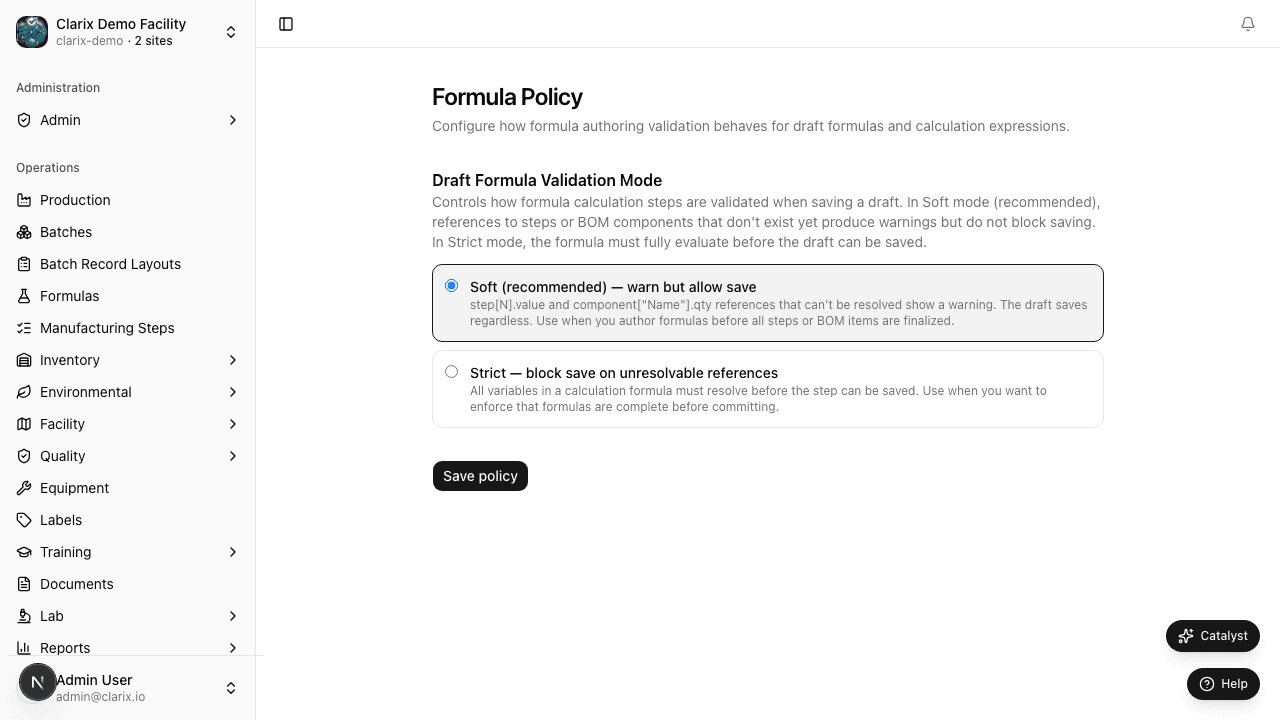
Role required: Administrator only. The draft validation mode applies to all formula authors in your organization. Changes take effect immediately and apply to all subsequent formula save operations.
What is a calculation expression?
Clarix formulas can include calculation expressions in step fields — for example, a weight field might contain an expression like formula.batchSize * component.concentration / 100 rather than a hardcoded number. These expressions reference other steps and components in the formula by name.
When a formula is being drafted — when new steps are being added, components are being defined, and expressions are being written — it is common for an expression to temporarily reference a step or component that has not yet been defined. The draft validation mode controls how Clarix responds to these temporary inconsistencies.
Draft Validation Mode: Soft
In Soft mode, Clarix allows formula steps with calculation expressions to be saved even when the expression references components or steps that do not yet exist in the formula. When a step is saved with an unresolvable expression, it is highlighted with a yellow warning indicator in the formula editor. The warning communicates: "This expression has an unresolvable reference — it will need to be fixed before the formula can be published."
When to use Soft mode:
Soft mode is appropriate when your formula authors are actively building complex formulas before all steps and components are fully defined. For example, when authoring a new parenteral formula, a pharmacist might write out all the calculation expressions in the compounding steps first, then go back and define each component in the Bill of Materials. During the time between writing the expression and defining the component, the expression will be unresolvable — and Soft mode allows this intermediate state without blocking the author's workflow.
Soft mode is also useful during formula import or migration, when incoming formula data may have references that need to be cleaned up over several editing sessions.
Note: Even in Soft mode, a formula with unresolvable expressions cannot be Published (moved from Draft to Active status). The draft can be saved with warnings, but publication requires all expressions to be fully resolvable. Soft mode only relaxes the constraint at save time, not at publication time.
Draft Validation Mode: Strict
In Strict mode, Clarix rejects any save attempt where a calculation expression contains an unresolvable reference. The affected step shows a red error indicator and the save is blocked until the expression is corrected. The formula author cannot proceed until every expression references a component or step that actually exists in the formula.
When to use Strict mode:
Strict mode is appropriate for production-ready environments where formula authors are experienced, all components are defined before calculation expressions are written, and formula integrity must be enforced at every save — not just at publication. Strict mode prevents incomplete or broken formulas from persisting in the draft state, reducing the risk that a formula with a silent error advances toward publication without detection.
If your organization has a dedicated formula validation protocol that is performed before publication, Strict mode provides an additional automated check that complements your human review process.
Comparison
| Soft | Strict | |
|---|---|---|
| Unresolvable expressions at save | Allowed (yellow warning) | Blocked (red error) |
| Formula can be published with warnings | No — warnings block publication | N/A — warnings are not created |
| Best for | Complex drafting workflows, multi-session formula authoring | Production-ready environments, trained formula authors |
| Risk | A formula with many warnings could be overlooked | Higher friction during initial formula building |
Changing the validation mode
- Navigate to Settings → Formula Policy.
- Select either Soft or Strict from the Draft Validation Mode selector.
- Click Save Policy.
- The new mode takes effect for all formula save operations immediately.
Changing from Strict to Soft does not retroactively validate any existing formulas. Changing from Soft to Strict does not immediately invalidate any existing formulas with warnings — those formulas continue to exist in draft state with their yellow warnings until they are next saved (at which point the save will be blocked until the expressions are resolved).
Note: Formula Policy changes are logged in the audit trail. If your quality system requires change control for configuration changes that affect product quality calculations, treat a change from Strict to Soft (a relaxation of controls) as a change control event with appropriate documentation and approval.
Related pages
Inventory Policy
Configure lot duplicate handling, CoA assay range, PO number requirements, and default receipt status for incoming inventory in Clarix 503B compounding facilities.
Production Lines
Configure the manufacturing production lines your 503B facility operates — name, code, and active status for batch scheduling and reporting.