
E-Signature Settings
Configure which authentication methods are required at each batch lifecycle gate — Start, QA Review, and PIC Release — to meet 21 CFR Part 11 electronic signature requirements.
The E-Signature Settings page at /settings/signatures is where administrators configure the electronic signature requirements for each gate in the batch manufacturing workflow. In a 503B compounding pharmacy, specific events in the batch lifecycle require a formal electronic signature to comply with 21 CFR Part 11 and demonstrate control over the manufacturing process. Clarix supports multiple authentication methods and allows you to configure the level of authentication required at each gate independently.
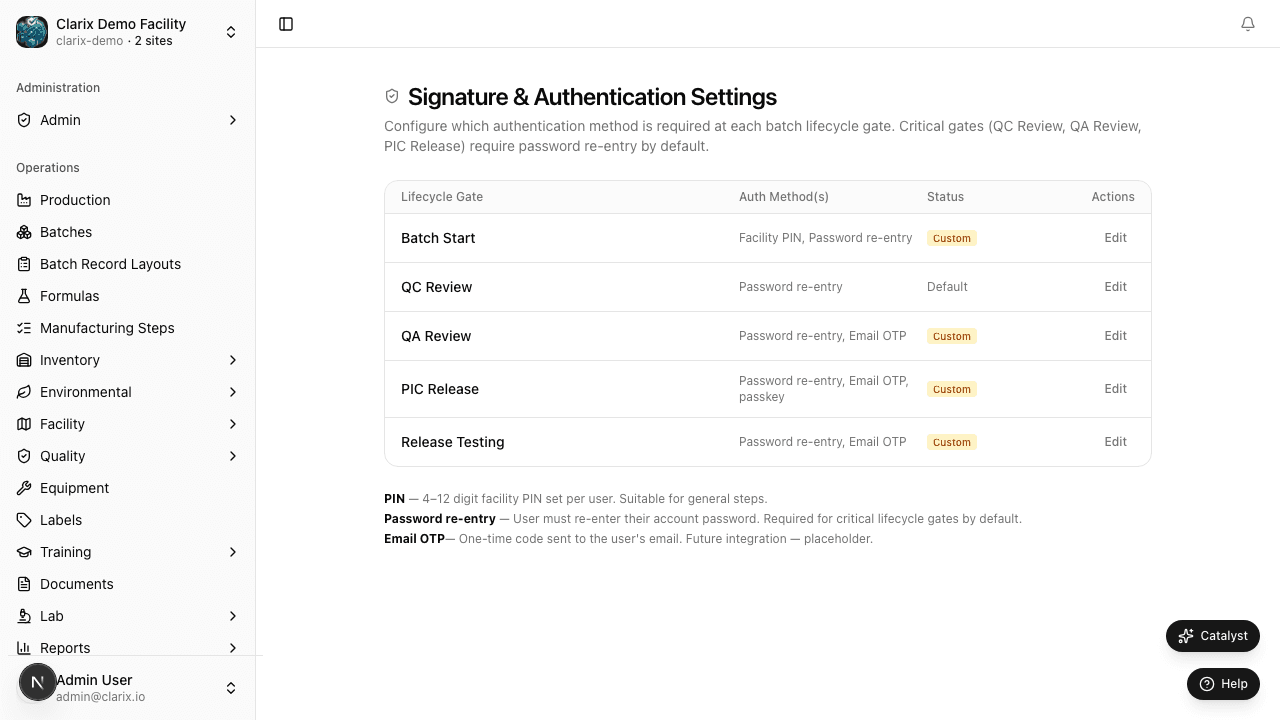
Role required: Administrator only. Changes to e-signature requirements are significant and take effect for all future signature events immediately upon saving. All changes are logged in the audit trail. Changes should be approved by your PIC or QA Manager before implementation.
Batch lifecycle gates
Clarix enforces electronic signatures at three points in the batch lifecycle:
Start gate
The Start gate is triggered when a batch moves from Draft or Approved status into In Progress — the moment active compounding work begins. The person who signs the Start gate confirms that they have reviewed the batch record, the formula, and the materials, and that they are authorized to begin production. This is typically the lead compounder or technician.
QA Review gate
The QA Review gate is triggered when the compounder submits the completed batch for quality review. Signing this gate confirms that all steps have been executed, all values have been recorded, and the batch record is complete. This is typically the compounder who executed the batch, or a senior technician who reviewed the work.
PIC Release gate
The PIC Release gate is the final signature before a batch can be distributed. It confirms that the Pharmacist-in-Charge (or designated pharmacist) has reviewed the complete batch record, confirmed all deviations are resolved, verified the batch meets specifications, and is authorizing the batch for release. This is the most consequential signature in the system.
Authentication methods
For each gate, administrators can configure one or more of the following authentication methods:
Facility PIN
A 4-digit PIN set by each user individually in their Facility PIN settings. PIN authentication is immediate and does not require a network connection to an external identity provider, making it well-suited for production floor signing on workstations that may have intermittent connectivity.
Password
The user's account password (the same password used to log in to Clarix). Password authentication provides a stronger binding between the signature and the user's account credentials than a PIN.
Email OTP
A one-time code sent to the user's registered email address at the time of signing. The user enters the code to authenticate. This method provides additional assurance that the user has access to their registered email account. It requires internet connectivity to send and receive the OTP.
Passkey (FIDO2)
A hardware or biometric authentication credential — such as Face ID, Touch ID, or a hardware security key (YubiKey) — using the FIDO2 WebAuthn standard. Passkeys provide the highest level of authentication assurance and cannot be phished. Users must register a passkey in their account settings before it can be used for signing.
Requiring multiple methods
Each gate can be configured to require one or multiple authentication methods. Requiring multiple methods (e.g., PIN + Password) increases assurance that the person signing is who they claim to be, at the cost of additional friction during signing.
For PIC Release, many facilities require at least two factors — for example, Passkey + Password — to reflect the regulatory significance of the release decision.
To configure multiple methods:
- On the gate's configuration panel, check all authentication methods you want to require.
- All checked methods will be required (AND logic — the user must complete all of them).
- Click Save Settings.
Configuring a gate
- Navigate to Settings → E-Signature Settings.
- Find the gate you want to configure (Start, QA Review, or PIC Release).
- Check or uncheck the authentication methods you want to require.
- The Effective immediately indicator shows whether the current settings are active.
- Click Save Settings to apply your changes.
- Clarix prompts you to re-authenticate yourself (using your current credentials) before the save is accepted. This prevents unauthorized configuration changes.
Note: Reducing authentication requirements (e.g., removing a required method) is a configuration change with regulatory implications. Any reduction should be discussed with your QA Manager and PIC, documented as a change control event, and reflected in your facility's validation documentation. The audit trail will record who made the change and when.
E-signature events in the audit trail
Every electronic signature generated in Clarix is recorded in the audit trail with:
- The record that was signed (batch number, record type)
- The gate that was signed (Start, QA Review, or PIC Release)
- The user who signed (name and email)
- The authentication method(s) used
- The timestamp (UTC)
- The IP address of the signing workstation
This data satisfies the 21 CFR Part 11 requirement that electronic signatures be linked to their associated records and that the record include the date and time of signature execution.
Related pages
Custom Numbering
Configure auto-numbering schemes for each Clarix record type — set prefixes, year formats, sequence lengths, and reset rules for batches, formulas, deviations, CAPAs, and more.
Business Rules
Configure automated alerts, blocks, and CAPA triggers based on system events — including yield thresholds, calibration due dates, EM excursions, and lot expiration warnings in Clarix.